SAVE
REC
01 GrandPno 03 E.Piano 05 E.Piano 3 07 Clavi
02 GrandPn 2
13 RockOrgn 15 Harmnic 17 CleanGtr 19 Strings
11 ChurOrgn
12 ReedOrgn
14 Acordion 16 NylonGtr 18 FngrBass 20 SynStrs
04 E.Piano 2 06 Harpsi 08 Vibra
09 PercOrgn
10 DrawOrgn
MIN MAX
VOLUME
21 SweetTrp
22 TenorSax
23 SweetFlu
24 PanFlute
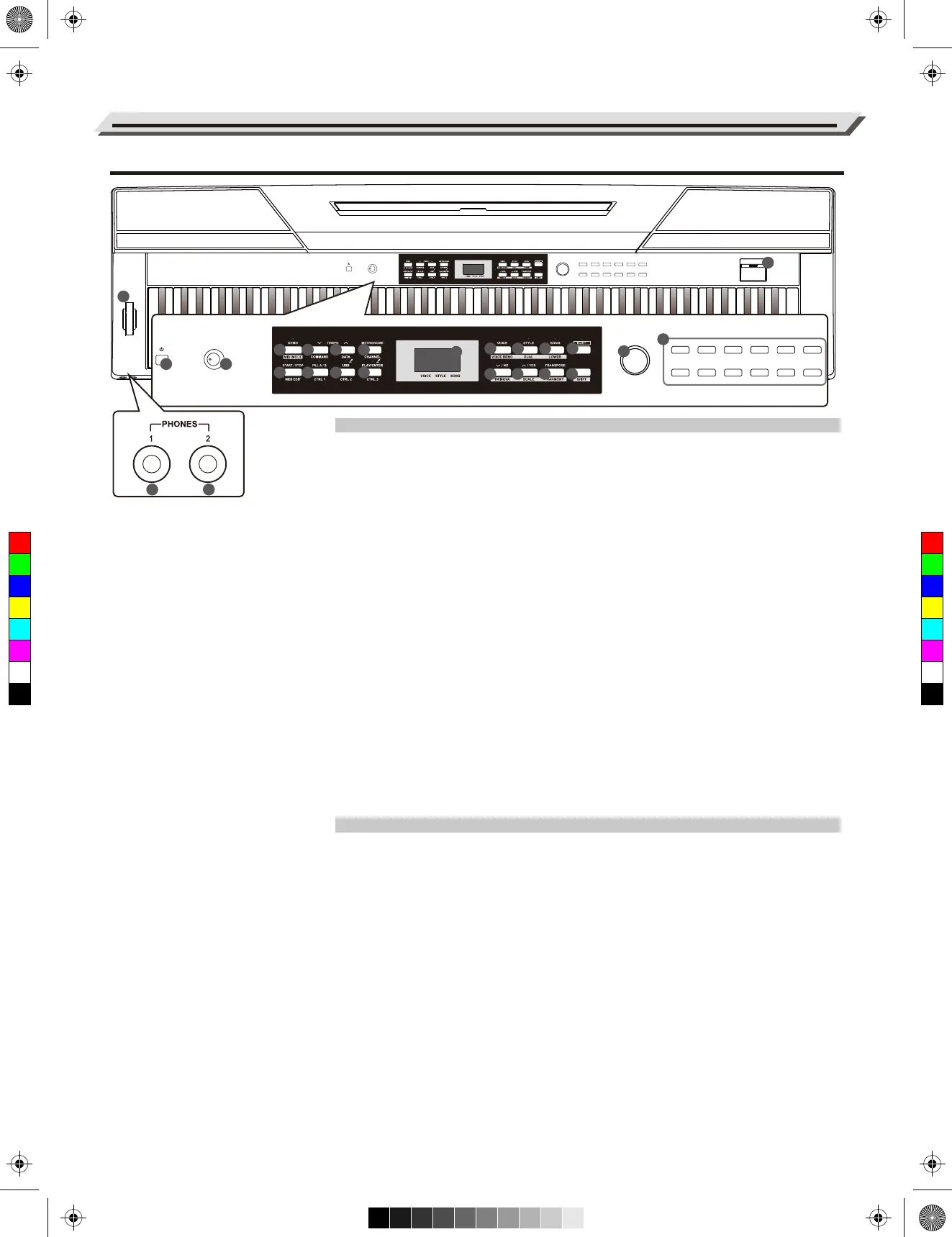
Panel Description
Front Panel
1. [POWER] Switch
Turn the power on or off.
2. [VOLUME] Knob
Adjust the master volume.
3. [DEMO]/[MIDI MODE] Button
Start/Stop demo playback.
Press and hold [shift], then press
[MIDI MODE] to turn MIDI MODE
on or off.
11. The NIXIE TUBE Display
Display all the parameters and
values related to the currently
selected operation and mode of
the piano.
15. [DUET] Button
Turn the duet function on or off.
19. [SHIFT] Button
Press and hold [SHIFT], then
press other button enables you
to execute various commands.
20. Data Dial
Adjust the value.
21. VOICE Select Buttons
Quickly select a preset voice.
22. USB Port
Connect a USB flash drive.
23. [PITCH BEND] Wheel
Roll the wheel upward or downward
to raise or lower the pitch.
51-52. PHONE 1 and PHONE 2
Connect stereo headphones with a
¼” stereo phone plug.
When exit the MIDI controller mode:
4. [TEMPO -] Button
Decrease the tempo value.
5. [TEMPO +] Button
Increase the tempo value.
6. [METRONOME] Button
Turn the metronome on or off.
7. [START/STOP] Button
Start or Stop playing the song or style.
8. [FILL A/B] Button
Fill in variation A/ B section.
9. [USB]/[SAVE] Button
Play the MIDI songs on USB flash drive.
Press and hold the button to save user
song to USB flash drive.
10. [PLAY/ENTER]/[REC] Button
Play back the recorded song.
Press and hold the button to enter
Recording mode.
When enter the MIDI controller mode:
4. [COMMAND] Button
Switch to command edit mode.
5. [DATA] Button
Switch to value edit mode.
6. [CHANNEL] Button
Switch to channel edit mode.
7. [MIDI EDIT] Button
Enter or Exit MIDI controller edit mode.
8. [CTRL 1] Button
Transmit controller 1 data, or switch
to controller 1 edit mode.
9. [CTRL 2] Button
Transmit controller 2 data, or switch
to controller 2 edit mode.
10. [CTRL 3] Button
Transmit controller 3 data, or switch
to controller 3 edit mode.
When the [SHIFT] button is released:
12. [VOICE] Button
Switch to voice mode.
13. [STYLE] Button
Switch to style mode.
14. [SONG] Button
Enter the song mode.
16. [-/NO] Button
Decrease the parameter value or
execute “NO” operation.
17. [+/YES] Button
Increase the parameter value or
execute “YES” operation.
18. [TRANSPOSE] Button
Enter the transpose setting.
When the [SHIFT] button is pressed:
12. [VOICE DEMO] Button
Start or Stop playing voice demo.
13. [DUAL] Button
Turn the dual function on or off.
14. [LOWER] Button
Turn the lower function on or off.
16. [TWINOVA] Button
Turn the TWINOVA function on or off.
17. [SCALE] Button
Turn the scale function on or off.
18. [HARMONY] Button
Turn the harmony function on or off.
04
51 52
ON/OFFTYPE ROOT
REVERB CHORUS
BEEP TOUCH TUNE OCTAVE SCALEPEDAL
RESONANCE
ON/OFF
EQ DUET HARMONY
ON/OFFTYPE ROOT
REVERB CHORUS
BEEP TOUCH TUNE OCTAVE SCALEPEDAL
RESONANCE
ON/OFF
BEEP TOUCH TUNEPEDAL
RESONANCE
METRONOME
ACCOMP
LOFF R
MELODY OFFEQ DUET HARMONY
ON/OFFTYPE ROOT
REVERB CHORUS
BEEP TOUCH TUNE OCTAVE SCALEPEDAL
RESONANCE
VOCALON/OFF
METRONOME
ACCOMP
0 1 2 3
4
5
TAP
TEMPO
LOFF R
MELODY OFFEQ DUET HARMONY
ON/OFFTYPE ROOT
REVERB CHORUS
TOUCH TUNE OCTAVE SCALE
VOCALON/OFF
22
23
SAVE
REC
01 GrandPno 03 E.Piano 05 E.Piano 3 07 Clavi
02 GrandPn 2
13 RockOrgn 15 Harmnic 17 CleanGtr 19 Strings
11 ChurOrgn
12 ReedOrgn
14 Acordion 16 NylonGtr 18 FngrBass 20 SynStrs
04 E.Piano 2 06 Harpsi 08 Vibra
09 PercOrgn
10 DrawOrgn
MIN MAX
VOLUME
21 SweetTrp
22 TenorSax
23 SweetFlu
24 PanFlute
1
5
6
7
8
9
12 13
14 15
16
17
10
11
18
19
2
4
3
20
21
C
M
Y
CM
MY
CY
CMY
K
aw_SP5300_Manual_G03_170426.pdf 4 17/4/26 10:16


 To Next Page