SAVE
REC
01 GrandPno 03 E.Piano 05 E.Piano 3 07 Clavi
02 GrandPn 2
13 RockOrgn 15 Harmnic 17 CleanGtr 19 Strings
11 ChurOrgn
12 ReedOrgn
14 Acordion 16 NylonGtr 18 FngrBass 20 SynStrs
04 E.Piano 2 06 Harpsi 08 Vibra
09 PercOrgn
10 DrawOrgn
MIN MAX
VOLUME
21 SweetTrp
22 TenorSax
23 SweetFlu
24 PanFlute
7 8
METRONOME
ACCOMP
0 1 2 3
4
5 6 7 8
TAP
9
TEMPO
1 2 3
4
5 6 7 80 9
STYLE
1 2 3
4
5 6 7 80 9
SONG
0 1 2 3
4
5 6
MIDI
LOFF R
MELODY OFFEQ DUET HARMONY
ON/OFFTYPE ROOT
REVERB CHORUS
BEEP TOUCH TUNE OCTAVE SCALEPEDAL
RESONANCE
9
VOCALON/OFF
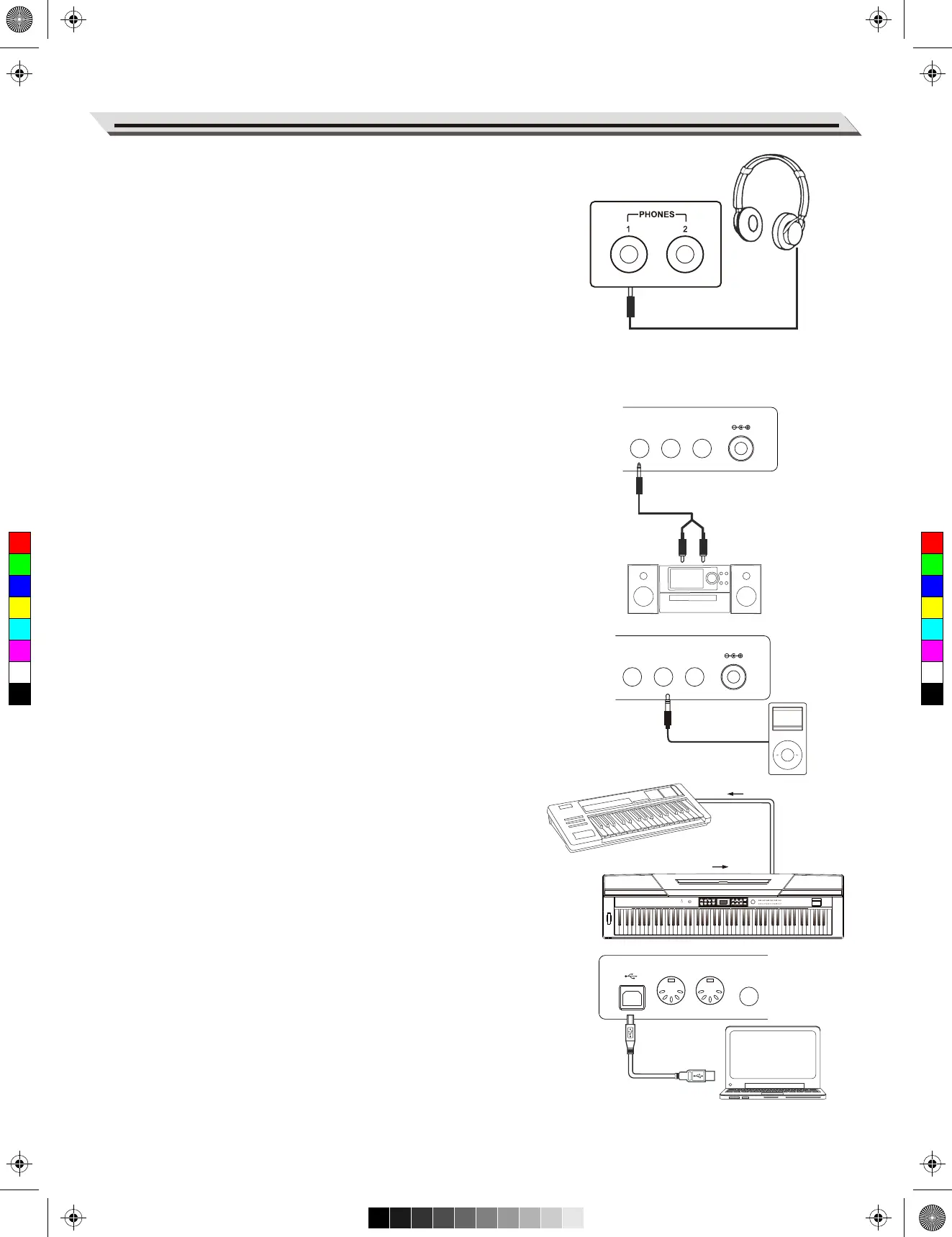
Connecting a pair of Headphones
A standard pair of stereo headphones can be plugged in here for
private practice or late-night playing.
Jack1: When a pair of headphones is plugged into the jack 1, the
sound can be heard from both headphones and speakers of the
instrument.
Jack2: When a pair of headphones is plugged into the jack 2, the
internal stereo speaker system is automatically shut off. The sound
can only be heard from headphones.
Note:
To avoid the risk of hearing loss when using headphones,please do
not play the piano with a high volume level for a long time.
Connecting an Audio Equipment
The rear-panel AUX OUT jack delivers the output of the instrument
for connection to a keyboard amplifier, stereo sound system, a
mixing console, or tape recorder.
Use an audio cable to plug into the AUX OUT jack located on the
rear board, then plug the other end of the cord into AUX IN of the
amplifier.
Note:
To avoid damaging the speakers, please ensure that the volume
has been set to the minimum level before connecting the power and
other devices.
Connecting a MP3/CD Player
Connect the audio output of an MP3/CD player or other audio
Source to the stereo AUX IN jack on the rear panel.
The input signal is mixed with the piano signal, allowing you to play
along.
Connecting a PC or an MIDI Device
MIDI OUT Connector
Connect the instrument MIDI OUT terminal to the MIDI IN terminal
of external device via the MIDI cables. All performance data will be
transmitted from this connector to connected PC or MIDI devices.
This instrument will be used as the MIDI controller. Namely the
external sound source can be used through this instrument.
MIDI IN Connector
Connect the MIDI IN terminal to PC or the MIDI OUT terminal of
external device with MIDI cables. In order to be used as a sound
source, all the performance data will be transmitted from other MIDI
devices to the instrument.
USB Connector
By connecting the USB terminal to PC, the data will be transmitted
between the instrument and the PC via the USB cables.
For example, you can save your instrument performance data in the
PC and playback the saved MIDI file by piano.
Note:
Please do not set the USB audio to be input and output simultane-
ously when you are setting the software on the PC. Otherwise the
sound will be overlapped when play the keyboard.
Connections
07
MIDI OUTMIDI IN
MIDI OUTMIDI IN
USB MIDI OUT MIDI IN SUSTAIN
AUX OUT AUX IN MIC DC IN
USB MIDI OUT MIDI IN SUSTAIN
AUX OUT AUX IN MIC DC IN
USB MIDI OUT MIDI IN SUSTAIN
C
M
Y
CM
MY
CY
CMY
K
aw_SP5300_Manual_G03_170426.pdf 7 17/4/26 10:16


 To Next Page