SAVE
REC
01 GrandPno 03 E.Piano 05 E.Piano 3 07 Clavi
02 GrandPn 2
13 RockOrgn 15 Harmnic 17 CleanGtr 19 Strings
11 ChurOrgn
12 ReedOrgn
14 Acordion 16 NylonGtr 18 FngrBass 20 SynStrs
04 E.Piano 2 06 Harpsi 08 Vibra
09 PercOrgn
10 DrawOrgn
MIN MAX
VOLUME
21 SweetTrp
22 TenorSax
23 SweetFlu
24 PanFlute
7 8
METRONOME
ACCOMP
0 1 2 3
4
5 6 7 8
TAP
9
TEMPO
1 2 3
4
5 6 7 80 9
STYLE
1 2 3
4
5 6 7 80 9
SONG
0 1 2 3
4
5 6
MIDI
LOFF R
MELODY OFFEQ DUET HARMONY
ON/OFFTYPE ROOT
REVERB CHORUS
BEEP TOUCH TUNE OCTAVE SCALEPEDAL
RESONANCE
9
VOCALON/OFF
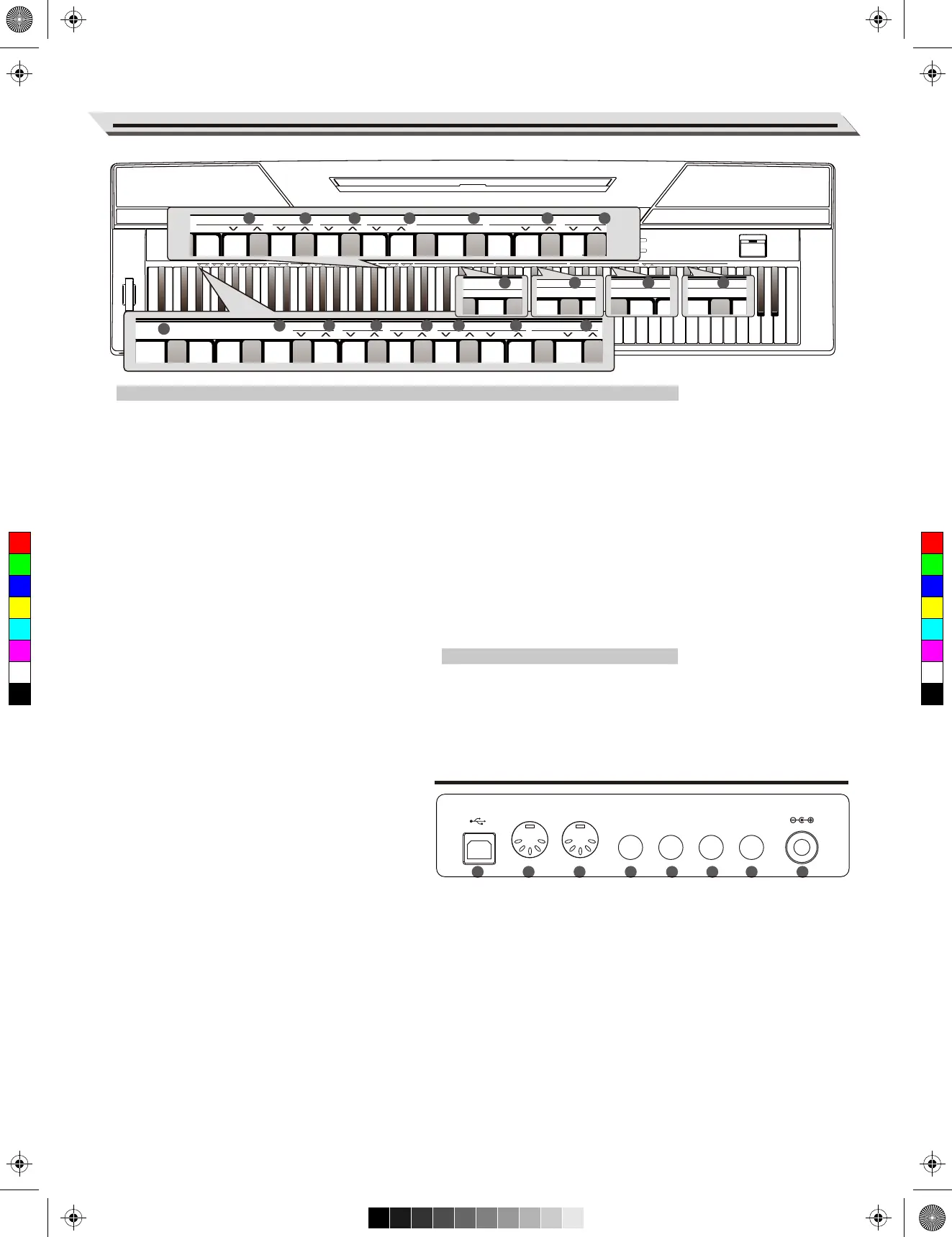
Panel Description
Rear Panel
When the [SHIFT] button is pressed:
24. [BEEP] Key
Turn the prompt tone on or off.
25. [PEDAL RESONANCE] Key
Turn the pedal resonance on or off.
26. [TOUCH] Keys
Set an appropriate touch sensitivity level.
27. [TUNE] Keys
Adjust the tune value.
28. [OCTAVE] Keys
In TWINOVA mode, adjust the octave value.
29. [SCALE TYPE] Keys
In SCALE mode, select different scale types.
30. [SCALE ROOT] Keys
In SCALE mode, set the root note of scale.
31. [REVERB] Keys
Turn the reverb effect on/off, or select the
desired reverb effect type.
32. [CHORUS] Keys
Turn the chorus effect on/off, or select the
desired chorus effect type.
33. [EQ] Keys
Select the desired EQ effect type.
34. [DUET] Keys
Select the desired duet effect type.
35. [HARMONY] Keys
Select the desired harmony effect type.
36. [MELODY OFF] Keys
In the SONG mode, press “L”/”R” to mute/
activate left or right-hand part, allowing each
part to be practiced separately.
When the [SHIFT] button is pressed:
37. [METRONOME] Keys
Set the metronome type.
38. [ACCOMP VOLUME] Keys
Set the accompaniment volume value.
39. [TEMPO] Keys
Set the tempo value.
40. [STYLE] Keys
Select the desired style.
41. [SONG] Keys
Select the desired song.
In the MIDI controller edit mode:
42. [MIDI] Keys
In the MIDI edit mode, set parameter value which
related to MIDI controllers.
43. USB Terminal
Connect to a computer.
44. MIDI OUT Jack
Transmit MIDI messages to
an external MIDI device.
45. MIDI IN Jack
Receive MIDI messages
from an external MIDI device.
46. SUSTAIN Jack
Connect a sustain pedal.
47. AUX OUT Jack
Connect an external audio
equipment.
48. AUX IN Jack
Connect an external audio source,
such as an MP3 or CD player.
49. MIC Jack
Connect a microphone with a ¼”
stereo phone plug.
50. DC 12V
Connect DC 12V power adaptor.
05
43 44 45
4746 4948 50
METRONOME
LOFF R
MELODY OFFEQ DUET HARMONY
ON/OFFTYPE ROOT
REVERB
BEEP TOUCH TUNE OCTAVE SCALEPEDAL
RESONANCE
3
4
5
TEMPO
1 2 3
4
5 6 7 80 9
STYLE
10
LOFF R
MELODY OFFEQ DUET HARMONY
VOCAL
METRONOME
ACCOMP
0 1 2 3
4
5 6 7 8
TAP
9
TEMPO
1 2 3
4
5
STYLE
1 2 3
4
5 6 7 80 9
SONG
R VOCAL
METRONOME
ACCOMP
0 1 2 3
4
5 6 7 8
TAP
9
TEMPO
10
LOFF R
MELODY OFFEQ DUET HARMONY
CHORUS
VOCALON/OFF
0 1 2 3
4
5 6 7 8 9
TEMPO
1 2 3
4
5 6 7 80 9
STYLE
1 2 3
4
5
SONG
7 88 9 1 2 3
4
5 6 7 80 9
STYLE
1 2 3
4
5 6 7 80 9
SONG
0 1 2
3
4
MIDI
41
2726 28 29 30 31
32 33 34 35 36 37 38
25
24
42
39 40
USB MIDI OUT MIDI IN SUSTAIN AUX OUT AUX IN MIC DC IN
C
M
Y
CM
MY
CY
CMY
K
aw_SP5300_Manual_G03_170426.pdf 5 17/4/26 10:16


 To Next Page