1. Install Power Adapter
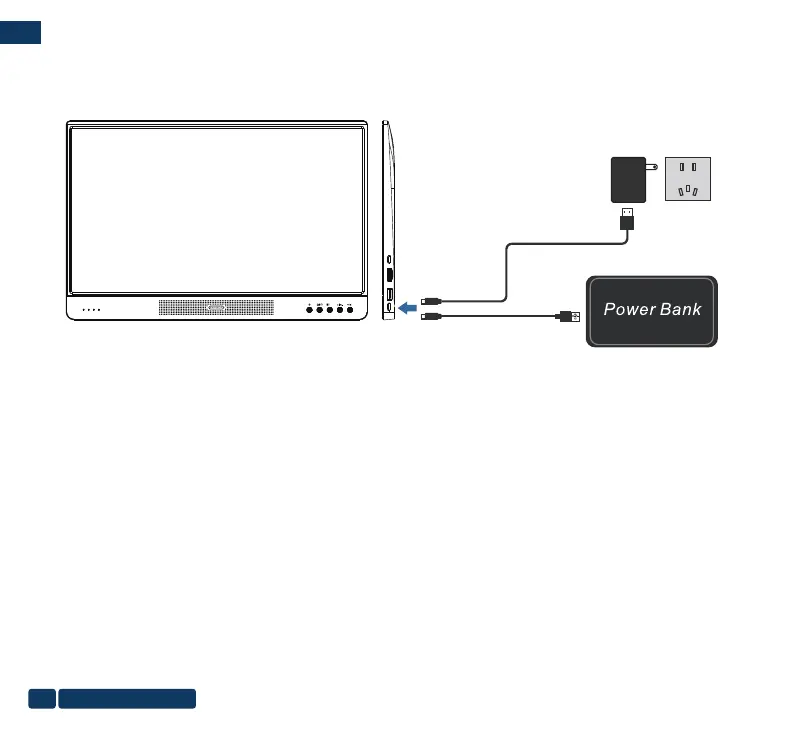
Follow below picture to connect power adapter.
First connect small end of adapter to monitor(Type-C dedicated charging port). Plug the adapter body to power outlet.
2. Connect to Power bank
Follow below picture to connect power bank.
Using Type-C to USB cable. Connect Type-C port to the monitor (Type-C dedicated charging port), plug USB port to power
bank. Make sure the power bank is full and keep the output status.
Install Power Adapter or Power Bank
Type-C to USB cable
AC Adapter
DC IN
Type-C to USB cable
DCIN Type-CUSB 1
HDMI
OK
+
us-pc@fangor.cn
08
EN


 To Next Page