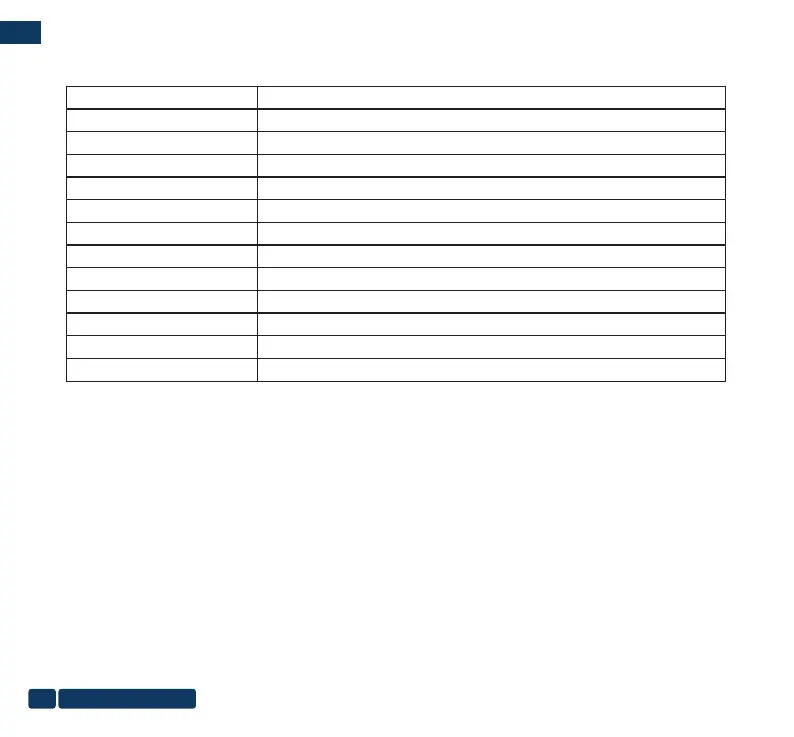
Specications
Name Portable Monitor
Model
F-157
Screen Size
15.6inch
Resolution
1920*1080P
Screen Ratio
16:9 widescreen
HD Standard
1080P(Full HD)
Panel Type
IPS ALL SIGHI
Backlight Type
W-LED
signal port
USB/Type-C/HDMI
Power input:
Type C 5V/2.5A
Size
14.1*9.4*0.6 inch
Color Silver
Item Weight
2.15 Pound
1. Power LED is not ON
Press the button to check if the monitor is in the ON mode. Check if the Type-C cable is properly connected to the monitor
and the power outlet. (FANGOR monitor is equipped with Type-C charging dedicated interface)
2. Screen image is too light or dark
Adjust the Brightness settings via the button.
3. Screen image bounces or a wave pattern is present in the image
Make sure the USB Type-C cable is properly connected between the USB Type-C monitor and the computer.
Move electrical devices that may cause electrical interference.
Troubleshooting(FAQ)
us-pc@fangor.cn
30
ENEN


 To Next Page