EN
us-pc@fangor.cn
29
EN
2.2 Wired Connection to Android Phone.(Need to download the APP: MiraPlug)
Step1: Turn on the portable monitor and Click the "source" button. Click to enter the "Mirascreen" on the portable monitor.
(Loading time 5-10 seconds)
Step2: Connect your Android device with the portable monitor USB port via USB to Micro/Type C Cable.
Step3: Choose USB Transfer Method(Transfer les)and open USB debugging.
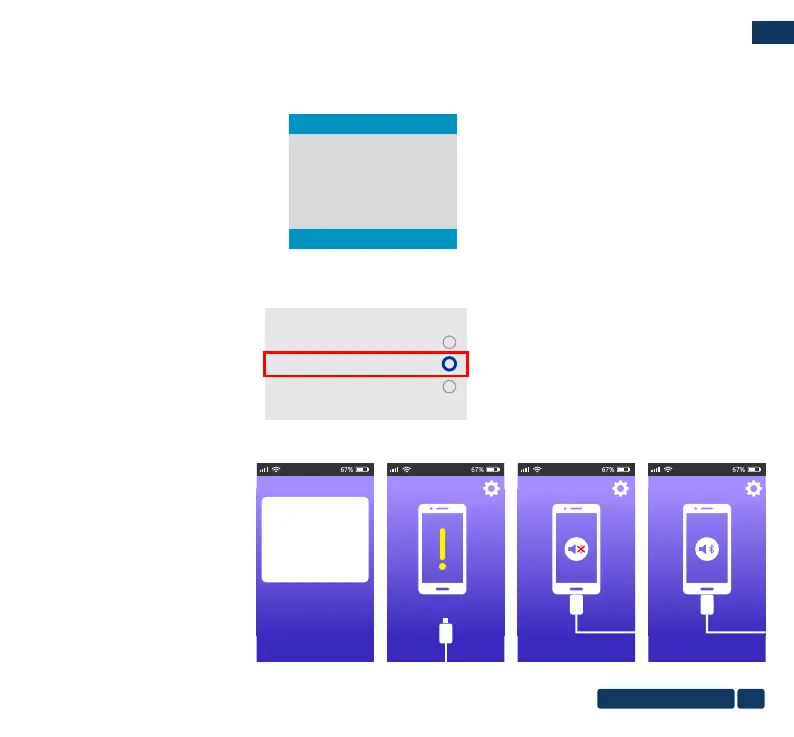
Step4:Follow the prompts of the APP.
①DownLoad MiraPlug;
②Re-plug the USB Cable to activate
the APP;
③Click ,Connect Bluetooth according
to the prompt tone
(Bluetooth name:PJ-BT);
④Back to UI interface.
Then the connection is succeeded.
MiraPlug
No installed apps work with this USB
accessory. learn more about this accessory
at https://...............................................
............................................................
............................................................
CANCEL
VIEW
Please plug in the MiraPlug device
055F96D4 is connected 055F96D4 is connected
Use USB to
Transfer files
Transfer photos
Charge only
Auto
Type-C
Mirascreen
HDMI


 To Next Page