EN
us-pc@fangor.cn
21
EN
Wireless Connection to Smartphone/Pad
1.1 Wireless Connection to iPhone/iPad.(iOS)
For IOS device, considering there are two different operating environments:
A)With WiFi environment.
B)Without WiFi environment.
A) IOS device with WiFi Environment.(Recommened)
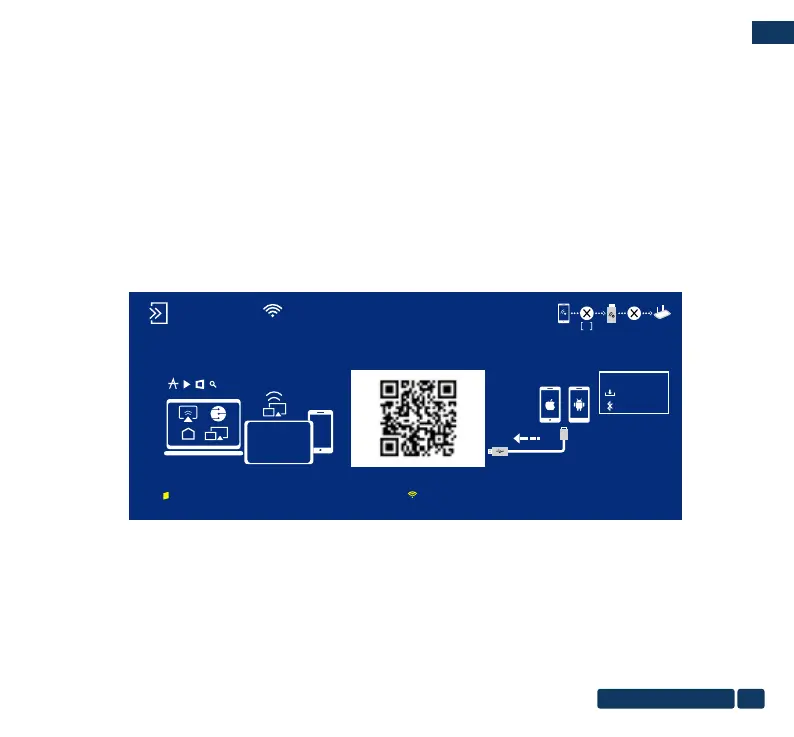
Step1: Turn on the portable monitor and press the "source" button to enter the "Mirascreen" mode.
(Loading time 5-10 seconds)
Step2: Open the WiFi function on your smartphone/pad, and connect to the portable monitor’s SSID
(name and password showed on the screen)
Step3: Enter the URL:http://192.168.203.1 on the browser(or scan the QR code)
Step4: Connect your Home WiFi on the browser page.
MiraScreen SSID:Dualcast-2677E9A8 PSK:30661238
0
MiraScreen
Android
MIRAPLUG APK
PJ-BT
EZMira
Wi-Fi Setting: 1:Mobile phone connection SSID
2:Scan QR code or Log in http://192.168.203.1
Help/Download:mirascreen.com


 To Next Page