ENGLISH
30 / 48
3.6.2.2 Browsing though ‘My_Shortcuts’
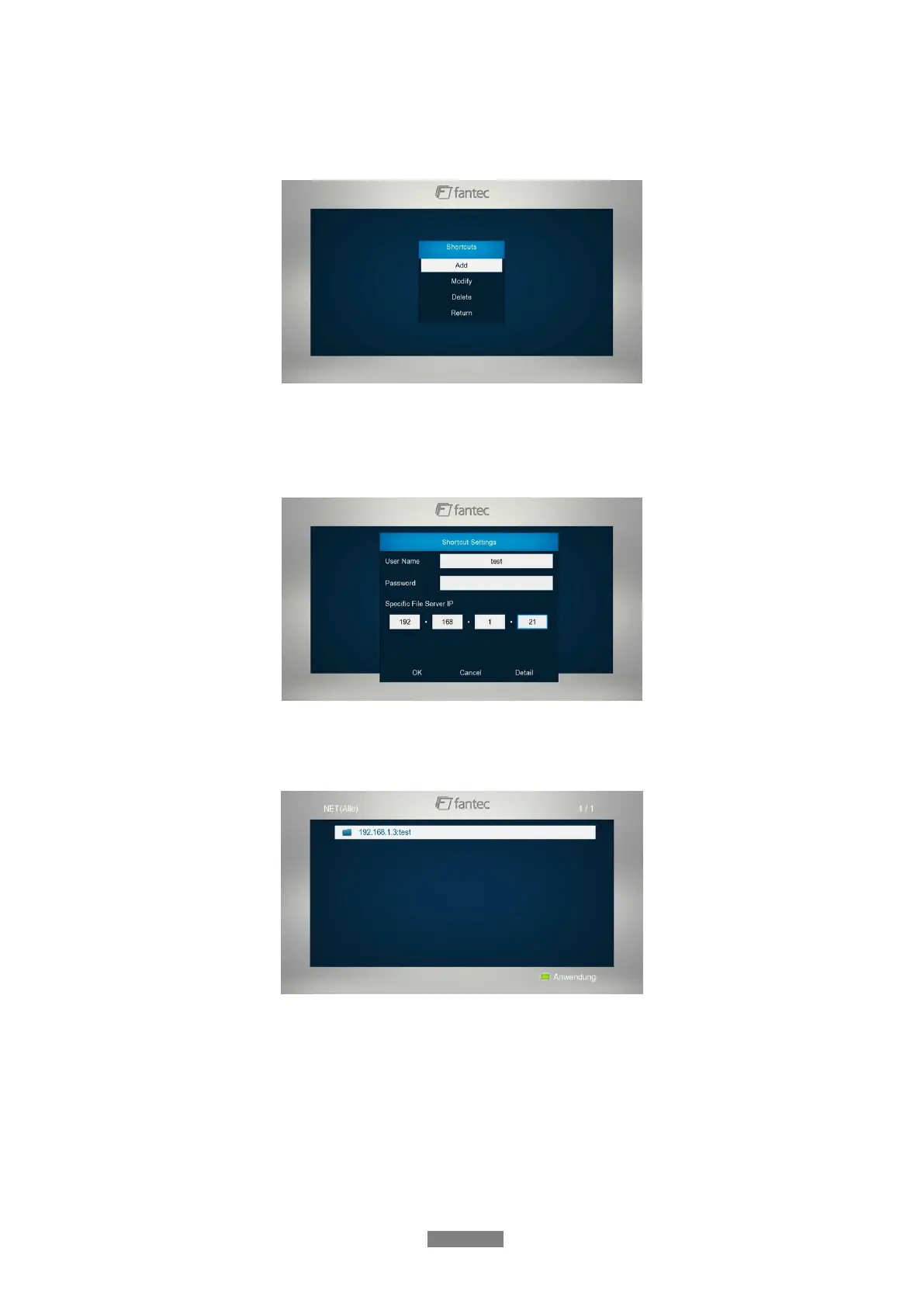
You can also set ‘Specific File Server IP’ and access it from ‘My_Shortcuts’ in the menu.
- Press the Green button and a popup menu appears.
- Select Add to open a popup menu where you can input Label, Net User ID, Net
Password, Domain, Host Name, and Specific File Server IP. Select OK to confirm,
Cancel to cancel, and Simple / Detail to switch between simple and advanced options.
- Select the shortcut you added and press the OK button to confirm. Then you can select
and play the shared media files on the destination computer.
3.6.3 A/V Streaming via UPnP-server
A built-in UPnP (Universal Plug and Play) client has been integrated on the system, which
enables the player to auto-detect UPnP Media Servers on the network to browse and stream
media files from them.



 To Next Page