EasyManua.ls Logo

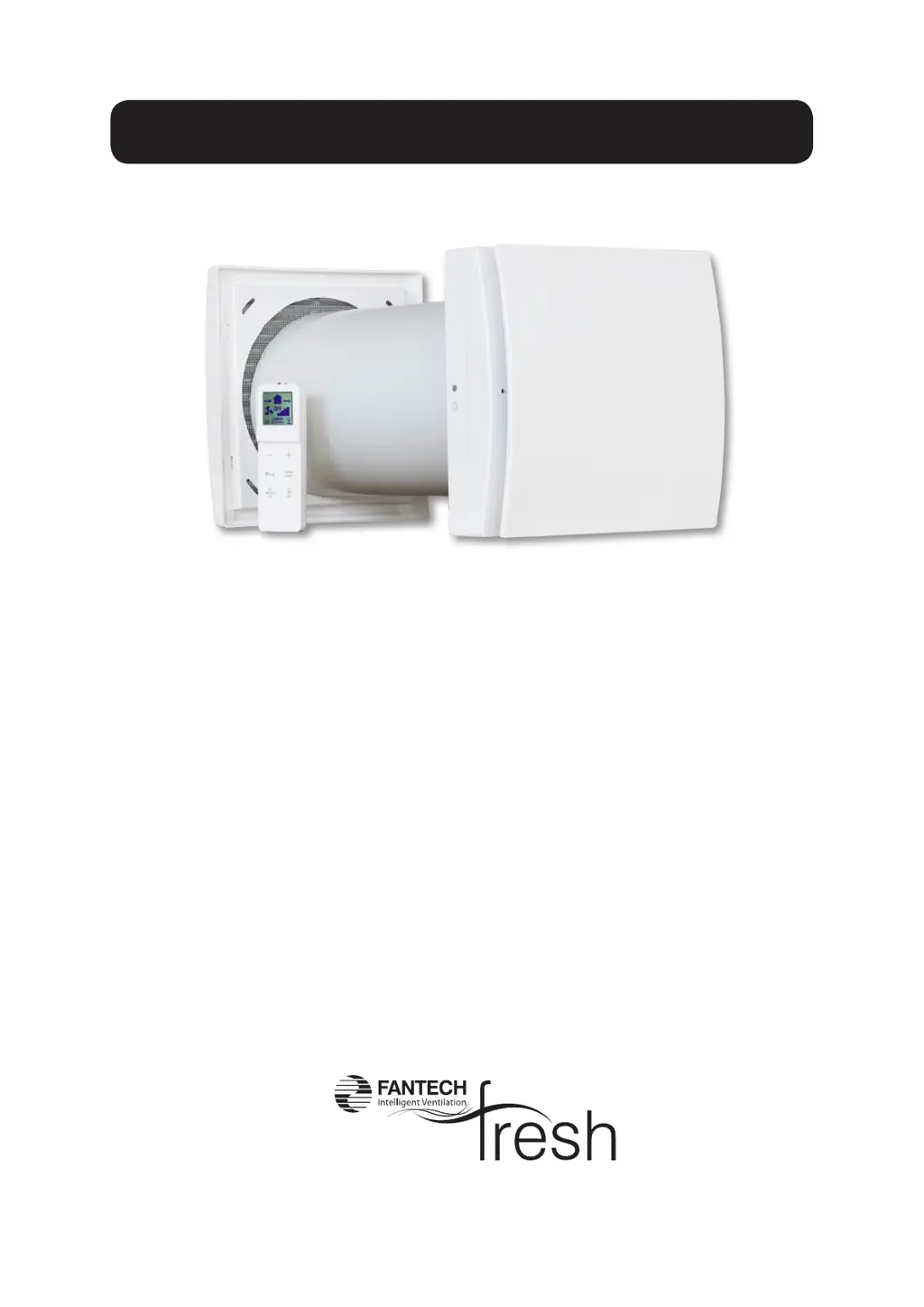
Fantech aerofresh AER-60HRV - User Manual

Fantech aerofresh AER-60HRV
22 pages
Print Icon
To Next Page IconTo Next Page
Loading...
AER-60HRV
aero
INSTALLATION, USE AND MAINTENANCE MANUAL
INST-AER-60HRV
July 2021

Questions and Answers

  • T
    Timothy CarterAug 18, 2025
    How to fix a Fantech aerofresh AER-60HRV when no icon is shown on the controller LCD display?
    • J
      Jennifer SavageAug 18, 2025
      If there is no icon shown on the LCD display of your Fantech Fan's controller, the possible causes are dead, missing, or wrongly positioned batteries. You should change the batteries if they are dead, check that the batteries are present, and ensure that the batteries are correctly positioned.
  • D
    David RodriguezAug 20, 2025
    What to do if my Fantech aerofresh AER-60HRV Fan unit does not operate?
    • S
      Shawn MooreAug 20, 2025
      If your Fantech Fan unit is not operating, it could be due to a lack of voltage or incorrect coupling with the support base. Check that the unit is correctly wired to the main supply and ensure that the coupling with the support base is properly done.
  • R
    Ricky ButlerAug 23, 2025
    Why is the icon flashing on the LCD display of my Fantech aerofresh AER-60HRV Fan?
    • G
      gallagherdavidAug 23, 2025
      If the icon flashes on the LCD display of your Fantech Fan, it indicates that the batteries are low. You should change the batteries.
  • A
    Austin BarnettAug 26, 2025
    What does it mean when the yellow LED is fixed on my Fantech aerofresh AER-60HRV Fan?
    • D
      Daniel SandersAug 26, 2025
      A fixed yellow LED on your Fantech Fan indicates that the filters are dirty. Filters maintenance or replacement is needed, and you have to reset filter operation.
  • T
    Travis JonesAug 28, 2025
    What to do if Fantech aerofresh AER-60HRV Fan unit doesn't execute commands from the remote control?
    • M
      Mark PenningtonAug 28, 2025
      If your Fantech Fan unit does not execute the command sent from the remote control, it signifies a lack of communication between the unit and the remote controller. Try moving closer to the unit, pointing the controller to the receiver on the left side of the unit.
  • M
    Matthew Smith Jr.Aug 30, 2025
    Why does the speed of my Fantech aerofresh AER-60HRV Fan unit suddenly increase?
    • B
      baxtertoddAug 30, 2025
      If the speed of your Fantech Fan unit suddenly increases, it is likely because the smart humidity control is activated. You can wait until the smart humidity control phase ends (10 minutes) or deactivate the humidity control function by pressing the button for 5 seconds.
  • J
    Justin JacksonSep 2, 2025
    Why is my Fantech aerofresh AER-60HRV operating at maximum speed?
    • S
      Sharon RobertsSep 2, 2025
      If your Fantech Fan is operating at the maximum speed, the Boost functionality is likely activated, as indicated by the icon on the display. You can wait until the boost timing ends (15 minutes) or deactivate the boost function by pressing the button.
  • A
    Ashley EvansSep 4, 2025
    What does a fixed blue LED mean on my Fantech aerofresh AER-60HRV?
    • H
      hintondanielleSep 4, 2025
      A fixed blue LED on your Fantech Fan indicates that Boost is activated. You can wait until the boost timing ends (15 minutes) or deactivate the boost function by pressing the button.
  • L
    lynn99Sep 6, 2025
    What does a fixed red LED on my Fantech aerofresh AER-60HRV Fan mean?
    • A
      Alejandro RuizSep 6, 2025
      A fixed red LED on your Fantech Fan indicates that antifrost protection is activated. Wait until the antifrost phase ends (30 minutes).
  • S
    Shari BrownSep 9, 2025
    What does a flashing blue LED mean on my Fantech Fan?
    • A
      Adrian Watson Jr.Sep 9, 2025
      A flashing blue LED on your Fantech Fan indicates that smart humidity control is activated. Wait until the humidity control phase ends (10 minutes).

Summary

Installation Guide

Installation Precautions and Safety

Key safety advice for installation, use, and maintenance of the unit.

Aerofresh 60 Introduction

Overview of the Aerofresh 60 unit and its purpose as a residential heat recovery unit.

Aerofresh 60 Technical Specifications

Detailed technical features and specifications of the Aerofresh 60 unit.

Aerofresh 60 Operation

Remote Controller Functions

Explanation of the infrared remote controller, its display, and buttons.

Ventilation Unit Status Indicators

How the ventilation unit signals status and responds to commands from the controller.

Operating Modes and Speed Settings

Detailed description of airflow directions, modes (Comfort, Efficiency), and speed settings.

Maintenance and Troubleshooting

Unit Maintenance and Cleaning

General guidance on user maintenance and cleaning of the unit.

Troubleshooting Common Unit Issues

Common anomalies, possible causes, and solutions for the unit.

Product Disposal and Recycling

Information on environmentally responsible disposal and recycling of the product.

Aerofresh 60 Installation Procedure

Wall Preparation and Mounting

Steps 2-7 detail preparing the wall and mounting the unit's support base.

Electrical Wiring and Connections

Steps 11-16B cover connecting the unit to the power supply.

Ducting and Unit Assembly

Steps 19-21 describe connecting the telescopic pipe and attaching the ventilation unit.

Final Setup and Operational Checks

Steps 30-37 cover final assembly, wiring checks, and unit attachment.

TRMPRO Installation and Dimensions

TRMPRO Unit Dimensions

Diagram showing the dimensions of the TRMPRO unit.

TRMPRO Installation Steps

Numbered steps for installing the TRMPRO unit.

Warranty and Support

Product Warranty Details

Information on product warranty, terms, and conditions.

Fantech Company Contacts

Contact information for Fantech offices in various regions.

Fantech aerofresh AER-60HRV Specifications

General IconGeneral
BrandFantech
Modelaerofresh AER-60HRV
CategoryFan
LanguageEnglish

Related product manuals