EasyManua.ls Logo

Fanvil X4 - User Manual

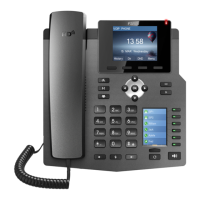
Fanvil X4
79 pages
Print Icon
To Next Page IconTo Next Page
Loading...
<>
Fanvil Technology Co., Ltd
HQ Add: 4F, Block A, Building 1#, GaoXinQi Hi-Tech Park (Phase-II, 67th District, Bao'An, Shenzhen, China 518101 P.R.
Tel: +86-755-2640-2199 Fax: +86-755-2640-2618 Email: sales@fanvil.com support@fanvil.com
Beijing Tel:+86-10-5753-6809 Suzhou Tel: +86-512-6592-0605
Document Version: 2.0
Software Version: 2.0
Release Date: 2016/8/26
User Manual
X4

Table of Contents

Questions and Answers

  • L
    Lauren BallJul 27, 2025
    Why is my Fanvil IP Phone not registering to a service provider?
    • C
      Christopher SimpsonJul 27, 2025
      There are several reasons why your Fanvil IP Phone might fail to register. First, ensure the device is properly connected to the network using the [Network] port, not the [PC] port. If the IP address displays 'Negotiating…', the device doesn't have one, indicating a network configuration issue. Also, double-check your line configurations for any errors. If problems persist, contact your service provider for assistance.
  • M
    Mrs. April BennettAug 2, 2025
    What to do if my Fanvil IP Phone could not boot up?
    • M
      Michael MartinAug 2, 2025
      If your Fanvil IP Phone fails to boot up, it could be due to a damaged system image. Please restore the system image. Alternatively, ensure you are using the standard power adapter or a PoE switch that meets the specification requirements, and verify that the device is properly connected to the power source.
  • N
    Nicole MartinAug 8, 2025
    Why is the audio chopping at the far end in hands-free speaker mode on my Fanvil IP Phone?
    • M
      Melissa StephensAug 9, 2025
      Choppy audio at the far end in hands-free speaker mode on your Fanvil IP Phone is likely due to loud volume feedback from the speaker to the microphone. Lowering the speaker volume should resolve this issue.
  • E
    Elizabeth DavisAug 14, 2025
    Why is there no audio or poor audio in the handset of my Fanvil IP Phone?
    • N
      Nancy CabreraAug 14, 2025
      If you're experiencing no audio or poor audio in the handset of your Fanvil IP Phone, first check that the handset is connected to the correct handset port and NOT the headset port. Also, the network bandwidth and delay may be unsuitable for an audio call.
  • C
    christopher20Aug 21, 2025
    Why is the audio poor or volume low in the headset of my Fanvil IP Phone?
    • D
      David GillAug 21, 2025
      If you're experiencing poor audio or low volume in the headset of your Fanvil IP Phone, ensure you are using the headset provided with the phone. If you're using a third-party headset, consult the wire sequence to ensure it's correct. Also, the network bandwidth and delay may be unsuitable for an audio call.

Summary

Instruction

General Safety Precautions

Essential safety guidelines for installing and operating the device to prevent damage and ensure user safety.

2 Installation

Power Supply Options

Explains how to connect the device using PoE or an external power adapter for reliable operation.

Mounting the Device

Provides instructions for setting up the phone in both desktop and wall-mount configurations.

3 Phone User Interface

Keypad Layout and Functions

Details the physical keypad layout, including soft keys, navigation, and numeric keys.

Web Portal Access

Guides users on how to access and use the device's web portal for management and operation.

4 Phone Configuration

Network Configuration

Details network setup options like DHCP, Static IP, and PPPoE for device connectivity.

Line Configuration

Explains how to configure line settings, including SIP proxy server addresses, for telephony service.

5 Using the Phone

Making Phone Calls

Covers dialing methods, default line selection, and initiating calls from the device.

Managing Multiple Calls

Explains how to handle second incoming calls and make second outgoing calls concurrently.

Conference Calls

Details how to join two calls into a conference and split calls using the phone's features.

Call Transfer Methods

Describes attended and unattended call transfer procedures for routing calls to other parties.

6 Phone Settings

Factory Reset Procedure

Procedure to reset the device to its original factory default settings, erasing all configurations.

7 Web Portal Operations

Web Portal Login

Covers the authentication process to access the device's web management interface.

Basic Network Settings

Covers essential network parameters like connection type, IP settings, and DHCP configuration.

VPN Configuration

Explains how to set up VPN connections for secure remote access and network integration.

SIP Line Settings

Covers the configuration of individual SIP lines, including username and display name.

8 Advanced Features

VPN Setup

Details the process of establishing VPN connections using L2TP or OpenVPN for secure network access.

OpenVPN Configuration

Provides instructions for setting up an OpenVPN connection, including required files.

9 Troubleshooting

Factory Default Reset

Procedure to restore the device to its original factory state, erasing all user configurations.

System Image Recovery

Guides on restoring the system image when it is damaged, often via FTP.

Common Trouble Cases

Lists common issues like no boot up or registration problems and their respective solutions.

Fanvil X4 Specifications

General IconGeneral
Lines quantity4 lines
Call log entries600
Phonebook sharingYes
Phonebook capacity500 entries
Power consumption (typical)2.5 W
Ethernet LAN (RJ-45) ports2
MountingDesk/Wall
Handset typeWired handset
Product typeIP Phone
Product colorBlack
Operating temperature (T-T)0 - 40 °C
Operating relative humidity (H-H)10 - 95 %
Cables includedLAN (RJ-45)
Number of handles included1 pc(s)
Volume controlDigital
Keypad number of keys38
Number of function keys6
Wi-FiNo
Networking standardsIEEE 802.1x, IEEE 802.3af
Ethernet LAN data rates10, 100 Mbit/s
Ethernet LAN interface typeFast Ethernet
Supported network protocolsDHCP, PPPoE, L2TP, OpenVPN, SIP2.0 UDP/TCP/TLS, RTP/RTCP/SRTP, STUN, DHCP, PPPoE, 802.1x, L2TP, SNTP, FTP/TFTP, HTTP/HTTPS, TR069
Display diagonal2.8 \
Display resolution320 x 240 pixels
Speakerphone-
Voice codecsAMR, AMR-WB, G.711a, G.711u, G.722, G.726, G.729ab, iLBC
CertificationCE, FCC
Dual-Tone Multi-Frequency (DTMF) modesIn-band, Out-of band, SIP info
Weight and Dimensions IconWeight and Dimensions
Depth169 mm
Width196 mm
Height173 mm
Package width270 mm
Package height65 mm

Videos

How to Factory Reset the Fanvil X4 Series Phones

Related product manuals