- 9 -
Mi 2488
Italiano English
- Relè 2
- Selezionare "Relè 2" e premere ; compare il valore precedente-
mente programmato (di fabbrica è 3 secondi);
- Cancellare il valore esistente premendo
;
- Inserire il nuovo valore compreso tra 0 e 60 (secondi) e premere
.
Maschera
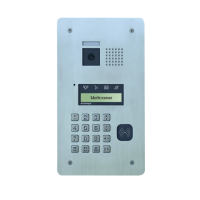
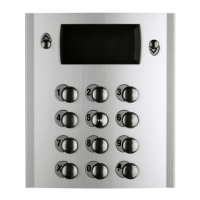
Quando la pulsantiera è a riposo, nella parte superiore del display,
appare una scritta che può essere sostituita con una personalizzata
(es. Residenza Belvedere, Condominio Dante, ecc.).
- Entrare in programmazione come descritto nel paragrafo "Entrare in
programmazione";
- Selezionare "Maschera" e premere
; sul display appare la scritta
attuale.
- Inserire la nuova scritta come indicato nel paragrafo "Inserimento
nuovo utente".
- Premere
per confermare ed uscire.
LCD
Il contrasto e il colore di fondo del display possono essere variati nel
seguente modo:
- entrare in programmazione come descritto nel paragrafo "Entrare in
programmazione";
- selezionare "LCD" e premere
; sul display appare:
Retroilluminazione e Contrasto.
- Retroilluminazione
Il colore di fondo dello schermo è la combinazione dei tre colori rosso,
verde e blu; per cambiarlo occorre:
- selezionare "Retroilluminazione" e premere
; appare: Rosso,
Verde e Blu;
- selezionare il colore e variarlo utilizzando i tasti
; premere per
la conferma;
- ripetere quest'operazione per variare gli altri colori oppure uscire
premendo
.
- Contrasto
Per variare il contrasto dello schermo, occorre:
- selezionare "Contrasto" e premere
; appare una barra orizzontale
con indicato il valore di contrasto attuale;
- utilizzare i tasti
per variarlo e premere .
Varie
Al suo interno si possono abilitare o disabilitare le seguenti funzioni:
- X per PWD. Utilizzo del tasto
(al posto di 00+ ) per entrare in
modalità immissione password di azionamento dei relè e per acce-
dere alle programmazioni (Esempio: premere
+ password + ).
- SI attiva il tasto
per questa funzione.
- NO rimane disattivato.
- Tutte le PWD. Consente l'estensione del numero massimo di
password utenti portandole da 20 a 250 (relè 1 da 1 a 125; relè 2 da
126 a 250).
- SI abilita 250 password.
- NO abilita 20 password.
- Disabilita toni. Attiva/disattiva i toni della tastiera.
- Si disabilita tutti i toni della tastiera.
- NO attiva tutti i toni.
Per accedere alle programmazioni, occorre:
- entrare in programmazione come descritto nel paragrafo "Entrare in
programmazione";
- selezionare "Varie" e premere
; sul display appare: per PWD,
Tutte le PWD e Disabilita toni;
- selezionare la funzione desiderata con i tasti
e premere ;
- scegliere Si o NO con i tasti
e premere per la conferma.
- proseguire con le altre programmazioni o ritornare alla lista delle
programmazioni, premendo
.
- Relay 2
- Select “Relay 2” and press ; the previously programmed
address (default is 3 seconds).
- Delete the existing value by pressing
.
- Enter the new value between 0 and 60 (seconds) and press
.
Mask
When the keyboard is at rest, the upper part of the display shows a
writing that can be replaced with a customized one (e.g. Belvedere
Residence, Dante building, etc..).
- Access the programming mode as described in the section “Enter
the programming mode”.
- Select “Mask” and press
, the display shows the actual message.
- Insert the new words as described in paragraph “Entering a new
user”.
- Press
to confirm and exit.
LCD
The contrast and the background colour of the display can be changed
as follows:
- access the programming mode as described in the section “Enter
the programming mode”;
- select “LCD” and press
, the display shows: Backlighting and
Contrast.
- Backlighting
Backlighting color is the combination of the three colours red, green
and blue; to change it is necessary:
- select “Backlighting” and press
; the display shows: Red, Green
and Blue;
- select a colour and use the buttons
to change it; press to
confirm;
- repeat the same operation to modify the other two colours or exit
by pressing
.
- Contrast
To change the contrast of the screen, you must:
- select “Contrast” and press
, a horizontal bar indicating the
current contrast value is shown;
- use the buttons
to change it and press .
Miscellaneous
Inside, you can enable or disable the following functions:
- Key X for PWD. Using the button
(instead of 00+ ) to enter the
mode storing password to operate a relay and access the program-
ming mode (Example: press
+ Password + ).
- YES enables the button
for this function.
- NO remains disabled.
- Extended PWD. Allows the activation of all user passwords
increasing their number from 20 to 250 (relay 1 from 1 to 125; relay
2 from 126 to 250).
-YES enables 250 passwords.
-NO enables 20 passwords.
- Disable tone. Enable/disable keypad tones.
- YES disables all keypad tones.
- NO enables all the tones.
To access the programming mode, you must:
- access the programming mode as described in the section “Enter
the programming mode”;
- select “Misc.” and press
; the display shows: Key for PWD,
Extended PWD and Disable tone;
- select the desired function with keys
and press ;
- choose YES or NO with
and press to confirm;
- continue with other programming or return to the list of programming
by pressing
.


 To Next Page
 Loading...