Advanced Function Instruction
7-93
FUN109 D P
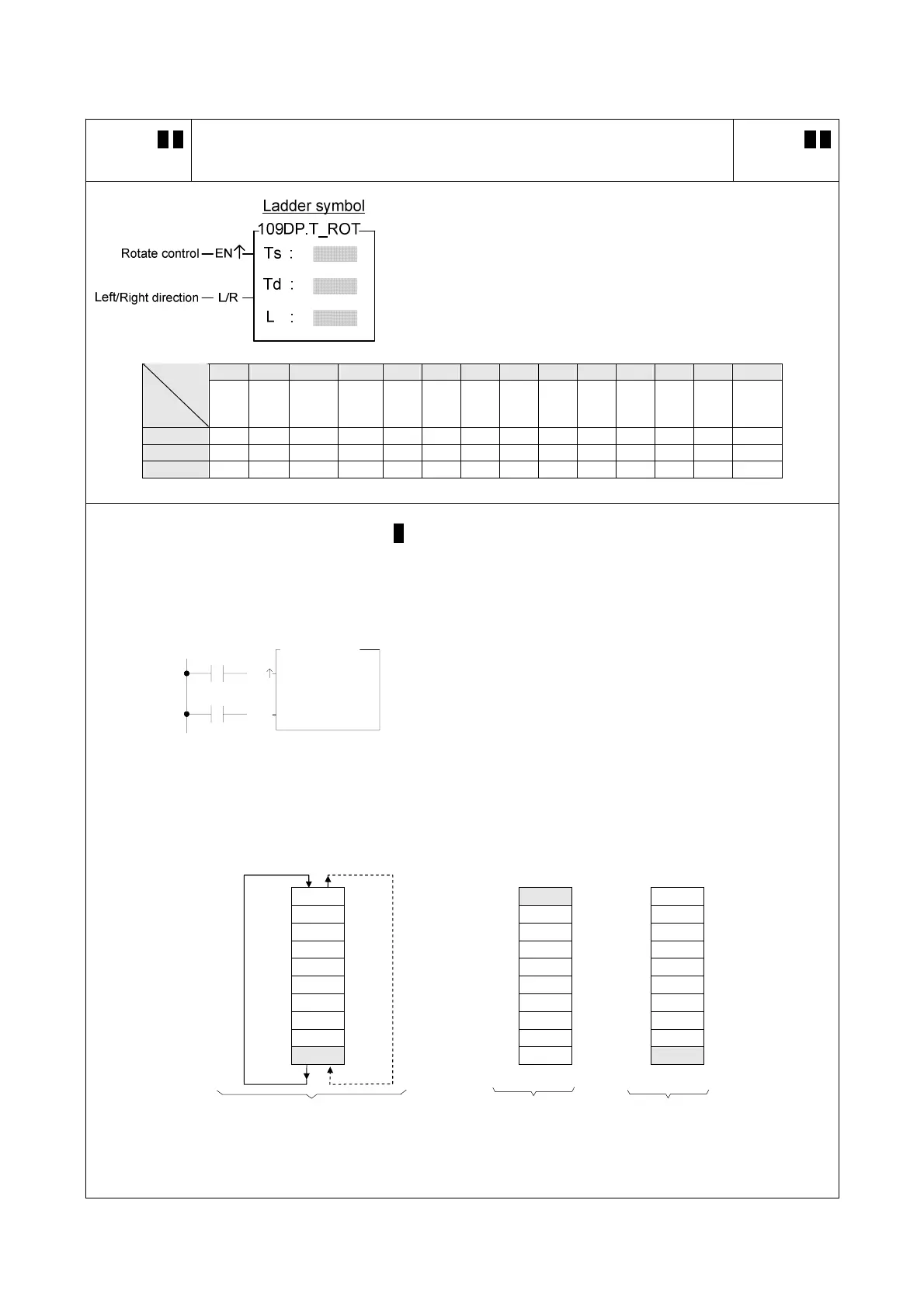
T_ROT
TABLE ROTATE
FUN109 D P
T_ROT
Ts : Source table for rotate
Td : Destination table storing results of rotation
L : Lengths of table
Ts, Td may combine with V, Z, P0~P9 to serve indirect
address application
WX WY WM WS TMR CTR HR IR OR SR ROR DR K XR
Range
Ope-
rand
WX0
∣
WX240
WY0
∣
WY240
WM0
∣
WM1896
WS0
∣
WS984
T0
∣
T255
C0
∣
C255
R0
∣
R3839
R3840
∣
R3903
R3904
∣
R3967
R3968
∣
R4167
R5000
∣
R8071
D0
∣
D4095
2
∣
256
V、Z
P0~P9
Ts ○ ○ ○ ○ ○ ○ ○ ○ ○ ○ ○ ○
○
Td ○ ○ ○ ○ ○ ○ ○ ○* ○* ○
○
L ○ ○* ○
○
z When rotation control "EN" = 1 or "EN↑" ( P instruction) has a transition from 0 to 1, the data from the table of
Ts will be rotated 1 position to the left (when "L/R" = 1)or 1 position to the right (when "L/R" = 0). The results of
the rotation will then be written onto table Td.
X0
EN
T
S :
Td :
L :
L/R
X1
109P.T_ROT
10
R 0
R 0
z In the program at left, Ts and Td is the same table. The
table after rotation will write back to itself. It first perform
one left rotation (let X1 = 1, and X0 go from 0
→1), and
then performs one right rotation (let X1 = 0, and X0 go
from 0
→1). The results are shown at right in the diagram
below.
Rotate left Rotate right (Rotate left) (Rotate right)
Ts ( T d )
Td(Ts) Td(Ts)
R0 0 0 0 0 (right) R0 9999 R0 0000
R1 1111 R1 0000 R1 1111
R2 2222 R2 1111 R2 2222
R3 3333 R3 2222 R3 3333
R4 4444 R4 3333 R4 4444
R5 5555 R5 4444 R5 5555
R6 6666 R6 5555 R6 6666
R7 7777 R7 6666 R7 7777
R8 8888 R8 7777 R8 8888
R9 9999 (left) R9 8888 R9 9999
Before execution
cFirst time dSecond time



 To Next Page