Advanced Function Instruction
7-95
FUN110 D P
QUEUE
QUEUE
FUN110 D P
QUEUE
z If no data has yet been pushed into the queue or the pushed in data has already been popped out (Pr = 0),
then the queue empty flag will be set to 1. In this case, even if there is further popping out action, this
instruction will not be executed. If data is only pushed in and not popped out, or pushed in is more than that
popped out, then the queue finally becomes full (pointer Pr indicates the QU
L
position), and the queue full flag
is changed to 1. In this case, if there is more pushing in action, this instruction will not execute. The pointer for
this instruction is used during access of the queue, to indicate the data that was pushed in the earliest. Other
programs should not be allowed to change it, or else an operation error will be created. If there is a specific
application, which requires the setting of a Pr value, then its permissible range is 0 to L (0 means empty, and 1
to L respectively correspond to QU1 to QUL). Beyond this range, the pointer error flag "ERR" will be set as 1,
and this instruction will not be carried out.
X0
EN
OW :
ERR
X1
I/O
110P.QUEUE
R 0
R 2
QU :
IW :
10
L :
Pr :
R 1
R 20
EPT
FUL
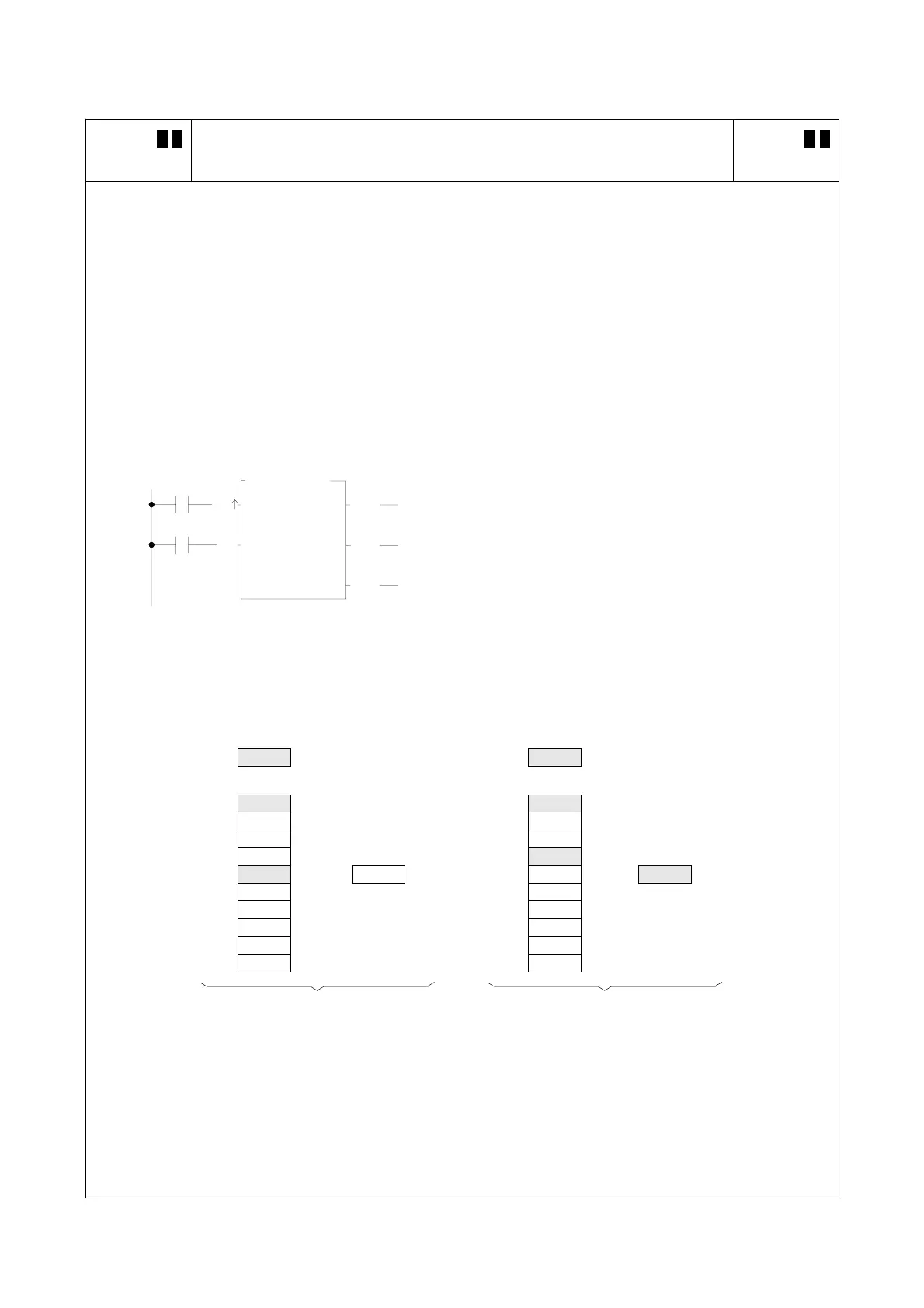
z The program at left assumes the queue content is the
same with the queue at preceding page. It will first
perform queue push operation , and then perform pop
out action. The results are shown below. Under any
circumstance, Pr always point to the first (oldest) data
that was remained in queue.
Pr
Pr
5
4
QU QU
QU1 5555 R2 QU1 5555 R2
QU2 4444 R3 QU2 4444 R3
QU3 3333 R4 QU3 3333 R4
QU4 2222 R5 OW QU4 2222 R5
OW
QU5 1111 R6
×××× R20
QU5
R6 1111 R20
QU6 R7 ↑
QU6
R7
QU7 R8 OW unchanged QU7 R8
QU8 R9 QU8 R9
QU9 R10 QU9 R10
QU10 R11 QU10 R11
After push in (X1=1,X0 from 0→1) After pop off (X1=0,X0 from 0→1)



 To Next Page