ENGLISH
8. SOFTWARE UPDATES
FA-07 software updates should be made with a personal
computer that has an Ethernet port, by following the
procedure below:
1. Identify the file containing the new software and
unzip it into a folder of the PC. Free versions of the
software may be available on the Favero Electronic
Design web site (www.favero.com), otherwise
versions at cost can be received via email.
2.
set the IP address of the PC at the fixed
value of “192.168.1.229”. For this operation, see the
document attached to the software updates.
3. Directly connect the PC’s Ethernet port to the FA-
07’s Ethernet port via a direct standard network
cable (EIA/TIA-568A/B).
4. Switch on the FA-07 while holding down the [F3]
key; release the key when the graphic display panel
begins flashing.
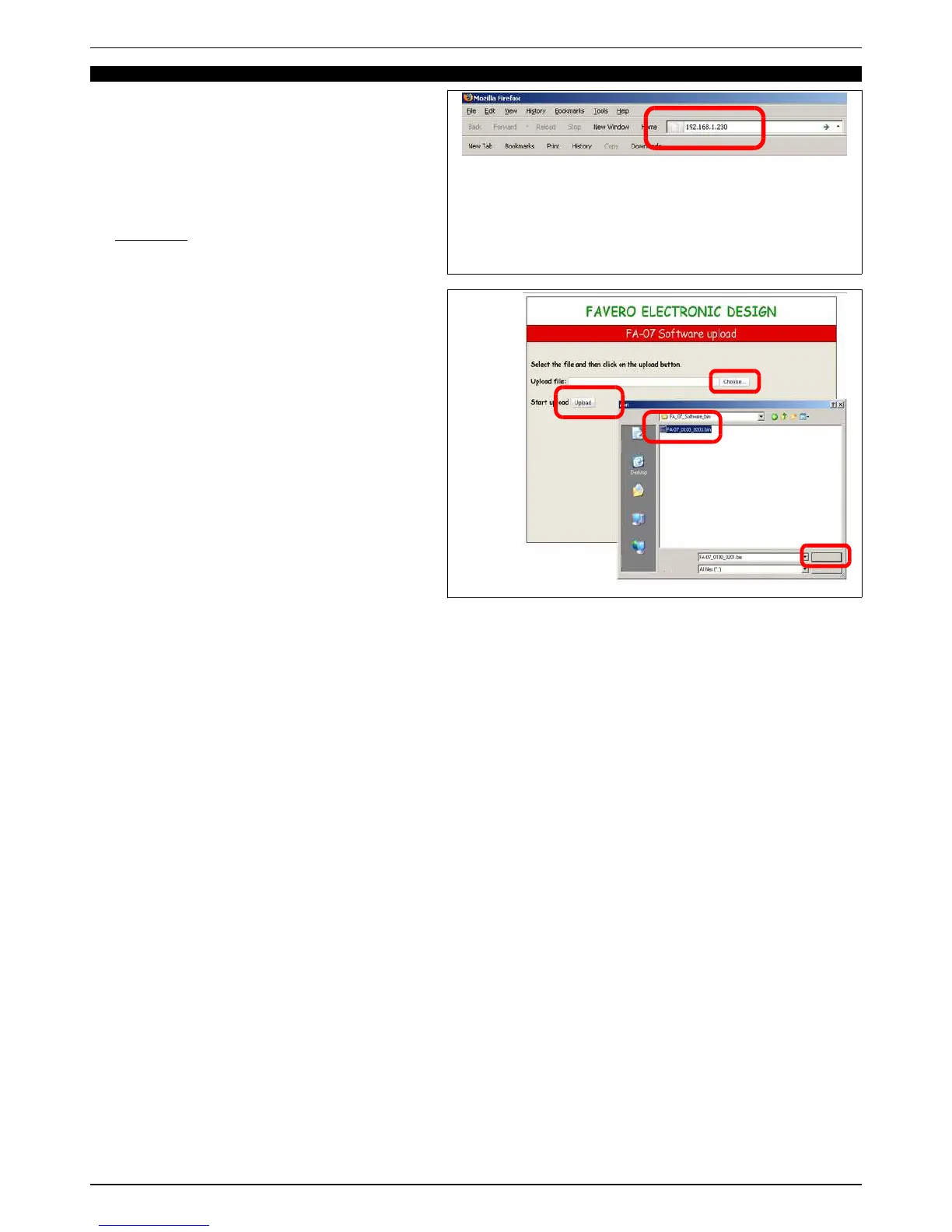
5. Launch a Web Browser, such as Explorer, Firefox,
Opera or other, on your PC. Type in the IP address
“192.168.1.230” in the browser’s address bar (See
Fig. 19).
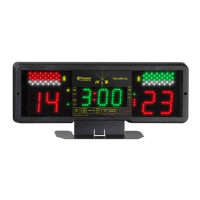
6. On the page that appears on your computer (see Fig.
20), click on the “Choose…” button to browse the
computer’s folders and select the previously saved
update file (of the type “FA-07_0100_0201.bin”). Then
click on “Open” to confirm your choice.
7. Launch the software update program by clicking on
“Upload”. At the end of the operation the FA-07 will
emit a brief sound and the graphic display panel will
stop flashing, while the message “UPLOAD
COMPLETED” will appear on the PC screen.
8. Disconnect the PC and reset the IP address to its original setting. Switch off the FA-07 and then switch it on again: the
new software version can be viewed in programming step P.09 (see chapter 5.2).
940-M06-EN FA-07 Manual
Page 15/ 16
FAVERO ELECTRONICS SRL


 To Next Page