ENGLISH
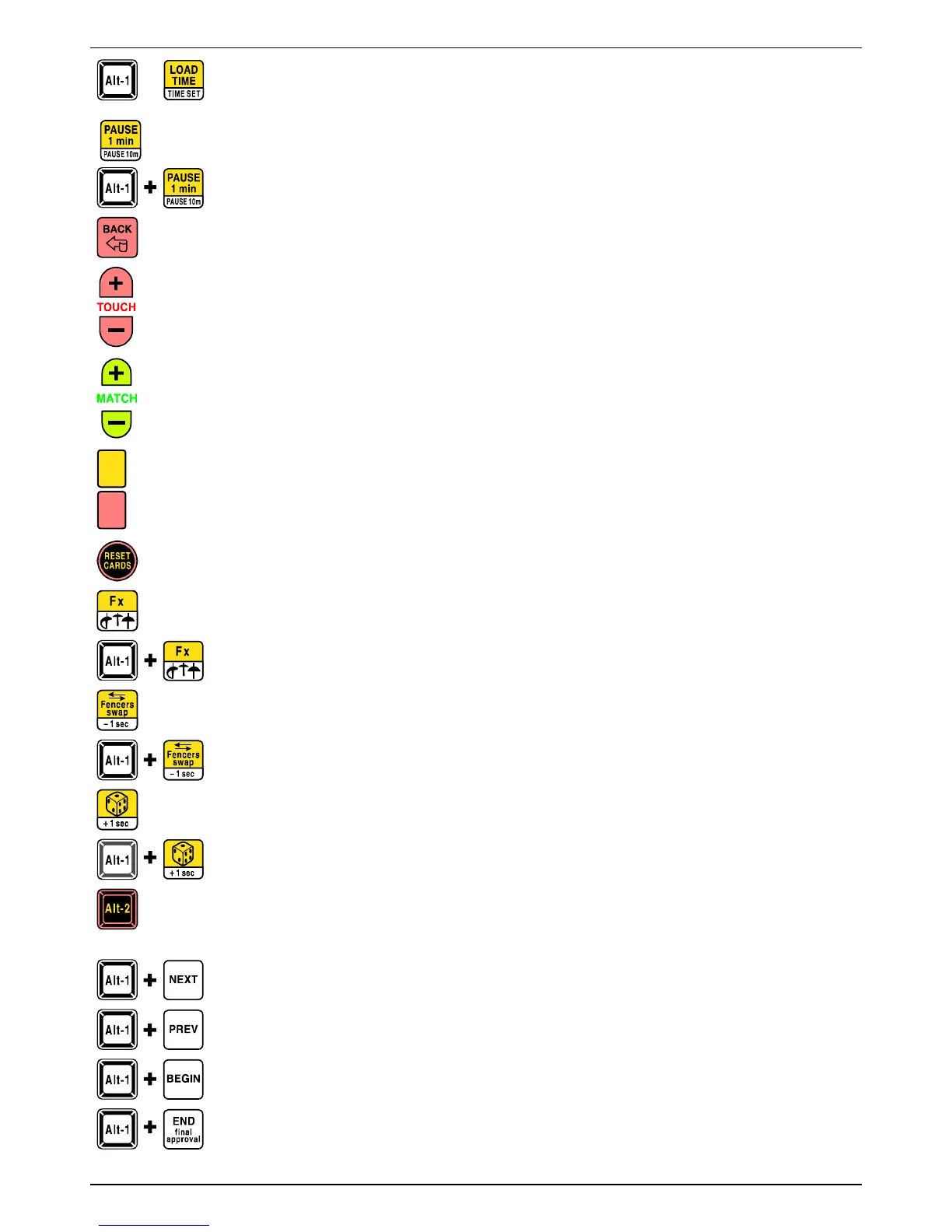
[Alt-1] + [TIME_SET]: these keys set the chronometer’s start time, which can be selected (upon
rotation) from 1 to 9 minutes. The same function can be effectuated from the FA-07 keyboard by
pressing the [TIME SET] key.
[PAUSE_1_min]: with the chronometer stopped, this key effectuates a pause of 1 minute. The pause time is
distinguished from the match time by the two yellow lights on the chronometer blinking faster.
[Alt-1] + [PAUSE_10m]: initiate a 10 minute pause of the chronometer, useful for medical interventions.
Once the 10 minutes are over, or if you STOP the counting, the previous chronometer time returns.
[BACK]: allows you to cancel the last operation made with regards to scores, cards and matches. It does not affect
the chronometer.
[+_TOUCH]: increases the number of hits.
[-_TOUCH]: decreases the number of hits.
[+_MATCH]: increases the number of matches.
[-_MATCH]: decreases the number of matches.
When you select Match Number = 0, the “-” (hyphen) symbol will appear and the chronometer and score will
switch off. This allows you to use the FA-07 as only a simple scoring apparatus and lowers the current
consumption.
[Yellow card] and [Red card]: increase the yellow and red cards.
Each fencer is assigned one yellow card only, and multiple red cards (max. 15). The red light indicates that at
least one red card is present, while the exact number (of red cards) will appear on the graphic display panel .
[RESET_CARDS]. Useful when beginning each match of a team competition: it sets only the yellow and red cards
at zero, whereas the [RESET_ALL] key also initializes the score and the number of matches.
[Fx]: not used.
[Alt-1] + [WEAPONS]: effectuate the change of weapon in the same way that the corresponding key on
the FA-07 keyboard does.
[Fencers_swap]: inverts all the visual displays regarding the two fencers. This is used when fencers change
positions.
[Alt-1] + [-1sec]: decrease the value of the chronometer by 1 second to allow for corrections to be
made. During the last 10 seconds, time decrease is displayed in hundredths of seconds.
[DIE]: causes the “Priority” signal to switch on randomly. In addition, one minute will be loaded on the
chronometer for the play-off. To turn off the Priority signal, simply press the “Priority” key again.
[Alt-1] + [+1sec]: increase the value of the chronometer by 1 second to allow for corrections to be
made. During the last 10 seconds, time increase is displayed in hundredths of seconds.
[Alt-2]: used only with the remote control’s “safety range function”, which is activated via programming step
P.03 (see chapter 4.2.3). In this mode all functions, which are usually effectuated by pressing only one single key,
now require that the [Alt-2] key also be pressed.
An exception is the [START_STOP_TIME] key, which should be pressed directly (without pressing [Alt-2]).
[Alt-1] + [NEXT]: request the central system to send the information concerning the subsequent match.
Then, to begin the match, press the [Alt-1] + [BEGIN] keys and subsequently the [START_STOP_TIME]
key. See chapter 6.5.
[Alt-1] + [PREV]: request the central system to send the information concerning the previous, already
concluded, match, to allow for eventual corrections to be made. See chapter 6.5.
[Alt-1] + [BEGIN]: tell the central system that the match has begun. See chapter 6.5.
[Alt-1] + [END]: tell the central system that the match has ended. See chapter 6.5.
940-M06-EN FA-07 Manual
Page 7/ 16
FAVERO ELECTRONICS SRL


 To Next Page