The FEC AM-1017 Aer Monitor is a 17-inch bezel-free display designed for Point-of-Sale (POS) applications. It is characterized by its slim, compact, and robust design, making it suitable for various environments. The monitor is a compatible component of the FEC AerPOS Terminal Series, allowing for easy removal and installation.
Function Description:
The Aer Monitor AM-1017 serves as a primary display unit for POS systems, offering both projective capacitive touch (P-Capacitive) and resistive touch options. It integrates various peripheral devices and supports customer displays, including VFD/LCM and a second 15-inch LCD pole display. The monitor features easy-to-access On-Screen Display (OSD) controls for adjusting brightness and other display parameters.
Important Technical Specifications:
- Display: 17-inch TFT LCD
- Resolution:
- AM-1017 Stand Type: 1280 x 1024
- AM-1017 Bracket Type: 1024 x 768
- Max. Color: 16.7 M (Stand Type), 16.2 M (Bracket Type)
- Contrast Ratio: 1000:1 (Stand Type), 700:1 (Bracket Type)
- Touch Screen:
- Projective-Capacitive (Stand Type)
- 5W Resistive (Stand Type)
- Optional (Bracket Type)
- Brightness:
- Projective-Capacitive: 350 nits (LED)
- 5W Resistive: 250 nits (LED)
- On Screen Display (OSD) Controls: Menu, Up, Down, Power
- Touch Screen Interface: 1 x USB Slave
- Video Port: 1 x VGA, 1 x DVI (Stand Type); 1 x VGA (DB15) / 1 x DVI (option) (Bracket Type)
- Audio Port: 1 x Line in
- DC-in Port: 1 x 3.5mm DC jack
- Integrated Peripherals (Optional):
- Finger Print Receiver: Optical Finger Print Receiver, USB interface
- RFID Reader: 13.56M Hz RFID reader, USB interface
- I-Button Reader: USB interface
- MSR (Magnetic Stripe Reader)
- Power Supply: 50W (12V/4.16A) External Power Adaptor / Cable DC PLUG / Power12V USB
- Dimensions (Without Base): 409.9 x 331.8 x 38.6 mm
- Dimensions (With Base): 409.9 x 382 x 212.3 mm
- Mounting: VESA 100 x 100
- IP Rating: IP65 front panel compliant (for both resistive and projective capacitive touch options)
Usage Features:
- Bezel-Free Design: Offers a sleek appearance and easier cleaning.
- Touch Technology: Available with either reliable tempered glass on projective capacitive touch or high-quality resistive touch, both ensuring durability and IP65 front panel compliance.
- Space Efficiency: Compact size suitable for various POS applications.
- Peripheral Support: Supports a range of peripheral devices, including MSR, Finger Print Receiver, RFID, and i-Button.
- Customer Display Integration: Can be integrated with VFD/LCM customer displays and a second 15-inch LCD pole display.
- OSD Controls: Intuitive OSD buttons (Power Switch/Status, Menu Up/Increase/Auto Tune, Menu Down/Decrease, Display OSD Menu/Next Page) are invisible until touched and automatically disappear after 5 seconds of inactivity.
- Installation Flexibility: The display module can be easily disassembled and reassembled from the main unit of the terminal, and it supports a pole-type installation for a second screen.
- Driver Support: Comes with a variety of drivers for different operating systems (Windows XP, POS Ready 2009, Win7, POS Ready7), available for download from the FEC website.
- Touch Calibration: For resistive touch, the EETI TouchKit Tools allow for 4-point or 9-point linearization for better touchscreen linearity and accuracy. Projective capacitive touch typically does not require 4-point calibration.
Maintenance Features:
- Cleaning: Disconnect from AC outlet before cleaning. Use a damp cloth; avoid liquid or spray detergents.
- Environmental Protection: Keep away from humidity. Protect from overheating by not covering air convection openings.
- Power Management: Disconnect from power source if not used for a long time to prevent damage from transient over-voltage.
- Troubleshooting Guide: Provides guidance for common issues such as touch panel malfunction (checking connections, HID USB detection, driver installation, cabling, and calibration) and OSD panel unresponsiveness (ensuring single, sustained touches).
- Professional Service: In case of damage (power cord/plug, liquid penetration, moisture exposure, malfunction, physical damage), the equipment should be checked by qualified service personnel.
- Storage Temperature: Avoid storage in environments below -20°C (-4°F) or above 60°C (140°F) to prevent damage.

 Need help?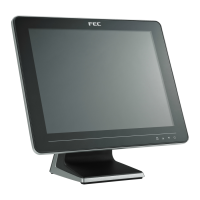

 To Next Page
 General