EasyManua.ls Logo

FEC AM-1017 - Chapter 3 Software Installation and Setup; FEC P-Capacitive; Resistive Touch Utility (EETI Controller)

FEC AM-1017
24 pages
Print Icon
To Next Page IconTo Next Page
To Previous Page IconTo Previous Page
Loading...
System Manual
12
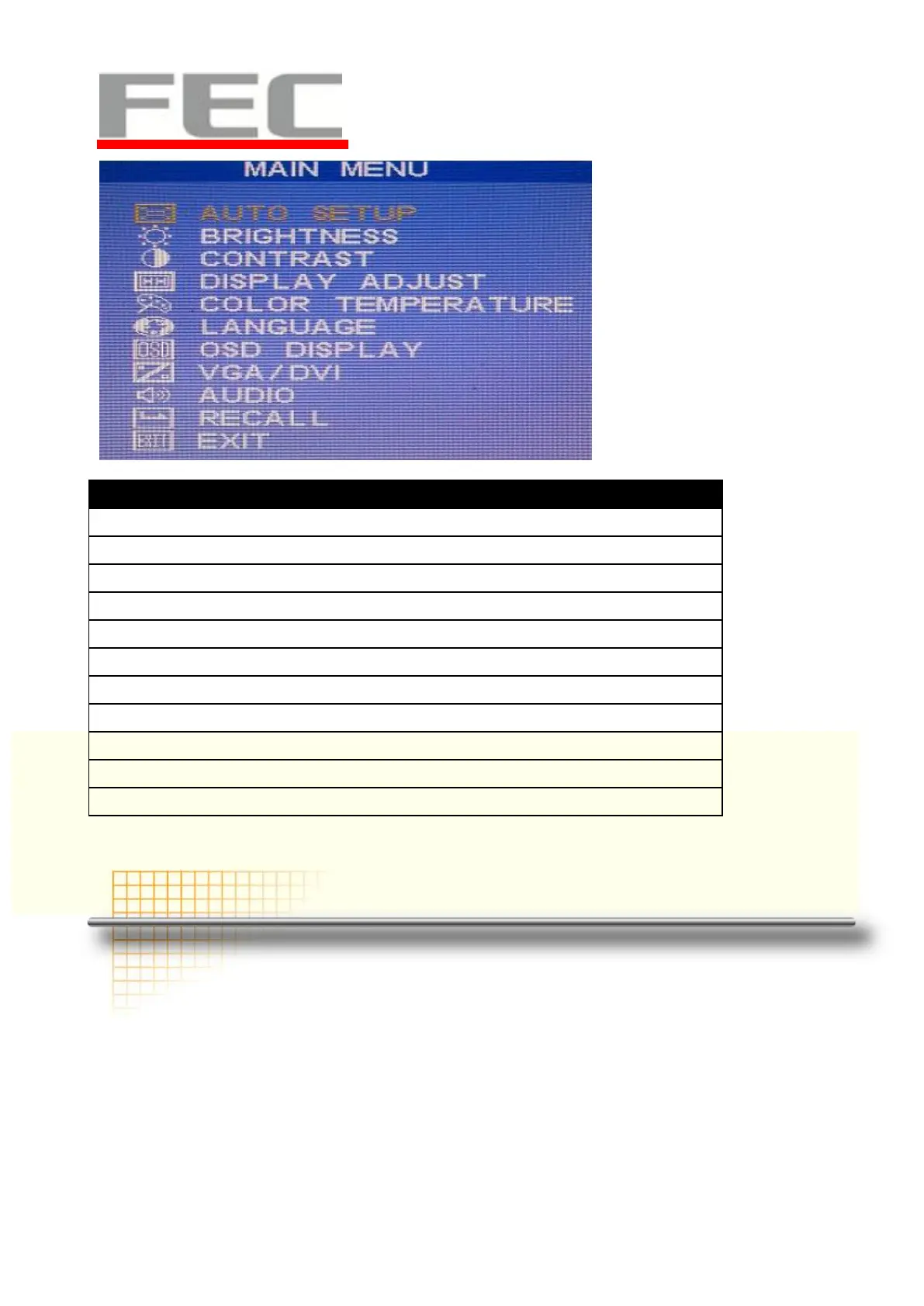
Menu
Function
1) AUTO SETUP
auto tune
2)BRIGHTNESS
brightness adjustment
3)CONTRAST
picture contrast adjustment
4)DISPLAY ADJUST
picture parameter adjustment
5)COLOR TEMPERATURE
color temperature adjustment
6)LANGUAGE
multi-language setup
7)OSD DISPLAY
OSD parameter setup
8)VGA/DVI
VGA/DVI signal setup
9)AUDIO
audio function adjustment
10)RECALL
reset all menu item value to default setting
11)EXIT
exit OSD menu
C
C
h
h
a
a
p
p
t
t
e
e
r
r
3
3
Software Installation and Setup
AM-1017omes with a variety of drivers for different operating systems.
You can download all the necessary drivers and utilities from http://www.fecpos.com.
FEC P-Capacitive/ Resistive Touch Utility (EETI Controller)