DescriptionofPartsonthe
PortableCoolingUnit
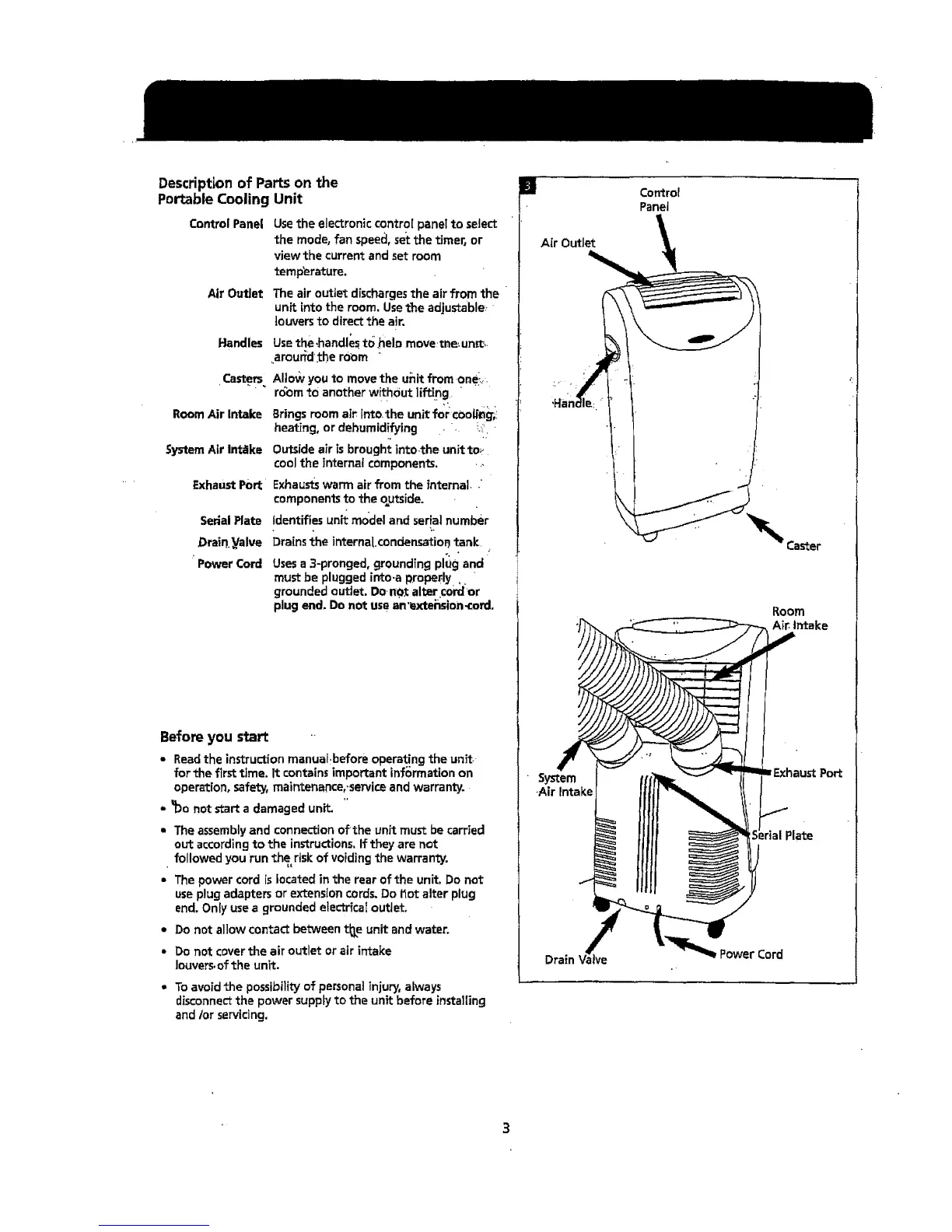
Control Panel
Air OutJet
Handles
,Castem.
Room Air Intake
System Air In_ke
Exhaust Port'
Serial Plate
Drain._Valve
' Power Cord
Use the electronic control panet to select
the mode, fan speed, set the timer_ or
view the current and set room
temperature.
The air outtet discharges the air from the
unit into the room. Use the adjustable: '
louvers to direct the air.
Use the,handles to held move,me,.un_,.
,.arour_l'the room '
Allow you to move the uiiit from onei_=.
r6bm tO another without iffing. •
Brings room air into.the unit for cOob_i
heating, or dehumidifying • . _.::''
.,
Outside air is brought into.the unit toe.
cool the internal components. ,,,
Exhaustswarm air from the internal, "
components to the o_utside.
identifies unit model and serial number
Drains the interna[,condensatiofl tank. ,=
,
Uses a 3-pronged, grounding plug and
must be plugged i_o.a proper:ly ,. •
grounded outlet. Do,n_ altar ¢ofdor
plug end. Do not use an'extei_sion_ord,
Before you start
• Readthe instructionmanual.beforeoperatingthe unit.-
forthe firsttime. It containsimportantinformation on
operation,safety, maintenance,,seTviceandwarranty.
- _Oanot start a damagedunit
, The assemblyand connectionof=theunit must becarried
out accordingto the instructions,ifthey are not
followedyourun the risk of voidingthe warranty.
• Thepowercord islocatedinthe rearof the unit,Do not
useplugadaptersor extensioncords,Do t_otalter plug
end.Only usea groundedelectricaloutlet.
• Do not allowcontactbetweent_e unit andwater,
• Do not coverthe air outlet orair intake
louvers.ofthe unit.
* To avoid the possibility of personat injury, always
disconnectthe power supply to the unit before installing
and/or servicing,
Control
Panel
Air Outlet
Caster
Room
Air. intake
• System
-Air Intake
Port
Drain
Power Cord



 To Next Page