Calibration Steps
Please select an open site and calibrate based on steps below.
1. Enter J.ME FLY setting interface, select the “enter flying setting page” at top right corner
and slide to “compass calibration” interface to calibrate.
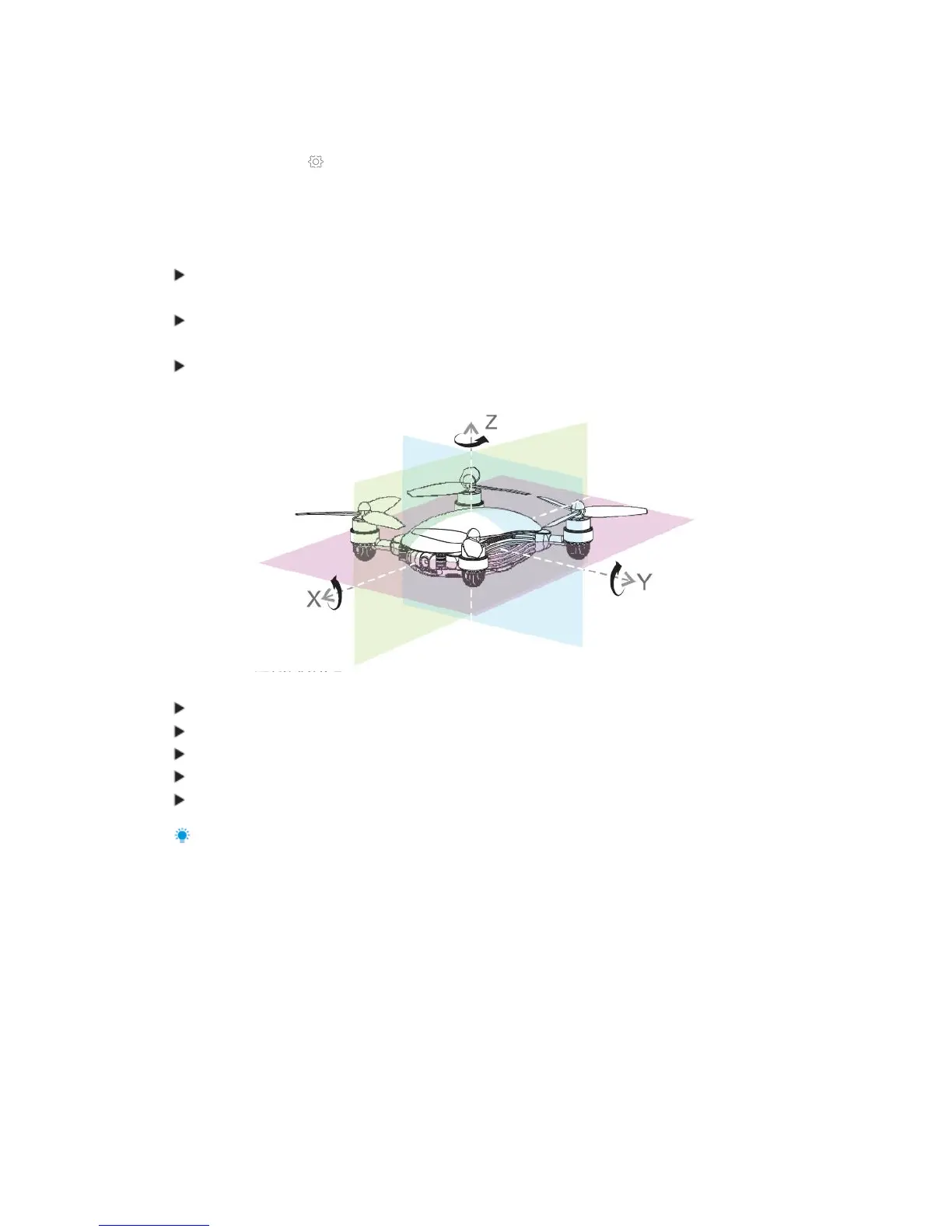
2. Click “Start Calibration”; if the red aircraft status indicator becomes normally on, the compass
calibration procedure starts and then operate following coordinate in the diagram below and
following steps.
Rotate the aircraft body by 360 along Axis Z, and the yellow indicator lamp will turn on after
completion;
Rotate the aircraft body by 360 along Axis Y, and the green indicator lamp will turn on after
completion;
Rotate the aircraft body by 360 along Axis X, the red indicator lamp at head will turn on and
the green indicator lamp at tail will flicker after completion.
Re-calibration is needed if:
The compass data are abnormal and the yellow indicator lamp flickers;
The flight site is far away from last one calibrated by compass;
The structure of aircraft is changed;
During flying, the aircraft drifts seriously or is not able to fly in a straight line; or
Battery is changed.
For more about compass calibration, please check relevant teaching videos.
Main Interface



 To Next Page