- 7 -
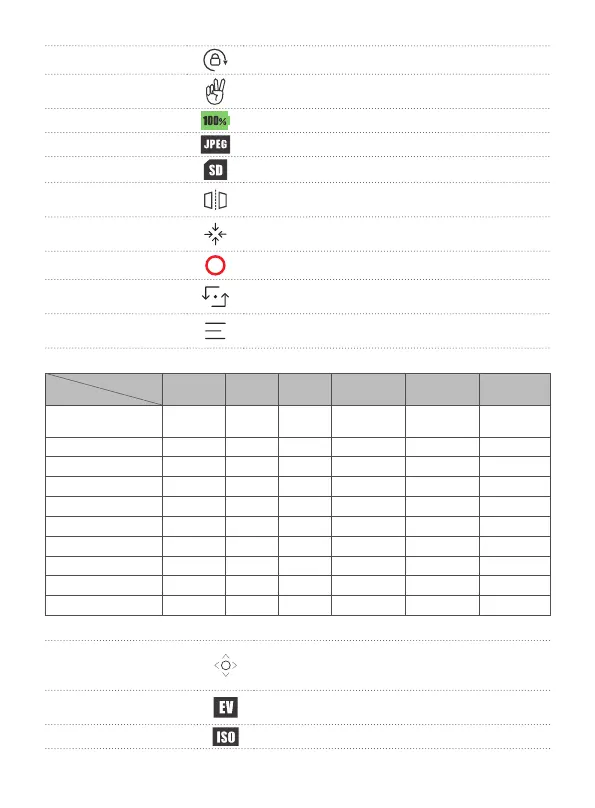
[2] Lock Screen orientation lock
[3] Gesture shooting
Make a "V" gesture in front of the camera to take
photo or start recording.
[4] Battery indicator Show battery level of Feiyu pocket.
[5] File format Prompt the le format of the saved le.
[6] Storage spaces Display remaining storage spaces.
[7] Mirror
Images from the camera are mirrored after turn it
on.
[8] Recenter
Lens return to center and keep towards front or
back as before.
[9] Shoot Start recording or take photo.
[10] Camera turn
around
Camera horizontally rotate 180° to shoot, which can
be used to take sele
[11] Camera settings
Set parameters of current shooting mode, format
microSD card, view device information.
Modes
Parameter
Photo-
graph
Video
Slow
motion
Timelapse
Panoramic
photo
Hyperlapse
Viewing angle
√ √
Anti-icker
√ √ √ √ √ √
Grid
√ √ √ √ √ √
Watermark
√ √ √ √ √
Proportion
√
Photo format
√
Video format
√ √ √ √
Color
√ √ √ √
White balance
√ √ √ √ √ √
Panoramic mosaic
√
[12] Joystick
Long press the circle and turn left and right to
control pan axis, turn up and down to control tilt
axis.
[13] Exposure
compensation
Set or display current exposure compensation.
[14] ISO Set or display current ISO.


 To Next Page