- 4 -
4. Operation
4.1 Follow mode introduction
Pan mode (HF): Pan follow, only the pan axis follows the movement of user's hand.
Follow mode(TF): Pan and tilt follow, where both the pan and tilt axes follow the movement
of user's hand, but roll axis does not.
All follow mode(AF): Pan, tilt and roll follow, where all 3 axes follow the movement of user's
hand.
Lock mode(LK): All 3 axes do not follow the movement of user's hand, gimbal keeps the
direction of the camera xed.
Diving mode(DV): A follow mode which use with waterproof case for Feiyu Pocket 3
(optional)
.
In this mode, lens turn upward, and all 3 axes follow the movement of user's hand.
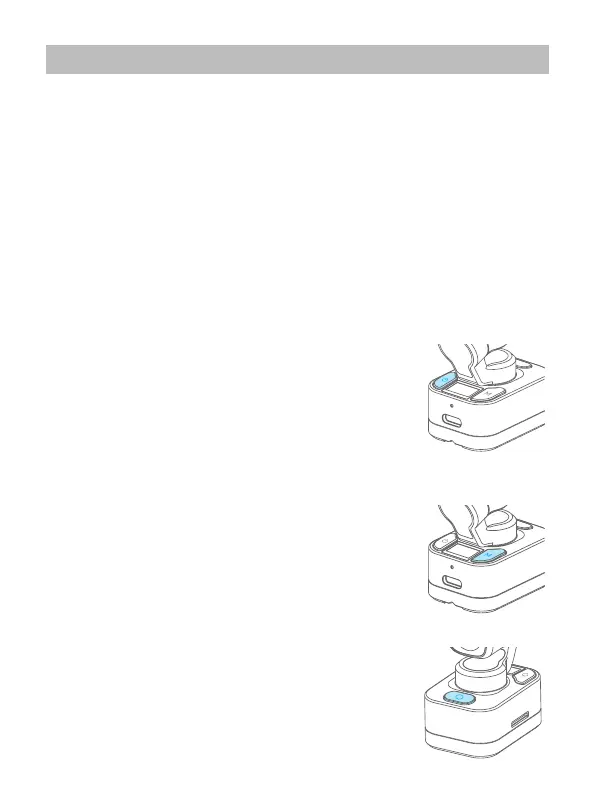
4.2 Power button
Long press for 1s: Power ON/ OFF
Single tap: Switch among photo mode/ video mode/ recently
used function
Single tap (Connect computer when the camera is on):
switch between PCCAM/Udisk mode
Long press for 8s: Power o forcely
4.3 Gimbal mode button
Single tap: Follow mode/All follow mode/Pan mode
(Switch in
turn)
Double tap: Recenter
Triple tap: Enter/ Exit sele mode
Tap four times: Enter diving mode (Single tap again to exit)
Press and hold: Enter lock mode
4.4 Shutter button
Single tap: Start recording/ Stop recording/ Take photo
Long press for 3s: Turn on/ o Wi-Fi


 To Next Page