- 11 -
Manual lock
Manually move camera to desired position, and hold for half a second. New tilt
/pan positions are automatically saved.
7. App Connecting
7.1 Connect with Feiyu SCORP APP
(1)Turn on the gimbal
(2)Turn on the smartphone Bluetooth, run Feiyu SCORP APP, tap the top of the home
page to connect gimbal.
After the connection succeed, it's easy to control gimbal via APP, including control
the pan and tilt axis angle with the virtual joystick, switch modes, set motor power/
camera parameters/follow speed, set other functions, parameters, and update
rmware.
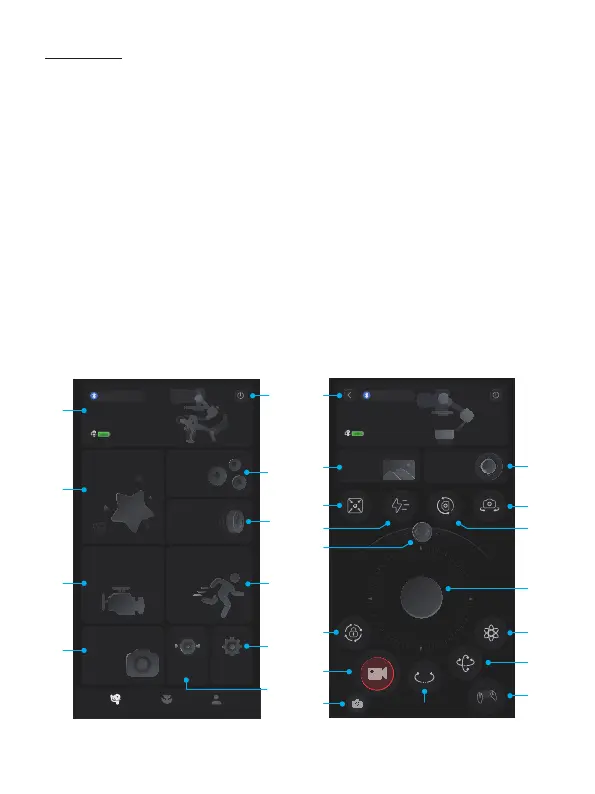
7.2 Function introduction of APP
Device battery
Joystick
settings
Image
transmission
device
Current device
FY-XXXXXXXX
100%
100%
Scenario
Device battery
Current device
FY-XXXXXXXX
Button
settings
Knob
settings
Follow speedMotor power
Camera settings
Horizon
calibration
More
[1]
[2]
[11]
[12]
[14]
[20]
[21]
[22]
[18]
[15]
[3]
[6]
[8]
[17]
[25]
[26]
[13]
[16]
[24]
[19]
[4]
[5]
[7]
[10]
[9]















 To Next Page