- 18 -
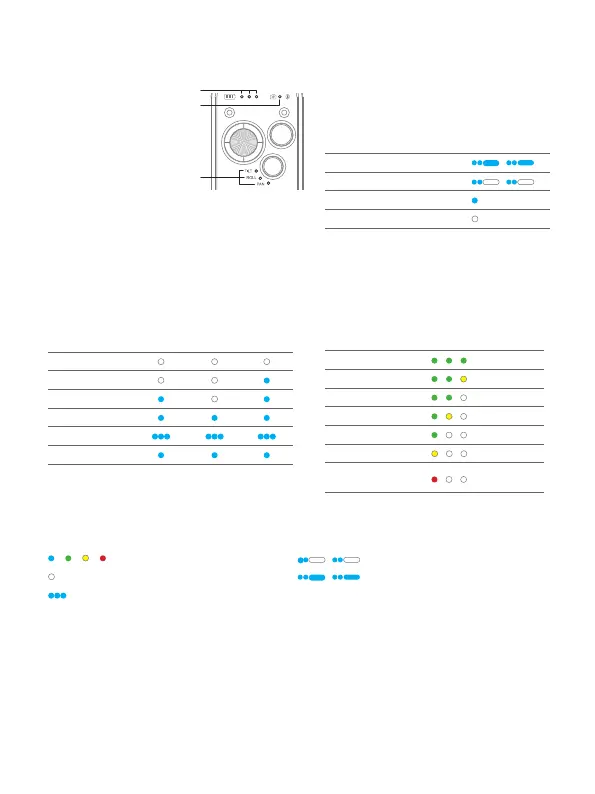
8.2 Indicator
[1] Battery indicator A/
B/C
[2] Camera/Bluetooth
indicator
[3] Follow status
indicator
TILT = Tilt axis
ROLL= Roll aixs
PAN = Pan axis
Camera/Bluetooth indicator
instruction
Camera
connection
Bluetooth
connection
Indicator
√ √
√
x
x
√
x x
The indicator is on which means the corresponding
axis follows the movement of user's hand.
Follow status indicator instruction
Mode
Follow status indicator
TILT ROLL PAN
Lock
PF
PTF
FPV
FFW
Auto rotation
Battery indicator instruction
Battery level
Battery indicator
A B C
100%
80%
60%
40%
20%
10%
Low power,
will auto power o
Icon:
/ / /
Light of corresponding color is on
Blue light keeps ashing twice
Light is o Blue light ashes twice then grows
solid blue for 1.5s, keeps repeating
Blue light ashes quickly
8.3 Control ports
There is a camera control port, an image transmission port, and 2 extension ports on
the xed plate, to connect focus motor and other extension devices.















 To Next Page