6
OPERATING INSTRUCTIONS
STEP 2
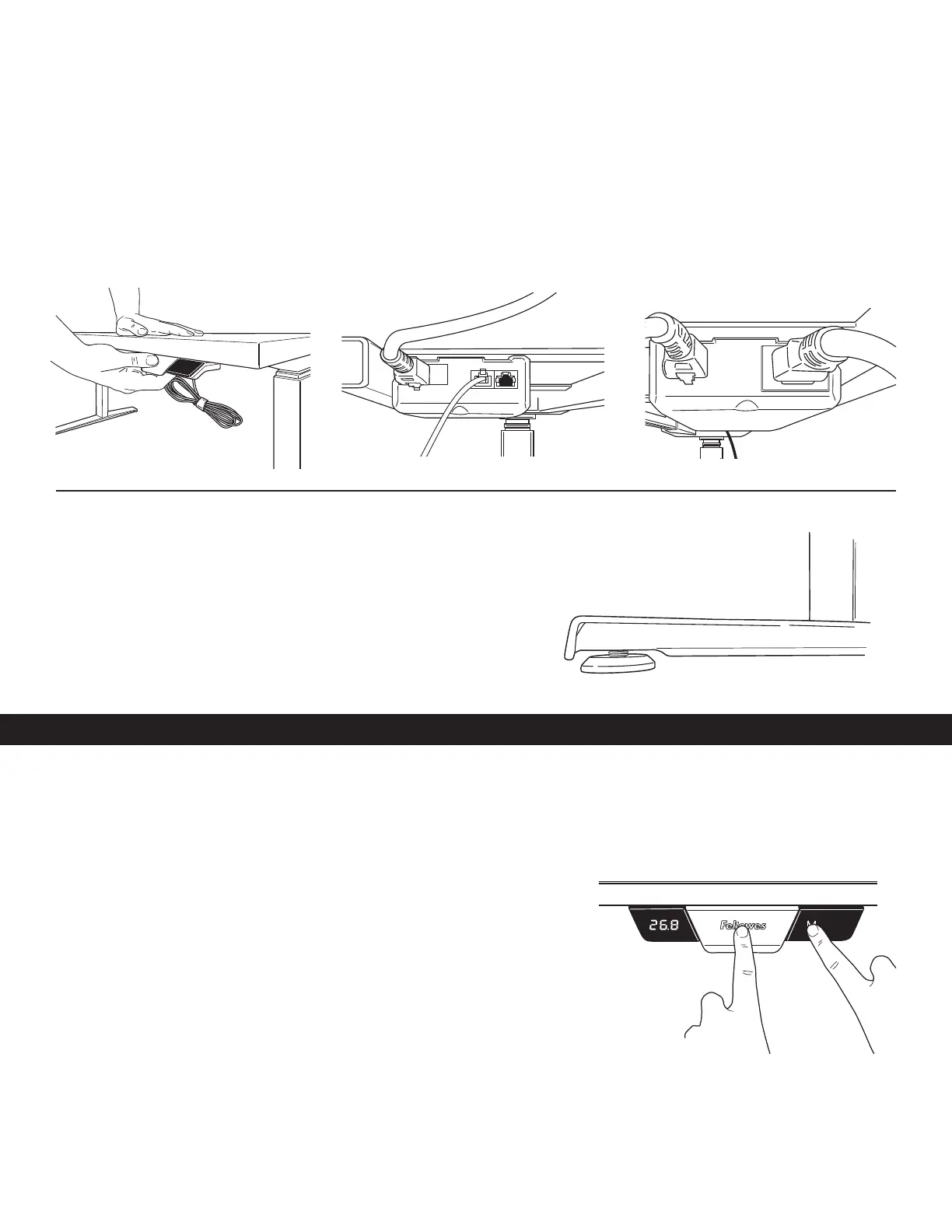
Attach the handset using the included adhesive strip or using two M3 Phillips round head screws
• Position the handset on the left or right side of the table, according to user preference.
• Mount the handset flush to the front edge of the table.
• Plug handset into controller on base.
• Plug power cable into controller on base and into an power outlet.
INITIALIZE THE SYSTEM
IMPORTANT: The initialization procedure below must be completed before operating the table.
CAUTION: Ensure proper clearance. Make sure all objects are clear of the table
• Press and hold down the paddle and M buttons simultaneously for 10-15 seconds.
• The legs will begin to move down at half speed of normal operation.
• Continue to hold the buttons.
• The legs will move down to the lowest position, then rebound 1/16" to 3/16" (2mm
to 5mm) and stop.
• Release both buttons at the same time. This completes the initialization procedure.
• If initialization is started and not finished, the table will not operate. You must finish
the initialization process.
STEP 3
Level Feet
• If table feels unbalanced adjust the (4) leveling pads located on bottom of feet
• Turn clockwise to lower and counterclockwise to raise


 To Next Page