L. TREBLE - Adjusts the amount of high frequency boost or cut in the
DRIVE
channel. This control is post distortion and
is useful in adjusting the distortion characteristic from smooth to brash.
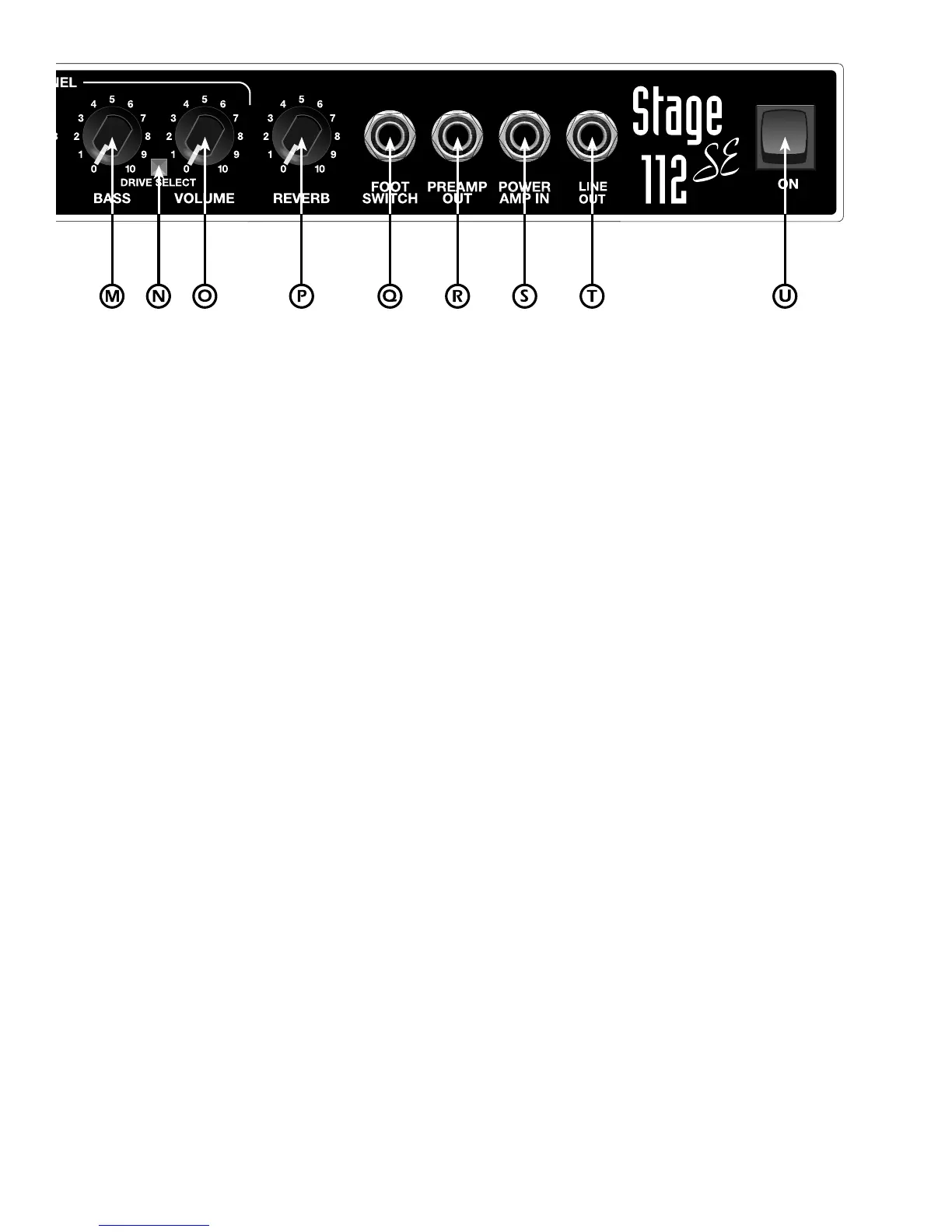
M. BASS - Adjusts the amount of low frequency boost or cut in the
DRIVE
channel. This control is post distortion and is
useful for adjusting the amount of “thump” or “chunk” produced by the
DRIVE
channel.
N. DRIVE SELECT - When this button is depressed, the amp switches from the
NORMAL
channel to the
DRIVE
channel. NOTE: Depressing this switch disables the CHANNEL SELECT footswitch button.
O. VOLUME - Adjusts the overall volume of the
DRIVE
channel.
P. REVERB - Adjusts the amount of reverb present in both the
NORMAL
and
DRIVE
channels.
Q. FOOTSWITCH - Plug-in connection for a remote footswitch to switch between the
NORMAL
and
DRIVE
channels
and to turn the REVERB on and off. NOTE: Any good quality patch cord will work with the remote footswitch;
however, a speaker grade cord is preferable to a coax guitar cord when it’s available.
R. PREAMP OUT - This jack provides an unbalanced output signal from the preamp. This jack can be used with the
POWER AMP IN jack (item S) as a patch point for effects.
S. POWER AMP IN - This jack provides an input directly to the power amp. It automatically disconnects the preamp
signal when used. This is useful when using effects, or when the STAGE 112SE is used as a slave amplifier.
T. LINE OUT - This jack provides an output signal taken directly off the amplifier output and speaker. Using a stereo
cord in this jack will provide a quasi-balanced signal. A mono cord will provide an unbalanced signal.
U. POWER SWITCH - Turns the AC power on and off. When the switch is in the off position, the amplifier is completely
shut down.








 To Next Page