Pag 26
FINGERPRINTFINGERPRINT
FINGERPRINTFINGERPRINT
FINGERPRINT
FINGERPRINTFINGERPRINT
FINGERPRINTFINGERPRINT
FINGERPRINT
REMOTE UNIT
FOR ACCES CONTROL
+
321
7 8 9
0
x
-
654
S e c S t d
REMOTE UNIT
FOR ACCES CONTROL
+
321
7 8 9
0
x
-
654
REMOTE UNIT
FOR ACCES CONTROL
+
321
7 8 9
0
x
-
654
A d d
n E t
0 0 0 1
ON
ON
ON
ON ON
ON
8
512 3 4 768
ON
512 3 4 768
9
ON ON
512 3 4 768 512 3 4 768
10 11
ON ON ON
12 13 14
512 3 4 768 5123 4 768 512 3 4 768
ON
15
512 3 4 768
ON
24
512 3 4 768
ON
ON
ON
25 26 27
512 3 4 768
512 3 4 768
512 3 4 768
ON
ON
28 29
512 3 4 768
512 3 4 768
ON
ON ON ONON
ON
ON ON
ON
ON
512 3 4 768
ON
............................
01 2 3
20 21 22 23
16 17 18 19
ON
ON
ON ON
512 3 4 768
512 3 4 768
512 3 4 768 512 3 4 768
30 31
5
6 7
4
127
512 3 4 768
512 3 4 768 5123 4 768 512 3 4 768512 3 4 768
512 3 4 768
512 3 4 768
512 3 4 768 512 3 4 768
512 3 4 768
512 3 4 768 5123 4 768
512 3 4 768
512 3 4 768
O
N
1 2 3 4 5 6
7
8
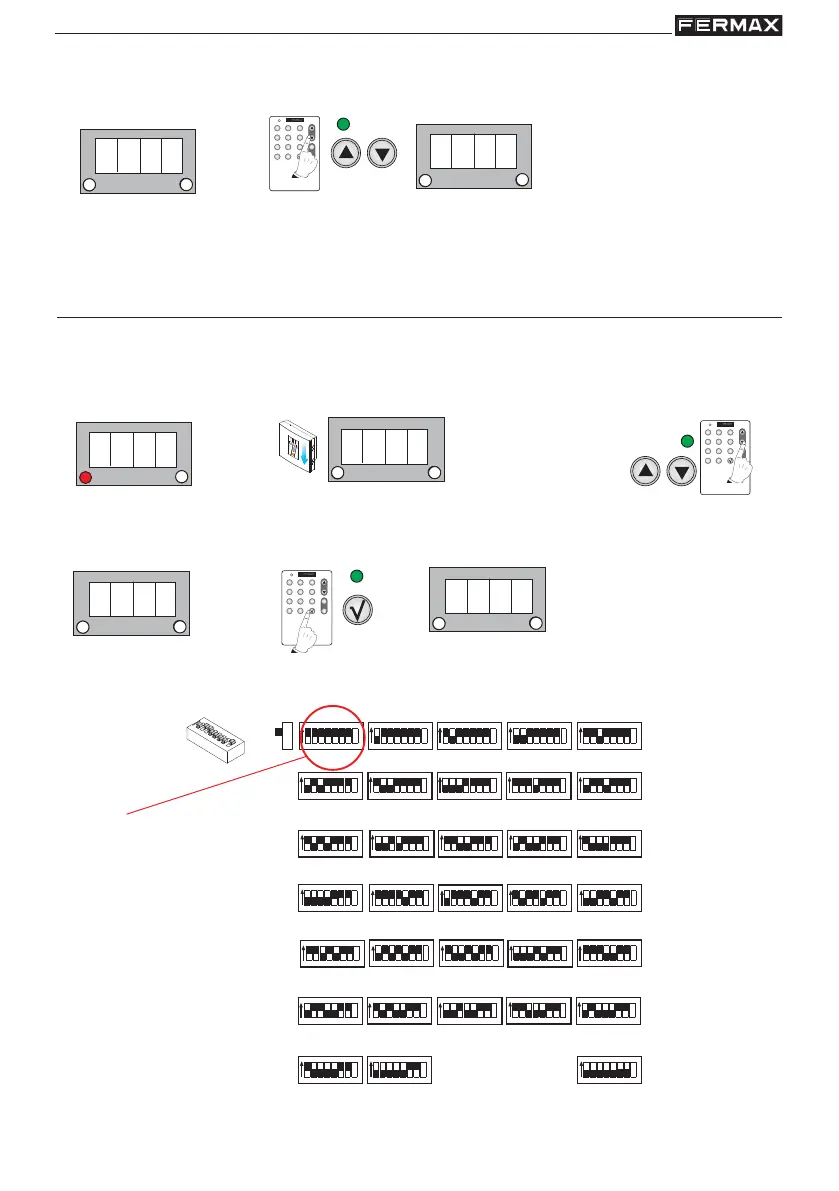
4. Sec is shown. Using the scroll keys the following sequence will appear: Sec, Std, Sec.... Select the required
mode: Sec (Security: double security) or Std (standard: no double security) and confirm with the OK key.
1 beep
NOTE:
- In Security mode, will only ask for double security if users have registered in this way.
Network Identifier (nEt)
Each reader must have an identifier number to able to carry out the copy option and this
number should not be repeated. This is codified using the dipswitch on the back of the
device. All readers are programmed in factory with an identifier number of 1.
Standby Mode
2. Search using the menu’s scroll keys:
nEt
1. Enter the master fingerprint.
1 beep
Enter Programming Mode
1 beep
Default Value: 1
3. nEt is shown. Confirm with the OK key. See this reader’s identifier number (informative purposes).
1 beep
Coding of the reader dipswitch for the network (1...127):
switches 1...7
Important note:
Address 0 cannot be used.



 To Next Page