Pag 9
FINGERPRINTFINGERPRINT
FINGERPRINTFINGERPRINT
FINGERPRINT
FINGERPRINTFINGERPRINT
FINGERPRINTFINGERPRINT
FINGERPRINT
d 1. 2
0 0 0 1
A u
REMOTE UNIT
FOR ACCES CONTROL
+
321
7 8 9
0
x
-
654
REMOTE UNIT
FOR ACCES CONTROL
+
321
7 8 9
0
x
-
654
r e L a
E o t h
A u
d 2. 1
d 2
REMOTE UNIT
FOR ACCES CONTROL
+
321
7 8 9
0
x
-
654
0 y
0 0 0 2
r e L a
REMOTE UNIT
FOR ACCES CONTROL
+
321
7 8 9
0
x
-
654
REMOTE UNIT
FOR ACCES CONTROL
+
321
7 8 9
0
x
-
654
E o t h
d 1. 1
REMOTE UNIT
FOR ACCES CONTROL
+
321
7 8 9
0
x
-
654
x
E r r
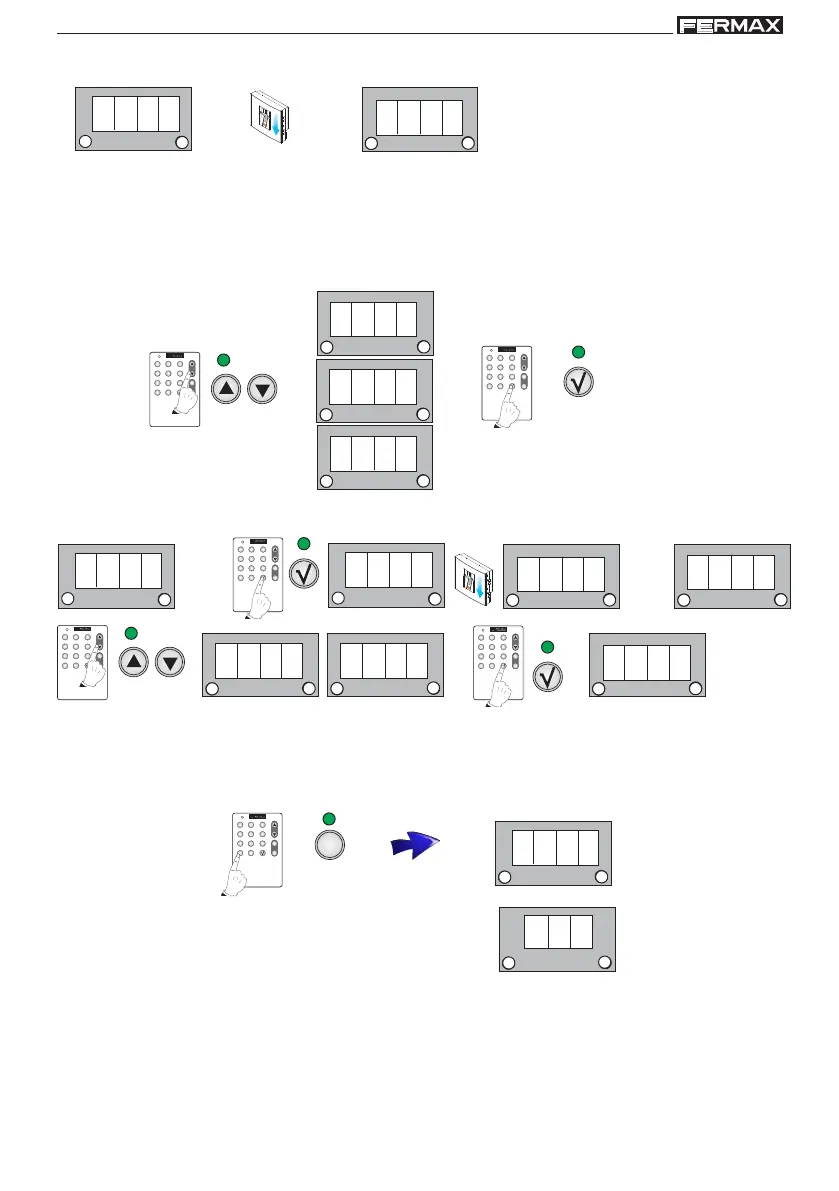
4. d1.2 is shown. Re-enter the user fingerprint you wish to register to confirm the fingerprint.
1 beep
1 beep
1 beep
6. d2 is shown. Confirm the second fingerprint option using the OK key Enter the user fingerprint you wish to use
for the functions described in fingerprint mode 2.
5. Relay is shown. Using the scroll keys the following sequence will appear relay, both, Au....There are three
options the action of which associated with this user fingerprint is:
- Relay: to open the door.
- both: to open the door and activate the auxiliary exit simultaneously.
- Au: to activate the auxiliary exit
Select the required option and confirm using the OK key.
1 beep
for example: Au
(to activate the auxiliary exit)
1 beep
7. Cancel the rest of the options with "X" until the new option d1.1 is shown, to continue registering users
Repeat the aforementioned steps to register new users in mode 2 fingerprints.
NOTES:
- The same fingerprint cannot be entered twice on different registers (user number), therefore if it is
already registered on the system it cannot be re-registered.
- The master fingerprint cannot be the user fingerprint either.
Details: If the reader is unable to read the user fingerprint an
error message will appear and it will re-start.
1 beep



 To Next Page