Pag 19
Kit Halo & iLoftKit Halo & iLoft
Kit Halo & iLoftKit Halo & iLoft
Kit Halo & iLoft
Kit Halo & iLoftKit Halo & iLoft
Kit Halo & iLoftKit Halo & iLoft
Kit Halo & iLoft
Option 1: From Panel + Monitor
1. With the monitor connected, press the programming button «PROG » for 2
seconds (to access this, you must lift up the front cover). A confirmation tone will be
emitted.
2. Press the call-to-residence button. A different confirmation tone will once again sound,
and the programmed number will be shown on the DISPLAY (for 2 seconds).
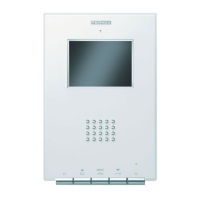
Hundredths: Press the button (SW2)
Tenths: Press the button (SW3)
Units: Press the button (SW4)
Option 2: From the Monitor
1. Go into configuration mode: Press the button for two seconds. The LED blinks
once each second and a confirmation tone is emitted.
2. Put the monitor into programming mode: With the monitor connected, press the
programming button «PROG
» for 1 second (to access this, you must lift up
the front cover). A confirmation tone will be emitted.
The first thing the monitor then does is indicate the number of the current monitor on
the DISPLAY. If it is not programmed, it will show the following: - - -
3. Programme the call number: Each time the button corresponding to hundredths,
tenths or units is pressed, the figure goes up by one and is shown on the DISPLAY.
4. Exit programming mode: Press the programming button « PROG
» for 2
seconds, or wait 30 seconds before pressing any button.
When you exit programming mode, the number indicated is stored. If it is correct (between 1
and 199), a confirmation tone is emitted; if it is not correct, an error tone is emitted, and the
«Err» message is shown on the DISPLAY.
Once you reach 9, if you press again, it
returns to 0 and a low error tone is
emitted. The next time you press, it will
go to 1.














 To Next Page