Pag 24
Kit Halo & iLoftKit Halo & iLoft
Kit Halo & iLoftKit Halo & iLoft
Kit Halo & iLoft
Kit Halo & iLoftKit Halo & iLoft
Kit Halo & iLoftKit Halo & iLoft
Kit Halo & iLoft
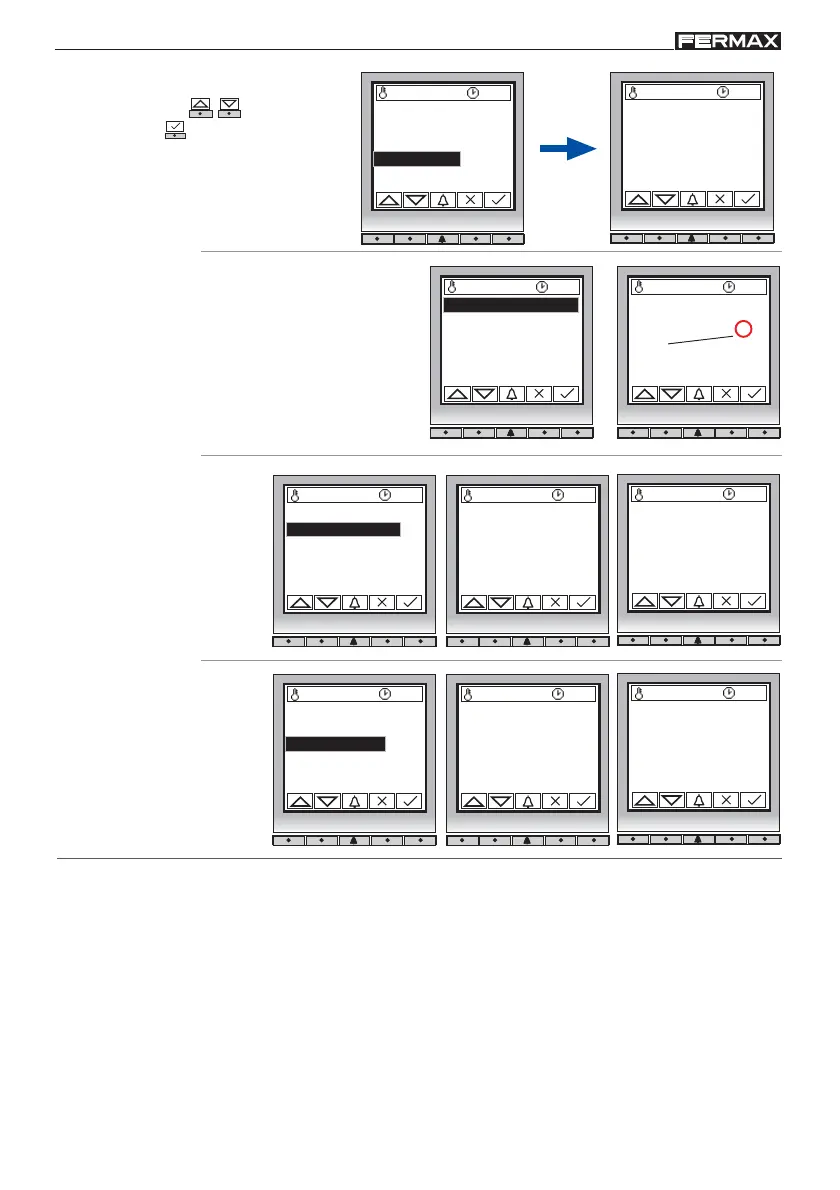
1. 4 Memory
27 ºC 10:54
1.4.1 Used memory
1.4.2 Compact
1.4.3 Short
Select option ( - )
and confirm ( ).
This option informs us on
the user memory status.
1. 4. 1 Memory in use
27 ºC 10:54
Used memory: 3
Shows the number of
cards already in use in
the system.
Definitively deletes the
blanks, freeing space for
the user memory.
1. 4. 2 Compact
27 ºC 10:54
Processing...
27 ºC 10:54
Compact?
Arranges the card codes
from lower to higher.
This action is
IRREVERSIBLE.
1. 4. 3 Sort
27 ºC 10:54
Processing...
27 ºC 10:54
Short?
1.1 Add
1.2 Delete
1.3 Initialize
1.4 Memory
1.4.1 Used memory
1.4.2 Compact
1.4.3 Short
1.4.1 Used memory
1.4.2 Compact
1.4.3 Short
1.4.1 Used memory
1.4.2 Compact
1.4.3 Short














 To Next Page