Pag 25
Kit Halo & iLoftKit Halo & iLoft
Kit Halo & iLoftKit Halo & iLoft
Kit Halo & iLoft
Kit Halo & iLoftKit Halo & iLoft
Kit Halo & iLoftKit Halo & iLoft
Kit Halo & iLoft
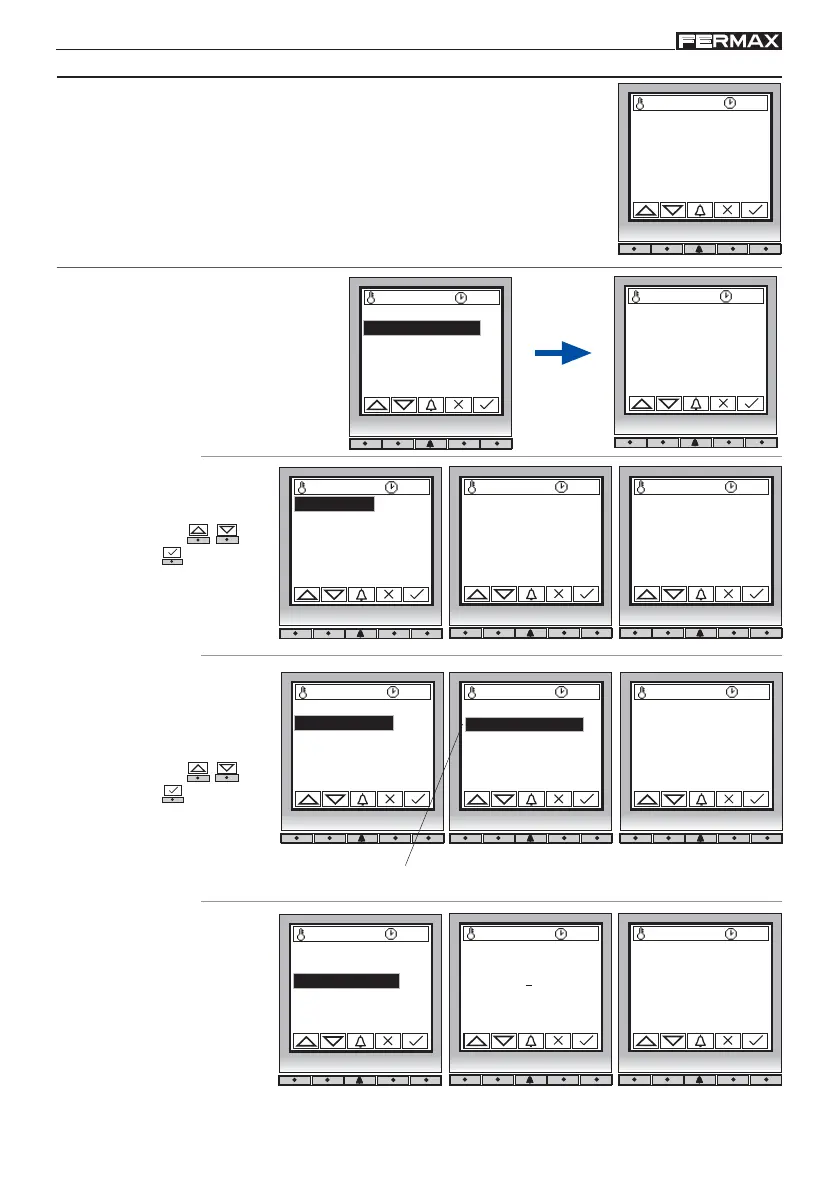
From the Programming Menu, we can access the different basic
programming options.
2. 2 Language
Select the language.
Spanish by default.
27 ºC 10:54 27 ºC 10:54
Updated
2.2.1 Spanish
* 2.2.2 English
2.2.3 French
2.2.4 German
The * symbol indicates the language selected
Select option ( - )
and confirm ( ).
2. 3 Panel Number
27 ºC 10:54
Panel Nr
01
(1..31)
27 ºC 10:54
Updated
(1..31)
The panel number must
be 1.
Comes programmed as 1
by default. Do not modify
this value.
2. 1 Clock
27 ºC 10:54
Time:
18/11/05 - 10:54
dd/mm/yy - hh:mm
27 ºC 10:54
Updated
dd/mm/yy - hh:mm
Configure the date and
time. Enter data ( - )
and confirm ( ).
2. Configuration
27 ºC 10:54
1.Users
2.Configuration
3.Codes
4.Timing
5.Message
6.Utilities
1.Users
2.Configuration
3.Codes
4.Timing
5.Message
6.Utilities
2.1 Clock
2.2 Language
2.3 Panel Nr
2.4 Panel Type
2.5 Exit button
2.6 Backlight
2.1 Clock
2.2 Language
2.3 Panel Nr
2.4 Panel Type
2.5 Exit button
2.6 Backlight
2.1 Clock
2.2 Language
2.3 Panel Nr
2.4 Panel Type
2.5 Exit button
2.6 Backlight
2.1 Clock
2.2 Language
2.3 Panel Nr
2.4 Panel Type
2.5 Exit button
2.6 Backlight
2. Basic Configutarion














 To Next Page