Pag 30
Kit Halo & iLoftKit Halo & iLoft
Kit Halo & iLoftKit Halo & iLoft
Kit Halo & iLoft
Kit Halo & iLoftKit Halo & iLoft
Kit Halo & iLoftKit Halo & iLoft
Kit Halo & iLoft
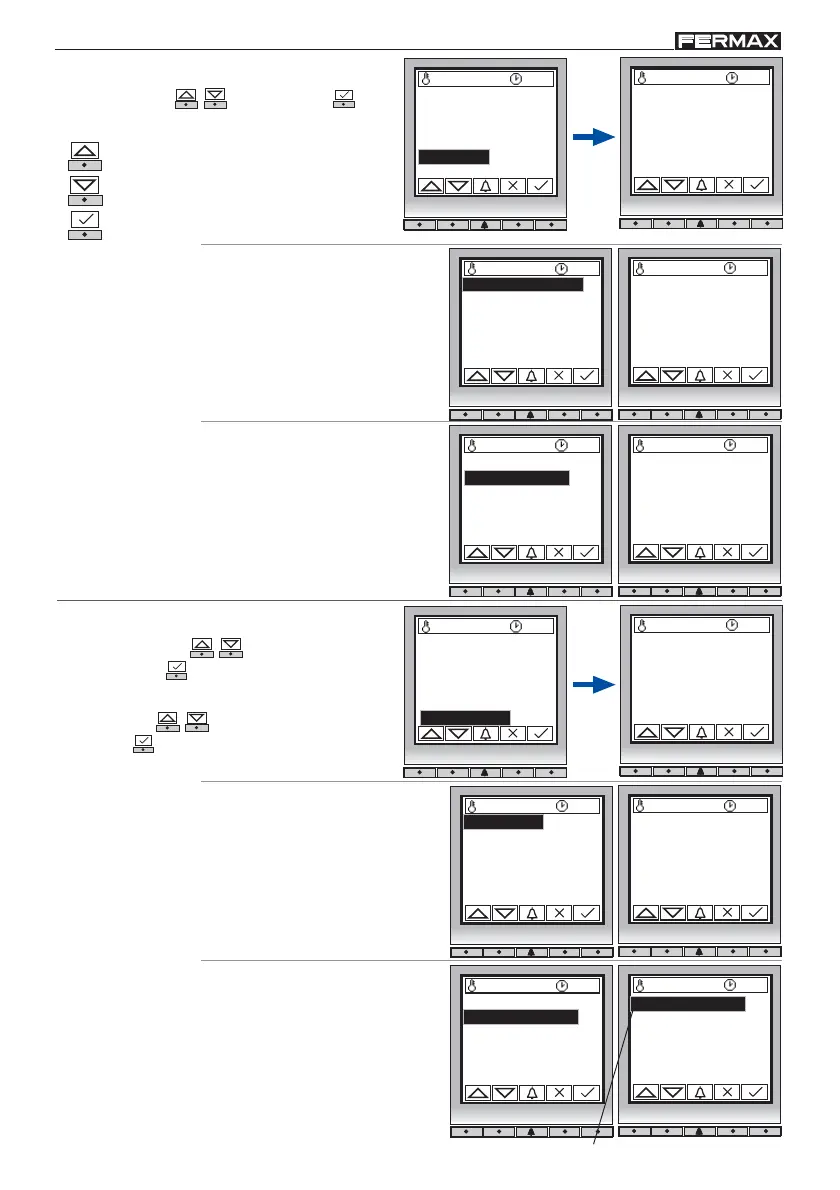
5. Message
Select option ( - ) and confirm ( ).
5. 1 Card holder
Card slot message edit.
By default, comes
programmed as: TOP
PERFORMANCE PANEL.
5.1 Card holder
5.2 Installer
Card holder:
TOP PERFORMANCE
PANEL
27 ºC 10:54
27 ºC 10:54
- Data Introduction options 5.1 and 5.2:
Arrow Key up: 1, 2, 3, ... , 8, 9, A, B, ... , Z,
(space), 0, 1, ... , etc.
Arrow Key down: Z, Y, X, W, V, ... , 9, 8, ... , 0,
(space), Z, Y, ... etc.
Confirmation key: Press after entering each
digit/symbol.
5. 2 Installer
Edition of a mesage
where the installer can
place own information:
telephone number,
address... etc.
Support:
www.fermax.com
27 ºC 10:54
The * symbol indicates the selected parameter
27 ºC 10:54
6. 1 Clone
27 ºC 10:54
Clone
02
(1..31)
6. 2 Temperature
Temperature selection in
degrees Celsius or
Fahrenheit.
6. Utilities
6.1 Clone
6.2 Temperature
27 ºC 10:54
In the options listed below,
enter data ( - ) and
confirm ( ).
Select option ( - )
and confirm ( ).
* 6.2.1 Celsius
6.2.2 Fahrenheit
By default, comes
programmed in degrees
Celsius.
1.Users
2.Configuration
3.Codes
4.Timing
5.Message
6.Utilities
5.1 Card holder
5.2 Installer
5.1 Card holder
5.2 Installer
1.Users
2.Configuration
3.Codes
4.Timing
5.Message
6.Utilities
6.1 Clone
6.2 Temperature
6.1 Clone
6.2 Temperature
To copy cards from one panel to
another (if there is one). Enter the
number of the destination panel
onto which you wish to copy the
cards of your current panel. The
panels must be connected by
means of Sa and Sb.














 To Next Page