Pag 31
Kit Halo & iLoftKit Halo & iLoft
Kit Halo & iLoftKit Halo & iLoft
Kit Halo & iLoft
Kit Halo & iLoftKit Halo & iLoft
Kit Halo & iLoftKit Halo & iLoft
Kit Halo & iLoft
Parameters Reset
It is possible that at some point you may want to retrieve the original configuration of
the reader. To make this task easier, a Reset Code has been included for the reset of:
- User Programming Code
- Administrator (Installer) Code
- Master Proximity Card.
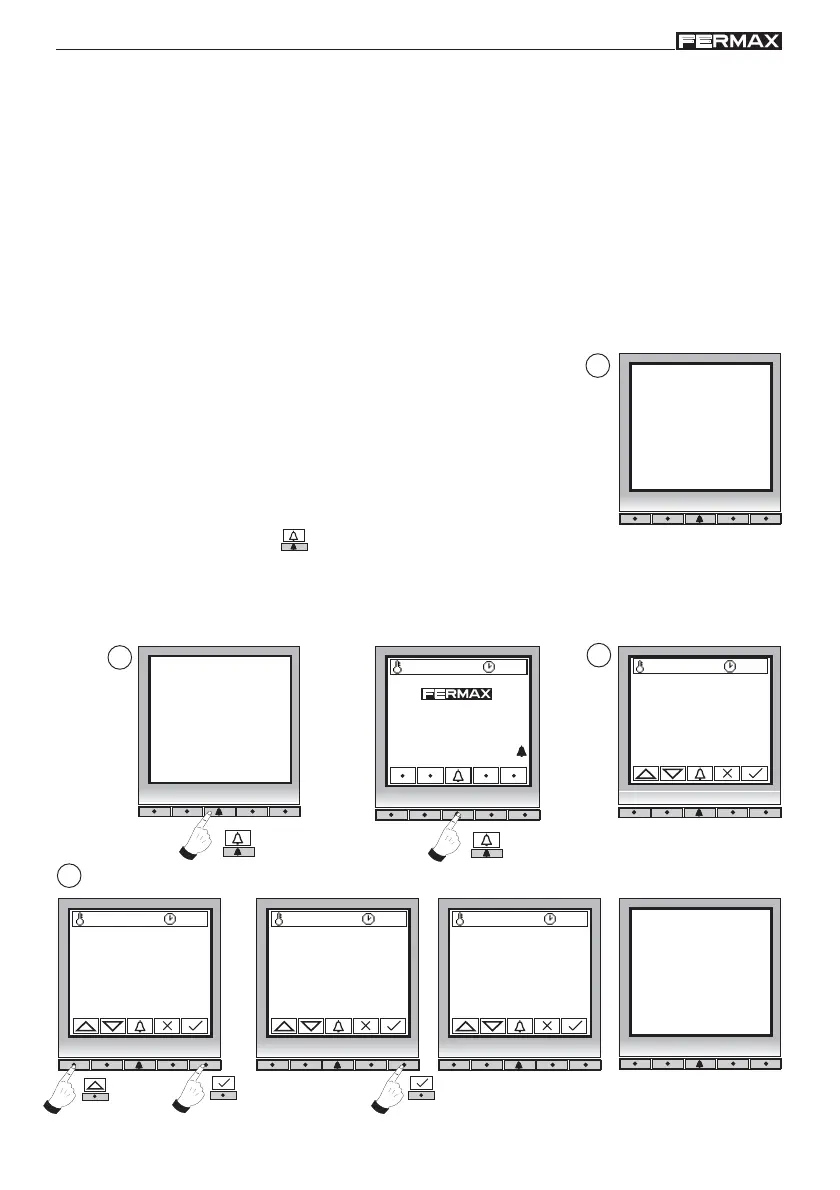
1. Disconnect the panel power supply.
2. Keep the bell
key pressed and supply power to the panel and a beep is
heard.
3. Release the bell key and “Programmer Code: 00000” is shown on the screen.
4. Enter the Reset Code: 11090. You have 1 minute to introduce this code.
Note:
Reset is an irreversible operation.
Programmer code:
0 0 0 0 0
27 ºC 10:54
To call press
Beeeeeeeep!!!
2
3
27 ºC 10:54
Reset Codes
27 ºC 10:54
Programmer code:
1 1 _ _ _
. . . .
27 ºC 10:54
Programmer code:
1 1 0 9 0
The panel resets the power
supply and the default codes
are now updated.
4
1
Once reset is complete, the User and Administrator codes return to their default
configuration and the Master Card is deleted.
The steps for resetting the parameters are:














 To Next Page