Pag 34
Kit Halo & iLoftKit Halo & iLoft
Kit Halo & iLoftKit Halo & iLoft
Kit Halo & iLoft
Kit Halo & iLoftKit Halo & iLoft
Kit Halo & iLoftKit Halo & iLoft
Kit Halo & iLoft
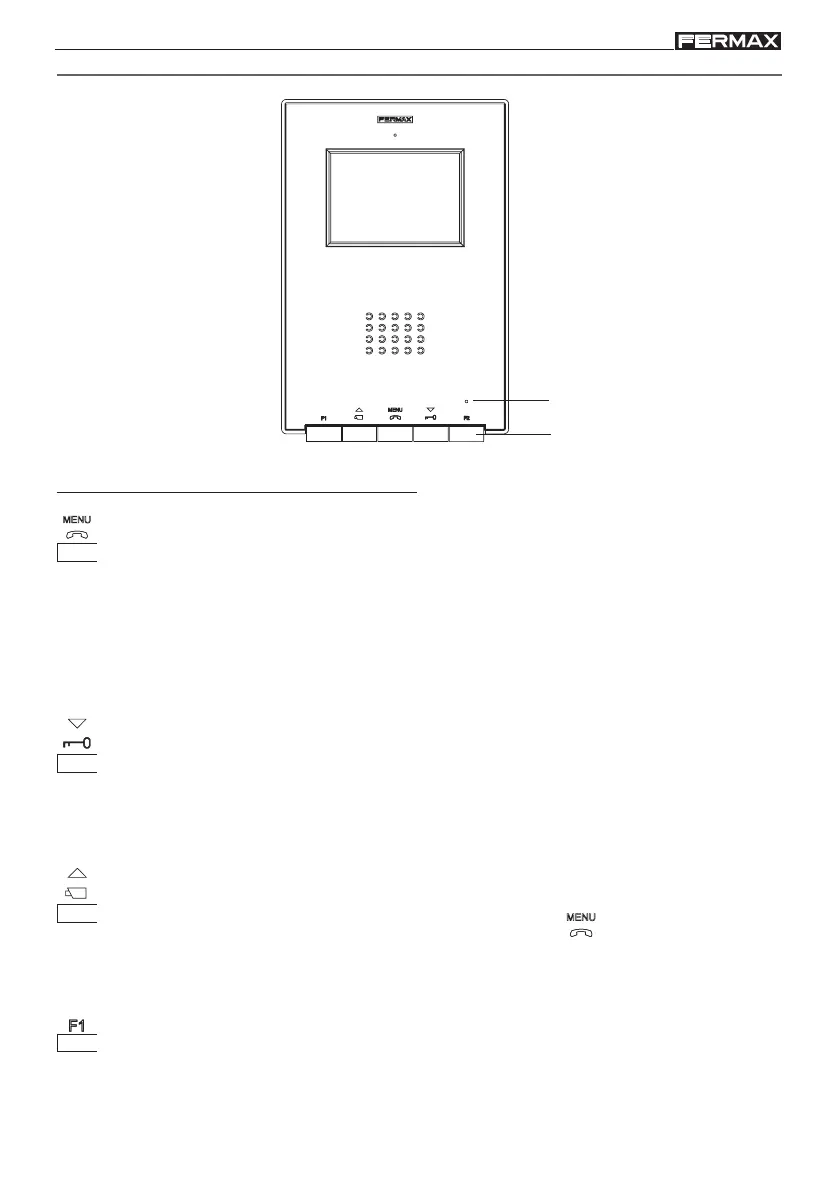
iLOFT MONITOR
Buttons
NOTE: The monitor screen goes on once the call from the panel has ended.
Auto-start / Main-Secondary Camera Selection Button.
· With the monitor on standby, press this button for 1 second to switch the monitor
on manually. To activate the audio, press the button
.
· With video, hold this button down for 2 seconds to sequentially select between
the main camera and the secondary camera (if there is one).
F1 and F2: Buttons for Additional Functions (assigned by the installer).
Audio Activation, Hanging-up and Configuration-adjustment Button (menu).
· When a call is received, press this button to speak to the visitor. The audio
channel between the street and the home is opened; operation is in hands-free
mode.
· Press to end the communication.
· With the monitor on standby, press this button for 2 second to go into monitor
configuration mode. See the «Monitor Settings» section.
Door-opener / call to reception button.
· When you are in conversation with the Street Panel, pressing this button will
activate the door-opener.
· With the monitor on standby, when you press this button a call will be made to
reception (if there is one).
Led
Buttons














 To Next Page