Pag 38
Kit Halo & iLoftKit Halo & iLoft
Kit Halo & iLoftKit Halo & iLoft
Kit Halo & iLoft
Kit Halo & iLoftKit Halo & iLoft
Kit Halo & iLoftKit Halo & iLoft
Kit Halo & iLoft
27 ºC 10:54
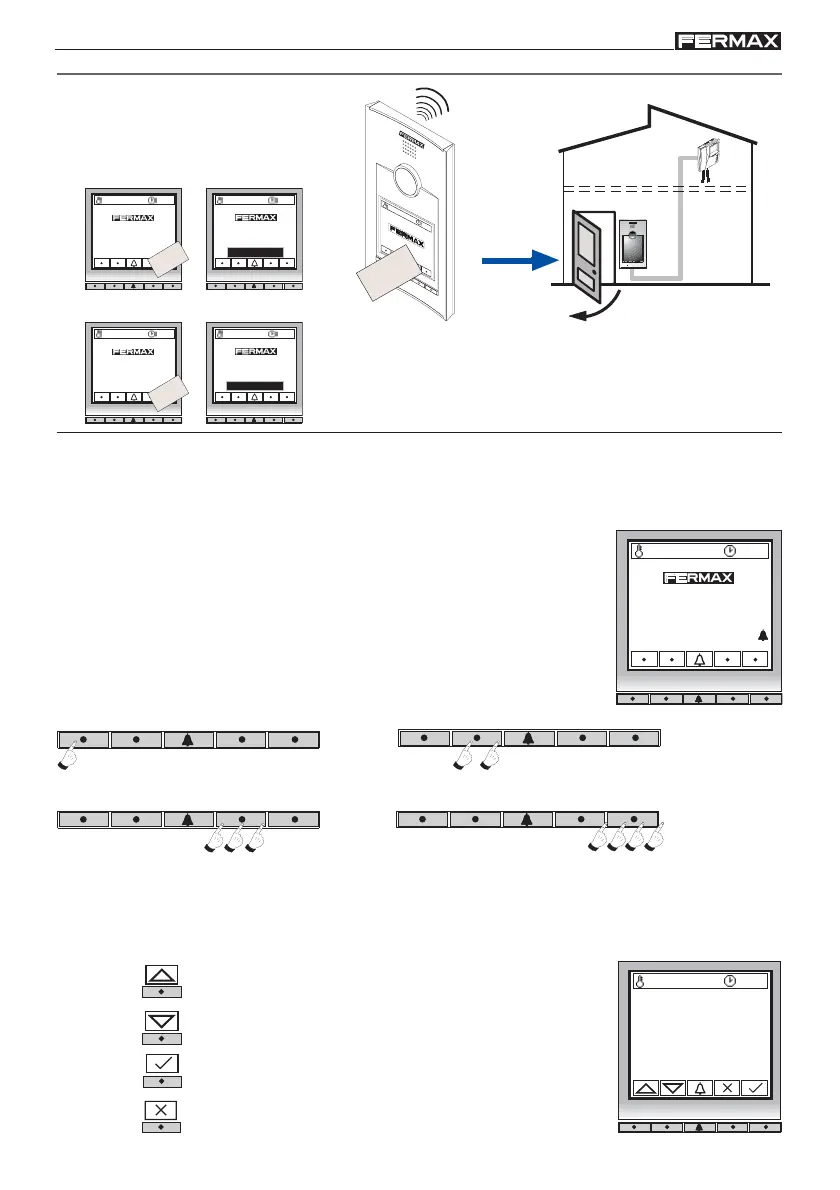
Open the door with a user card
(previously programmed).
TOP PERFORMANCE PANEL
ACCESS CONTROL SYSTEM
2
7
º
C
1
0
:
5
4
Card
Door open, please
close after entering
Programming
It is possible to add and delete user cards. To access these options, you must “Enter
Programming”.
Enter Programming mode
1. Press the keys marked with a dot (except the bell key)
sequentially from left to right. The first key once, the second
twice, the third 3 times and the fourth 4 times. If entered
correctly, a long tone confirmation will be heard at the final
press, except in the first.
2. Key in the
User Programming Code, which by default is 19025. (Consult your installer in case
it has been changed).
CARD
27 ºC 10:54
DOOR OPENED
Cancel key or return to previous digit or symbol.
-Entering Data:
Upward Arrow Key: To enter digits/symbols, shown in
ascending order: 1, 2, 3, 4 ... etc.
Downward Arrow Key: To enter digits/symbols, shown in
descending order: #, *, 9, 8 ... etc.
Confirmation key: Press after entering each digit/symbol.
OPERATION- User Access Control
Open door
27 ºC 10:54
27 ºC 10:54
WRONG CODE
Note: If the card is not authorised in the system, the
door will not open and a «CODE NOT VALID» message is
shown on the screen, while an error tone is heard (bop
bop).
CARD
To call press
To call press
To call press
Beep beep beep beep
Key 4-> press 4 times
+
+
+
Key 1-> press 1 time
Key 3-> press 3 times
+ +
Beep beep beep beep
Key 2-> press 2 times
Beep beep beep beep
+
Programmer code:
_ _ _ _ _














 To Next Page