Pag 39
Kit Halo & iLoftKit Halo & iLoft
Kit Halo & iLoftKit Halo & iLoft
Kit Halo & iLoft
Kit Halo & iLoftKit Halo & iLoft
Kit Halo & iLoftKit Halo & iLoft
Kit Halo & iLoft
27 ºC 10:54
27 ºC 10:54
27 ºC 10:54
0166438610
2566349980
8866445630
8261435620
Deleted
Delete?
2566349980
1.1 Add
1.2 Delete
1.3 Short
27 ºC 10:54
Programmer code:
1 9 _ _ _
. . . .
27 ºC 10:54
Programmer code:
1 9 0 2 5
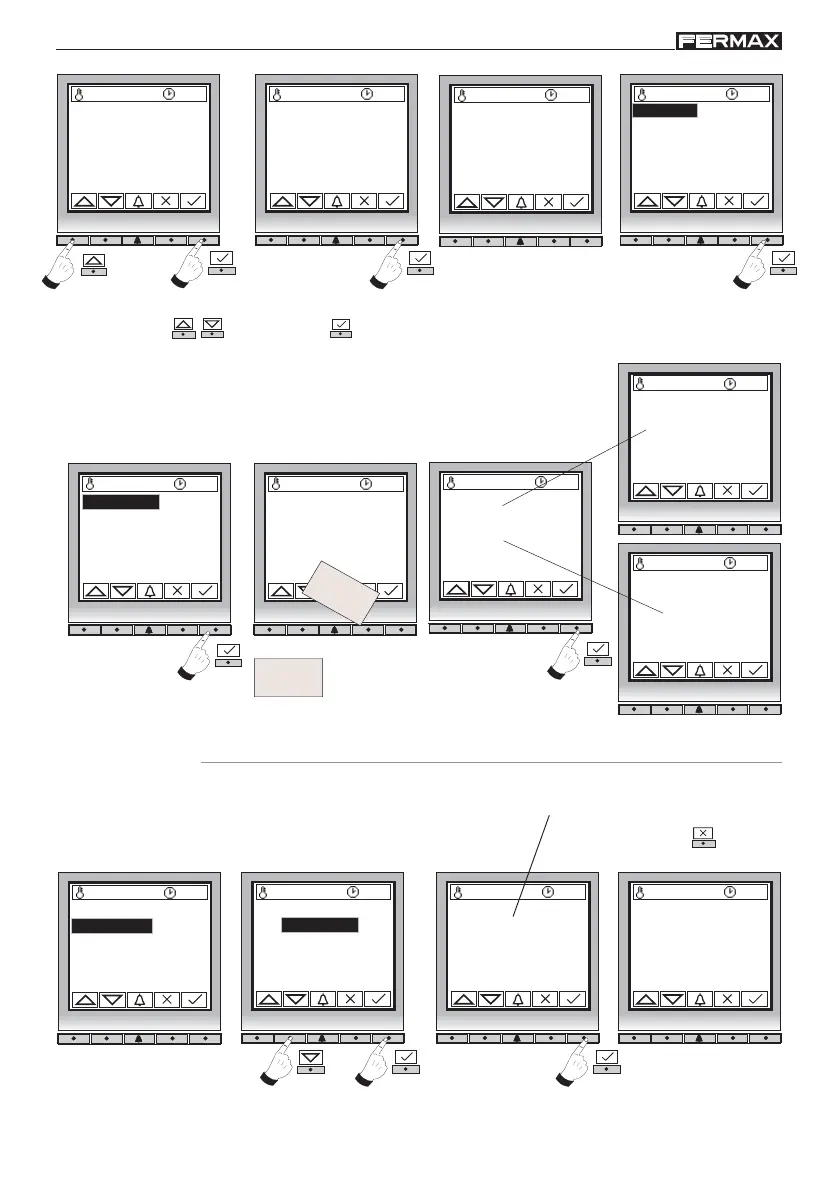
Programming Menu
27 ºC 10:54
Programming mode
1.Users
1. 1 Add
Lets you authorise the user cards.
Note:
Repeat these steps with each of the cards you wish to add to the system.
Select option ( - ) and confirm ( ).
1. 2 Delete
Lets you cancel the desired user cards.
If you do not want to delete the card,
press the cancel key
to return
to the previous menu.
Saving ...
Card in use
27 ºC 10:54
27 ºC 10:54
Card:
0166438610
27 ºC 10:54
Card:
0000000000
CARD
CARD
Code 016643861
If card is being
authorised for the first
time
If card is already
authorised in the system
Example:
1.1 Add
1.2 Delete
1.3 Short














 To Next Page