Pag 25
MENU
DISPLAY
TIME
EXIT 23.01.2008 12:37
MENU
DISPLAY
TIME
EXIT 23.01.2008 12:37
MENU
DISPLAY
TIME
EXIT 23.01.2008 12:37
DAY 2 3
MONTH 01
YEAR 08
HOUR 12
MINUTE 37
MENU
DISPLAY
TIME
EXIT 23.01.2008 12:37
DAY 2 3
MONTH 01
YEAR 08
HOUR 12
MINUTE 37
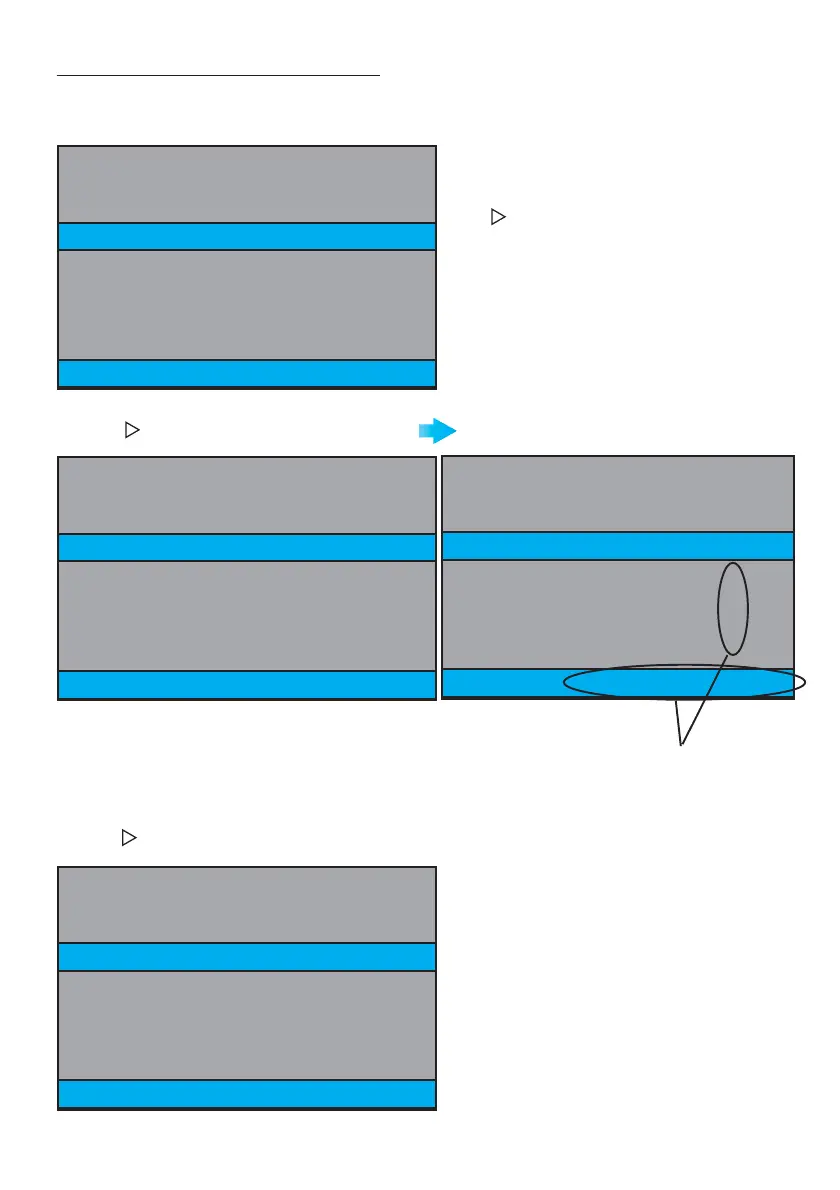
To adjust the monitor’s date and time.
With the Monitor in STANDBY mode (standby, monitor screen off), hold down the
REC
button for 2
seconds and you will see the following screen:
TIME Mode
Pressing we select TIME (yellow text)
Press to move between the different options.
Sequential Order: DISPLAY, TIME, EXIT, DISPLAY,
TIME... (the colour of the text will change to
yellow to indicate the option we are currently
in).
Pressing
REC
we select the option (red
text).
DAY . day
MONTH . month
YEAR . year
HOURS . hours
MINUTES. minutes
The data entered agrees
to that seen on the
screen.
Pressing we move between the options in order: DAY, MONTH, YEAR, HOURS, MINUTES, EXIT, DAY,
MONTH ... (yellow text).







 To Next Page