Pag 26
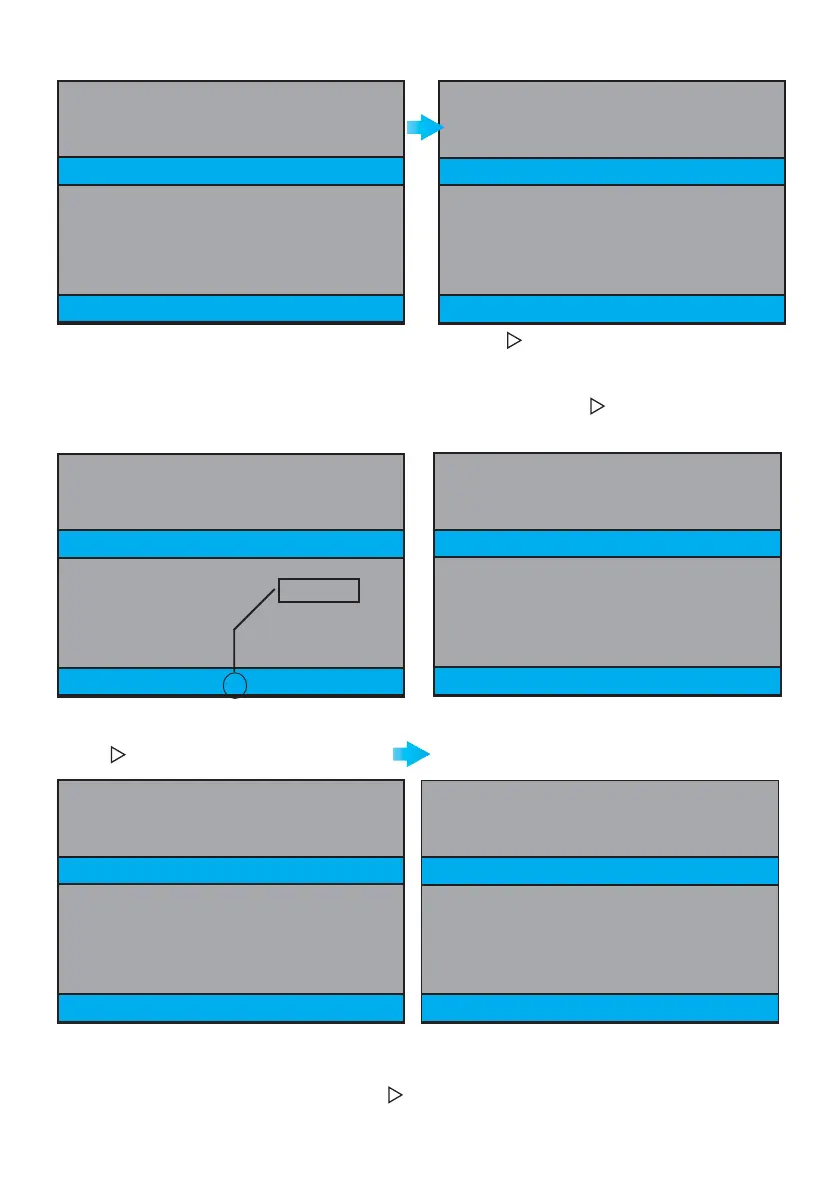
MENU
DISPLAY
TIME
EXIT 23.01.2008 12:37
DAY 2 3
MONTH 01
YEAR 08
HOUR 12
MINUTE 37
MENU
DISPLAY
TIME
EXIT 23.01.2008 12:37
DAY 2 3
MONTH 01
YEAR 08
HOUR 12
MINUTE 37
MENU
DISPLAY
TIME
EXIT 23.09.2008 12:37
DAY 2 3
MONTH 09
YEAR 08
HOUR 12
MINUTE 37
MENU
DISPLAY
TIME
EXIT 23.09.2008 12:37
DAY 2 3
MONTH 09
YEAR 08
HOUR 12
MINUTE 37
MENU
DISPLAY
TIME
EXIT 23.01.2008 12:37
MENU
DISPLAY
TIME
EXIT 23.09.2008 12:37
DAY 2 3
MONTH 09
YEAR 08
HOUR 12
MINUTE 37
Whilst in the option (yellow text), press
REC
to select that option (red text).
Pressing and holding or
REC
for more than 2
seconds, you exit the CONTRAST option (the text
goes yellow again).
Pressing decreases (short press)
Pressing
REC
increases (short press)
For example we change pressing:
REC
MONTH 09
Press until EXIT appears,
(yellow text).
Press
REC
and exit the previous screen
Pressing
REC
again, we return to STANDBY Mode.
30 seconds having elapsed without pressing or
REC
we also return to STANDBY mode.







 To Next Page