XS
4 DUOX VEO XS AMBIANCE MONITOR
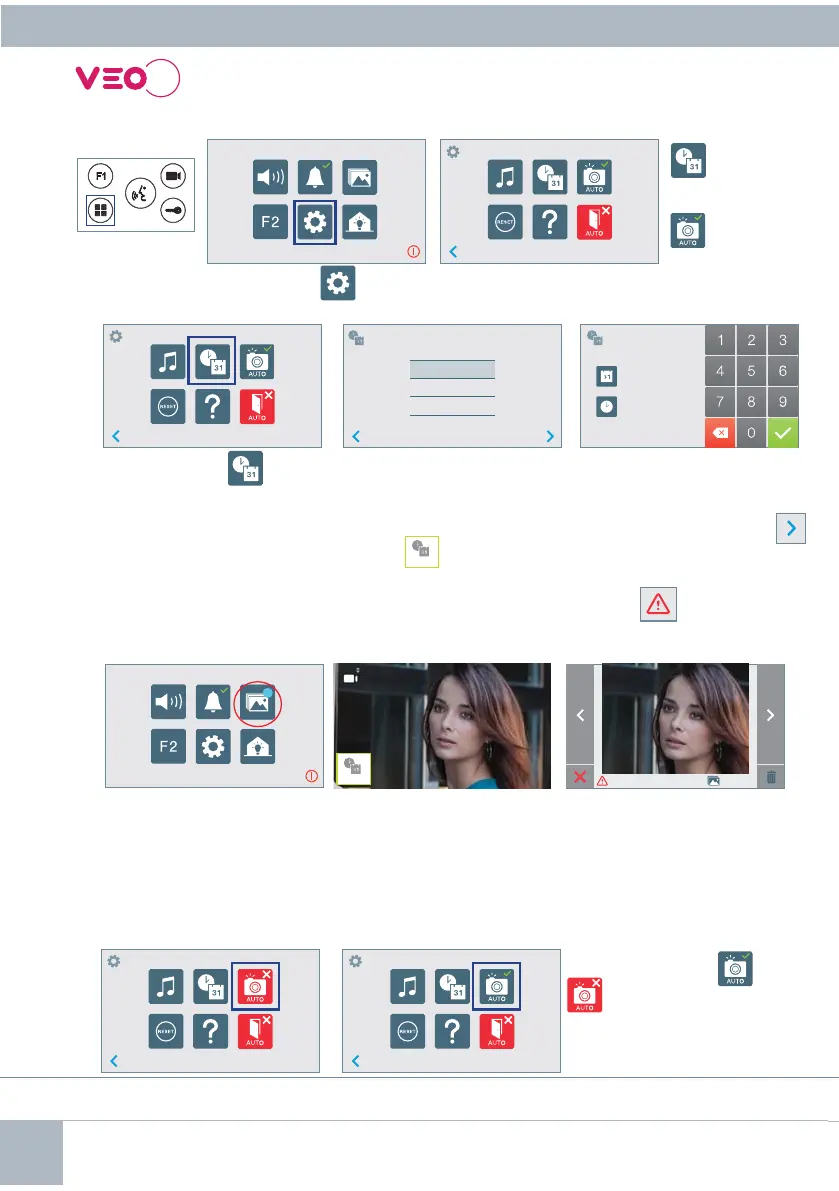
USER SETTINGS
Access user parameters.
User Menu Screen Communication screen
Image viewer screen
Date not set: 01/01/2017 (default). The icon
_ _ : _ _
appears indicating that the date is not correct (default
date). Upon losing power, it returns to the default date.
Note: If an image is captured with the date not yet set, the following icon appears .
Notifi cation icons for a date not set:
1. DATA AND TIME SETTINGS
By pressing the
icon, a
menu appears to select the
date format.
Select the date format. By
default, it displays the last
format selected and shaded in
grey.
Going to the hour/date
confi guration menu.
It can also be moved by pressing
on the corresponding cursor
.
1. Date
and time
settings
2. Picture
Capture
By pressing the
icon you access to a new screen with different options.
Image Viewer
Pressing over the -
icon you can activate/
deactivate the automatic
image capture.
This product is protected with the following patents and utility models:
PATENTS: US 9215410, US 9762852, BE1023440, AU2014203706.
UTILITY MODELS: ES1187384U, ES1141495U, FR3038192, DE202016000632U1, CN205987229(U).
12
3
12
3
31/01/2017
01/31/2017
2017/01/31
01 / 01 / 2017
01 : 01
_ _ : _ _
01 / 01 / 2017
00 / 00 001/018
99
21
2. ACTIVATION/DEACTIVATION OF VIDEO CAPTURE
The monitor can take an automatic picture within 5 seconds of receiving a call from an outdoor panel.
According to the European Union legislation about data protection ((EU) 2016/679), the capture of
images may be restricted. This feature is deactivated by default in all monitors, although can be activated
at your own responsibility.
Furthermore, the legislation may force to place a sign next to door stations, indicating that monitors
can capture images. You can download it at
https://www.fermax.com/intl/en/corporate/utilities.html.













 To Next Page