Pag 30
+
1
8
V
1
.5
A
5
0
-
6
0
H
z
.
5
0
V
A
M
A
X
.
1
2
V
1
A
F
U
E
N
T
E
A
L
IM
E
N
T
A
C
IO
N
K
I
T
D
I
G
I
T
A
L
M
A
D
E
I
N
S
P
A
I
N
+
1
8
V
1
.
5
A
5
0
-
6
0
H
z
.
5
0
V
A
M
A
X
.
1
2
V
1
A
F
U
E
N
T
E
A
L
IM
E
N
T
A
C
IO
N
K
I
T
D
IG
IT
A
L
M
A
D
E
I
N
S
P
A
I
N
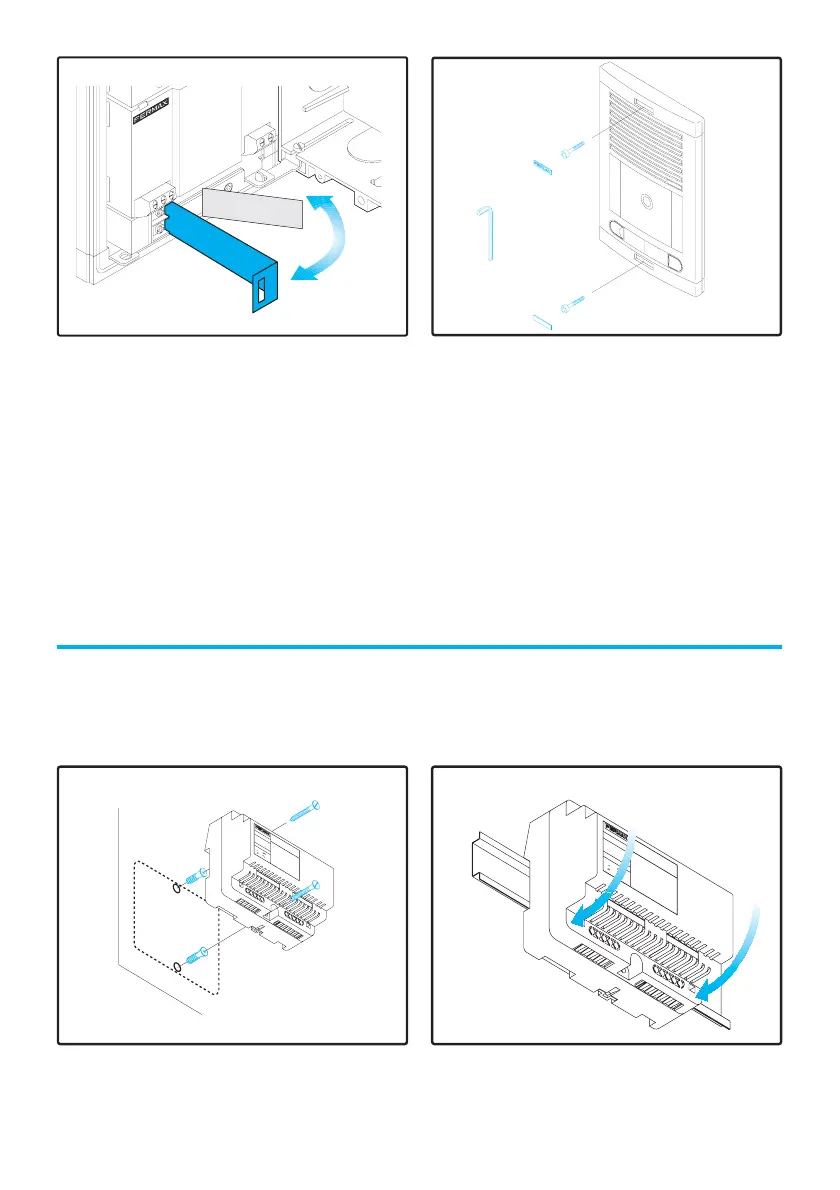
POWER SUPPLY INSTALLATION
Finally, the Power Supply must be placed in a place dry and safe from the
weather. Its DIN 6 format allows you to install it in any type box or directly on
the wall by using the wallplugs and screws supplied.
1.Drill 2 holes in the wall, place the
wallplugs and fasten the screws, fixing
the Power Supply to the wall.
2.The Power Supply can be fitted on a
DIN rail inside a box pressing it as shown
in figure.
MARIA
LORCA
HIG
H
R
ESO
LUT
IO
N
CO
LOU
R
TEL
EC
AM
ER
A
6.Close the Panel and fasten the screws
with the allen key supplied. Place the
covers to finish the installation.
5.Push up the houvre behind nameplate
the louvre and place the label. You can
use the labels supplied with the Outdoor
Panel.












 To Next Page