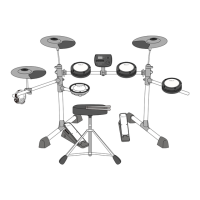
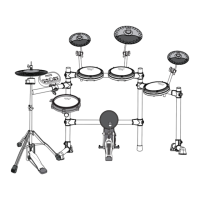
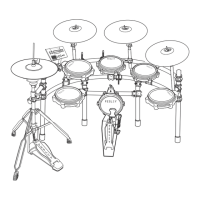
This document is an instruction manual for the Fesley FED200 Electric Drum, a modern electronic drum kit designed for a new cool.
Function Description
The Fesley FED200 Electric Drum is a sophisticated electro-acoustic instrument that combines modern and new electronic technology. It offers a comprehensive set of features for drumming, practice, and recording.
Key Functions:
- Pronunciations: Supports a maximum of 32 pronunciations with 6 layers, providing a rich and dynamic sound experience.
- Drum Sets & Timbres: Comes with 15 pre-set drum sets and 165 timbres, allowing for a wide range of musical styles and preferences.
- Songs: Includes 30 built-in songs for practice and enjoyment.
- Sensitivity Adjustment: Allows for individual adjustment of sensitivity parameters for each drum, enabling personalized playability.
- Teaching Modes: Features three dedicated teaching modes to help users improve their rhythm, accuracy, and endurance.
- Speed Control: Offers a wide speed control range from 30 to 250 beats per minute, suitable for various practice levels.
- Metronome: Provides 1 to 4 types of metronome settings to assist with timing.
- Parameter Storage & Reset: Users can store their customized parameters and reset the device to factory settings when needed.
- Recording: Equipped with a recording function to capture performances.
- Display: Features a three-digit LED display for clear visual feedback.
Teaching Modes:
- C-1 Beat Detection Exercise: Focuses on hitting the drum at a fixed speed to train the accuracy of the blow.
- C-2 Practice Mode: (Details not fully specified but implied to be a different practice mode).
- C-3 Speed Strike Practice: The metronome automatically adjusts speed from slowest to fastest and back, helping to build combat endurance.
Recording Function:
- Enter recording preparation state by pressing the "rec" button. The screen displays "REC" flashing.
- Start playing any drum, and the metronome will sound, with the screen displaying "--" flashing, indicating recording is active.
- Stop recording by pressing "rec" or "play" again. "A-1" will be displayed.
- Play back the current recording by pressing "►I". Press again to stop playback.
- If recording preparation is entered without hitting any drum, the last recorded "A-1" will be played back.
Drum Parameters:
Users can adjust various parameters for each drum, including:
- S03 (surface sensitivity)
- T05 (trigger threshold)
- C05 (crosstalk threshold)
- R05 (repeated trigger)
- V01 (drum force curve)
- L25 (drum volume)
These parameters can be changed by rotating the data wheel. Long pressing the "-" key saves the changes. The manual notes that all drum settings are factory-tuned to the module's audio, and adjustments are only necessary if there are issues like insensitivity, multiple triggers, or crosstalk. Factory settings can be restored by pressing and holding the "+" key.
Important Technical Specifications
Interfaces:
- Power Supply: DC 9V input for power.
- USBMIDI: Allows interaction with music devices with MIDI, enabling connection to computers and mobile phones for learning, composing, and storing music.
- Earphone: A dedicated earphone socket for monitoring percussion details without disturbing others.
- Audio Input (AUX IN): Connects sound source playback devices (e.g., MP3 players, mobile phones) to the module box for playback.
- Audio Output (OUTPUT): Connects to active speakers (special electronic drum speakers) and large audio equipment.
Components (Included Items):
- Module
- Module Bracket
- Hi-hat
- Ride
- Crash
- Cymbal Arm (2pcs)
- Cymbal Arm (Short)
- Tor-Tom (3pcs)
- Snare
- Hi-hat Pedal
- Kick Drum Pedal
- Drum Stick
- Headphone
- Signal Connection Line
- Power Adapter
- Drum Key
- Drum Stool
Drum Timbre List:
The manual provides an extensive list of 165 timbres categorized by drum type (Kick, Snare, Tom, Crash, Ride, Hi-Hat) and style (Funk, Original, Poprock, Rock, Seesion, SpeedMetal, ClassicDry, Modern, Jazz, Blues, Popular, Fuse, Dancehall, Synthgaze, Standard). Each timbre has a unique numerical identifier.
Demonstration Music:
The device includes 30 demonstration songs, listed from Song 001 to Song 030.
Usage Features
Installation:
The manual provides a step-by-step guide for installation, emphasizing careful handling and correct assembly.
- Check Attached Items: Verify all components are present after unboxing.
- Iron Pipe Holder: Assemble the stand components, which are located in a separate package.
- Drum Pan Installation: Attach the tom and snare drums to the stand, being careful to avoid pinching fingers.
- Bracket and Drum Tray Installation: Insert brackets and drum trays into their corresponding positions and tighten screws. Specific attention is drawn to the logos for correct tom and snare installation.
- Cymbals, Module, and Pedals Installation: Mount the cymbals, module, and pedals. Cymbals should not be overtightened to allow for movement. Accessory logos should be used for correct cymbal function identification.
- Striking Part Connection Cable: Connect all cables securely to avoid poor contact. The manual highlights two modes for the kick drum (mechanical or pedal) and specifies that this product uses mode B (pedal mode).
Operation:
- Power On/Off: Turn the switch on to power up the host and display. Turn off to power down.
- Drum Group Selection: Select from 15 drum groups using the data wheel or the "kit" button.
- Metronome: Activate/deactivate the metronome with the "click" key. Adjust speed (30-250 bpm) and parameters (beat type, beat number, volume) using the data wheel and "Select" key.
- Coach Mode: Access three practice modes (C-1, C-2, C-3) to improve rhythm, accuracy, and endurance.
- Song Mode: Play built-in songs, adjust song parameters, and turn drum sounds on/off for the Etude.
- Volume Control: A dedicated volume knob is available on the module.
Connectivity:
- USB MIDI: Connects to computers/mobile devices for music software interaction.
- Audio Input/Output: Allows connection to external audio sources (MP3, phone) and output to speakers or headphones.
- Earphone Socket: For private listening.
Important Notes:
- The product is an electro-acoustic instrument, so a slight current sound from speakers/earphones after power-on is normal.
- Keep the device away from RF electrical interference sources (radio, TV, router, refrigerator, motor, etc.).
- Always turn down the volume and shut down equipment before making connections to prevent damage.
- Additional cymbals, speakers, headphones, and peripherals are not standard accessories and must be purchased separately if needed.
Maintenance Features
Product Maintenance:
- Avoid Heating, Dampness, or Direct Sunlight: Do not expose the product to direct sunlight, air conditioning, or extremely hot/damp environments.
- Avoid TV or Radio Interference: If the product causes video/audio interference, move it away from the TV or radio.
- Cleaning: Use a soft cloth dampened with a weak water solution and neutral detergent. Wring the cloth until it's almost dry before cleaning. Do not use diluents or similar chemicals.
- Handling: Handle the product carefully and lightly when moving to prevent damage from violent vibration or collision.
Safety Precautions:
The manual outlines extensive safety precautions to prevent harm to users and damage to the product, categorized under "WARNING" (potential risk of death or serious injury) and "BE CAREFUL" (potential danger of injury or financial damage).
Warnings:
- Smoke, Odor, Overheating: If the product smokes, smells, or overheats, immediately turn off power, unplug, and contact the dealer.
- Power Cord: Improper use can cause fire/electric shock. Use the designated power cord, ensure AC power supply is within rated voltage, do not overload sockets, avoid damaging the cord (heavy objects, excessive bending, twisting, pulling), replace damaged cords, do not touch with wet hands, keep away from water splashes, and prevent minors from unplugging/touching power lines.
Be Careful:
- Power Cord: Keep away from heat sources, pull by the plug body (not cable), insert fully into socket, ensure power is off before connecting/disconnecting, disconnect during thunderstorms or long absences, and clean dust from the plug annually.
- Do Not Burn: Do not put the product in fire to prevent combustion, explosion, and injury.
- Water and Foreign Bodies: If water or foreign objects enter the product, immediately turn off power, unplug, and contact the distributor.
- Disassembly and Transformation: Do not disassemble or modify the product to avoid electric shock, scald, or injury. All internal operations should be handled by a distributor.
- Falling or Colliding: If the product falls or is damaged, immediately turn off power, unplug, and contact the distributor.
- Plastic Bag: Do not let anyone put plastic bags over their head or in their mouth to prevent asphyxia, especially with young children.
- Keep Distance from Product and Bracket: Prevent young children from climbing the bracket to avoid overturning or damage.
- Put: Avoid placing the product on uneven or unstable surfaces to prevent falling and injury.
- Product Mobility: Unplug all power and connection cables before moving the product to avoid damage, fire, or electric shock.
- Clean: Unplug the power cord before cleaning to avoid fire or electric shock.
- Jack: Only connect designated equipment to the product's sockets to prevent fire or electric shock.
- Location Selection: Avoid high temperature, dusty places, kitchens with lampblack, direct sunlight, or areas that generate high heat to prevent fire or electric shock.
- Volume: Avoid playing music too loud, especially with headphones, to prevent hearing damage.
- Heavy Objects: Do not place heavy objects on the product to prevent overturning, dropping, and injury.
- Correct Assembly of Scaffolds: Assemble the bracket according to instructions to prevent overturning, falling, and injury.
Warranty Information:
- Returns: Items can be returned within 60 days for a full refund if returned in original packaging with all accessories. No re-stocking fee.
- Damages: Pictures may be required for returns. Items are not considered undamaged until verified by Fesley. Customer is responsible for damages until Fesley acknowledges receipt.
- Support: Contact support@fesleymusic.com for assistance.
- Disclaimer: Manufacturer and seller disclaim liability for personal injury, property damage, or loss resulting from incorrect attachment, improper use, inadequate maintenance, or neglect.

 Need help?

 To Next Page
 General