OPERATION GUIDE
9
2
DRUM GROUP SELECTION
1. Turn the switch on, the display will light up and the host will be turned on.
2. Turn the switch off , the display goes out and the host is turned off.
1
POWER OFF
3
METRONOME
4
COACH MODE
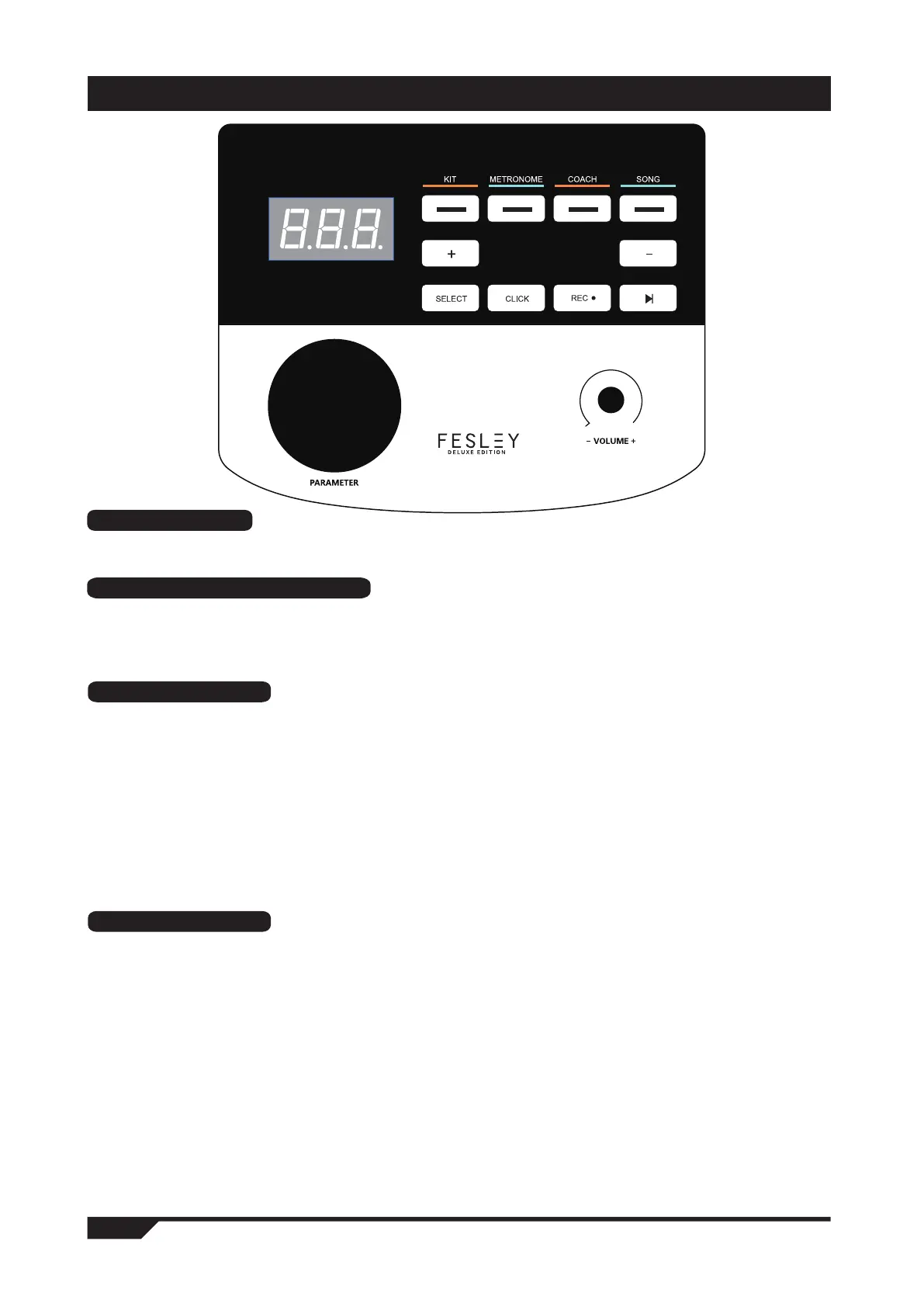
1. Press the < click > key to play the metronome, and press the < click > key again to stop playing.
2. Press the < metronome > button, and the Indicator light jumps to the "metronome" button on the second
left to enter the metronome mode, and the screen displays 120 (speed value). Turn the data wheel or< + >
< - > button to change the metronome speed.
3. Press the < Select > key in metronome mode, and the screen will jump to the metronome
parameter adjustment interface. You can press the < + > < - > button to select the parameters you want
to adjust: r.4 (beat type), B04 (beat number), L25 (metronome volume), and then turn the data wheel to
adjust the parameters.
4. After parameter adjustment, press the < Select > key to confirm and exit the parameter interface (the
metronome speed value is associated with "coach" mode and "song" mode).
The "coach" training mode of this product can help establish speed, accuracy and endurance and cultivate the
practice function of a better sense of rhythm,Make progress under the supervision of "coach" mode!
Press the "coach" button to enter the coach mode. In this mode, there are three practice modes.
Press the data wheel or . < + > < - > Button to select the practice mode.
1. Exercise mode 1: C-1 beat detection exercise: beat the drum at a fixed speed to train the accuracy of the blow.
2. Press the "coach" button to enter the coach-mode. In this mode, there are three practice modes. Press the
data wheel. < + > < - > Button to select the practice mode.
3. Practice mode 3: C-3 speed strike practice, the metronome will automatically change the speed from the slowest
to the fastest, and then from the fastest Express speed is reduced to the slowest speed to practice combat
endurance.
4. Press the < coach > button, the indicator light will jump to the left three "coach" buttons, and the screen wil
display C-1 (practice mode 1) when hitting Value practice, turn the coding wheel to switch the other two practice
modes C-2 and C-3.
1. Start up and enter the default drum group selection 01 (drum group No. 01). Use the data wheel to
select the addition and subtraction of the drum group.
2. Or press the < kit > key directly, the screen will jump to 01 (drum group number), and then use the data
wheel or < + > < - > button to select the drum group.



 To Next Page