13
Settings
Changing direction of rotation
[1-3]
• Switch to the left = clockwise rotation
• Switch to the right = counterclockwise rotation
Selecting the operating mode
Hammer drilling
Set selector switch
[1-5]
to hammer sym-
bol.
Screwdriving/drilling
Set selector switch
[1-5]
to drill symbol.
Tool holder, attachments
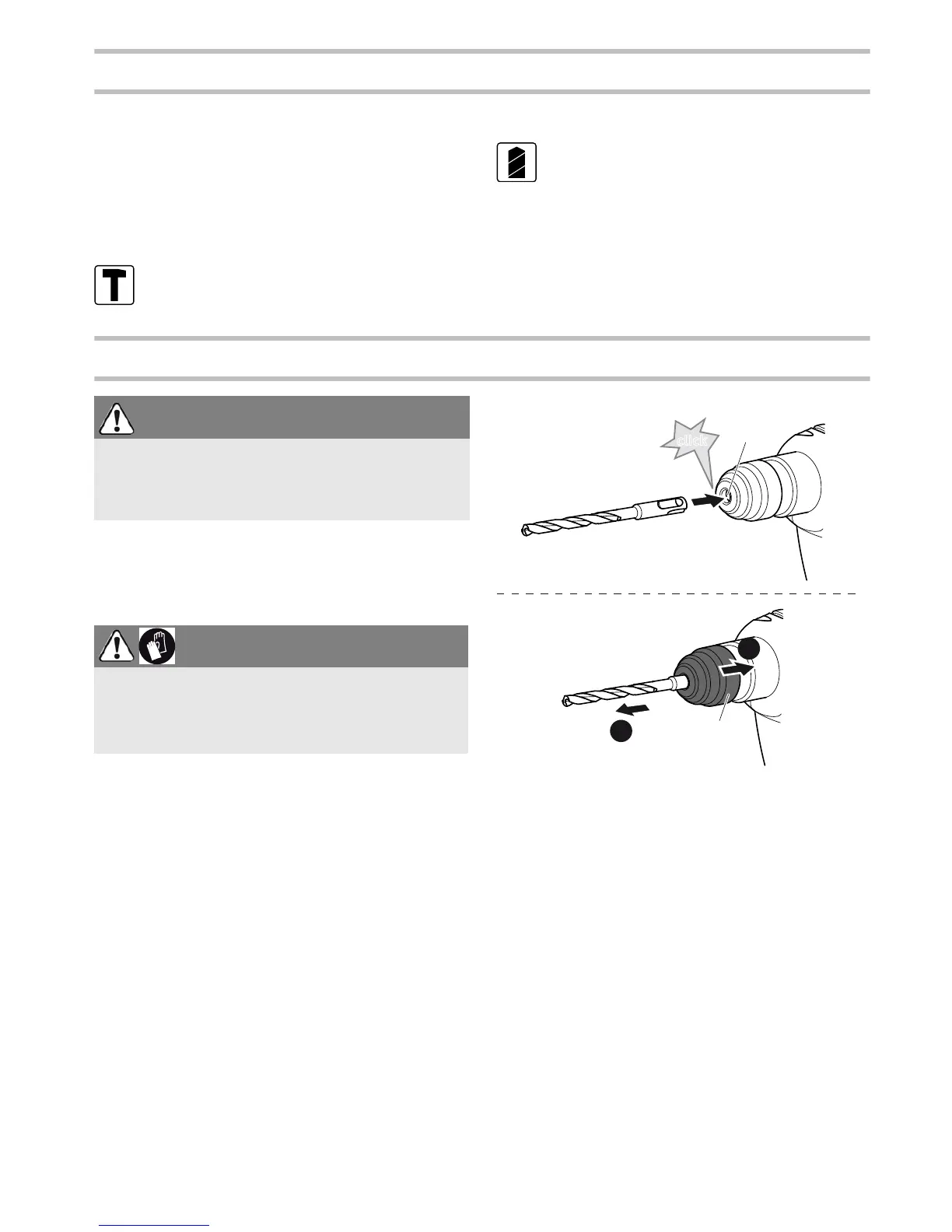
Changing tools
[5]
The SDS-plus system clamps drilling tools in
position without requiring a tool wrench.
Inserting the tool
Clean the tool shaft and grease lightly.
Do
not
retract the release sleeve
[5-2]
, instead
turn the tool into the tool adapter
[5-1]
until it
clicks into position.
Check that the tool is seated securely.
Removing the tool
Pull back the release sleeve
[5-2]
and remove
the tool.
WARNING
Risk of injury
Always disconnect the battery pack before per-
forming any type of work on the machine!
CAUTION
Hot and sharp tools
Risk of injury
Wear protective gloves.


 To Next Page