11
Inserting the battery pack
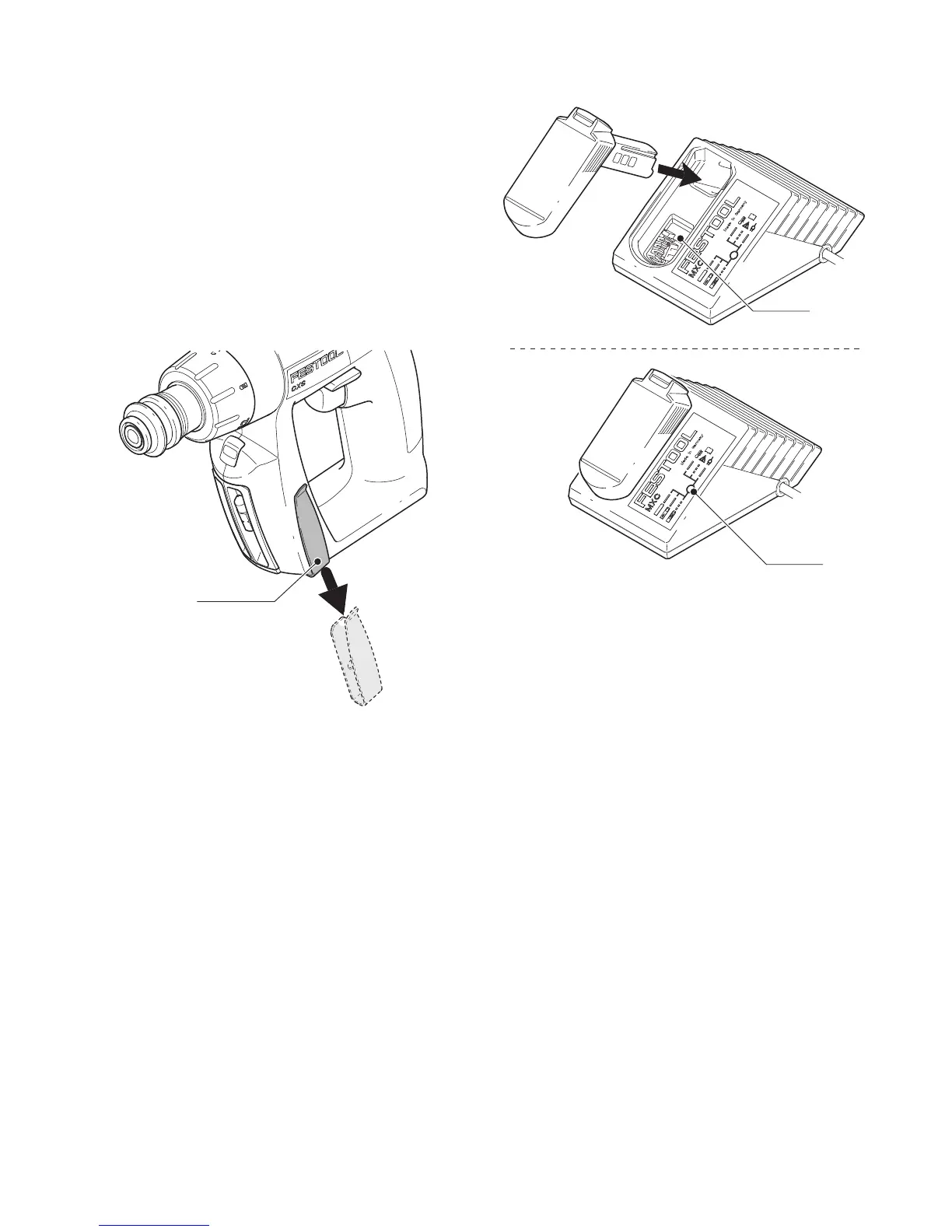
Slide the battery pack upwards into the machine
like shown in
Fig. [2]
until it engages.
Changing side of the belt clip
Fix the belt clip
[3-1]
on the right or on the left side,
depending on which side you prefer to clip the cord-
less drill.
Remove the battery pack
Fig. [2]
.
Remove the belt clip
[3-1]
.
Insert the belt clip on the side.
Insert the battery pack
Fig. [2]
.
Charging the battery pack [Fig 4]
The battery pack is delivered partially charged.
Charge the battery pack completely before us-
ing for the first time.
To charge the battery pack, put it on the retainer
[4-1]
on the charger.
To remove, pull off the charged battery pack.
The charger MXC can be used to charge all Festool
battery packs of the BP-XS series.
The LED
[4-2]
on the charger indicates the respec-
tive operating status of the charger.
LED yellow - lit continuously
Charger is ready to use.
LED green - flashing quickly
Battery pack will be charged with max. current.
LED green - flashing slowly
Battery Pack is charged to 80 % and will be charged
with further reduced current.
LED green - lit continuously
Battery pack is fully charged.
LED red - lit continuously
Battery temperature is outside the permitted range
(0 °C to 45 °C).
LED red - flashing
General fault display, e. g. incomplete contact,
short circuit, battery pack faulty, etc.




 To Next Page