CONNECT Nav+
43
OK
To confirm the chosen option, select
“OK” with the encoder 14-fig. 1 and
then press “ENTER” 15-fig. 1.
During the operations available in the
“CD Prog” function, buttons 18, 21
and 22-fig. 1 are disabled.
When removing the Compact Disc
from the player, a new playback se-
quence shall be programmed.
CD name
This function can be selected only if
a Compact Disc is inserted.
If the CD already has a name, this will
be shown on the display.
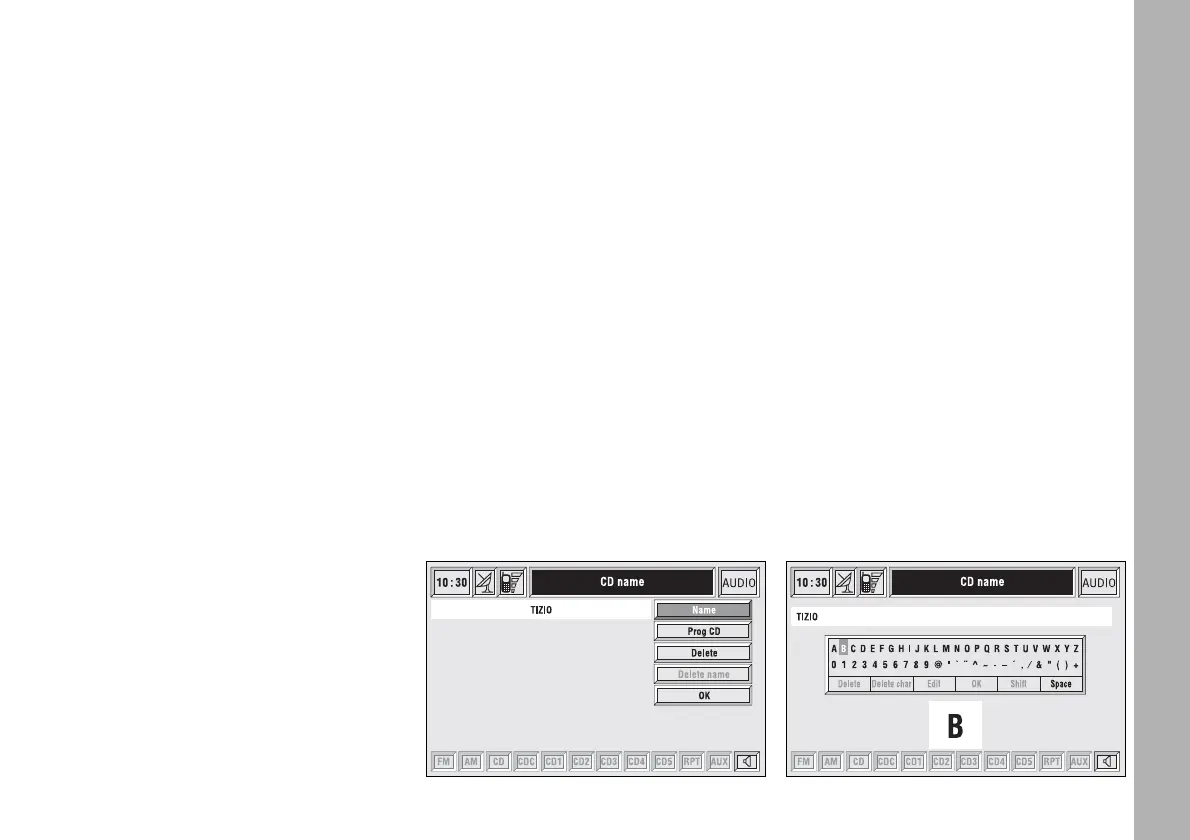
“CD name” function allows to name
max. 30 CDs with 20 characters max.
Selecting the “CD name” function by
rotating the encoder 14-fig. 1 and
pressing “ENTER” 15-fig. 1 goes to
next menu fig. 21:
– Name
– Prog CD
– Delete
– Delete name
– OK.
Name
Select “Name” icon with the en-
coder 14-fig. 1 and press “ENTER” to
confirm 15-fig. 1, in this way you go
to a screen showing and alphanumer-
ic sequence fig. 22 to be used to name
the CD inserted. Proceed as follows:
– select the first letter rotating the
encoder 14-fig. 1;
– press “ENTER” to confirm 15-fig. 1;
– proceed in the same way for the
other letters until completing the
name;
– select and press “OK” to confirm
the CD name.
After confirming the CD name, the
previous screen is shown automati-
cally.
The CD name is automatically asso-
ciated to CD track number and total
time duration.
Prog CD
Selecting “Prog CD” icon with the
encoder 14-fig. 1 and pressing “EN-
TER” 15-fig. 1 gives access to a menu
similar to the one shown in fig. 20
with the option to associate a name to
a preset track sequence.
Proceed as described before.
fig. 21
F0C4018g
fig. 22
F0C4035g



 To Next Page