CONNECT Nav+
72
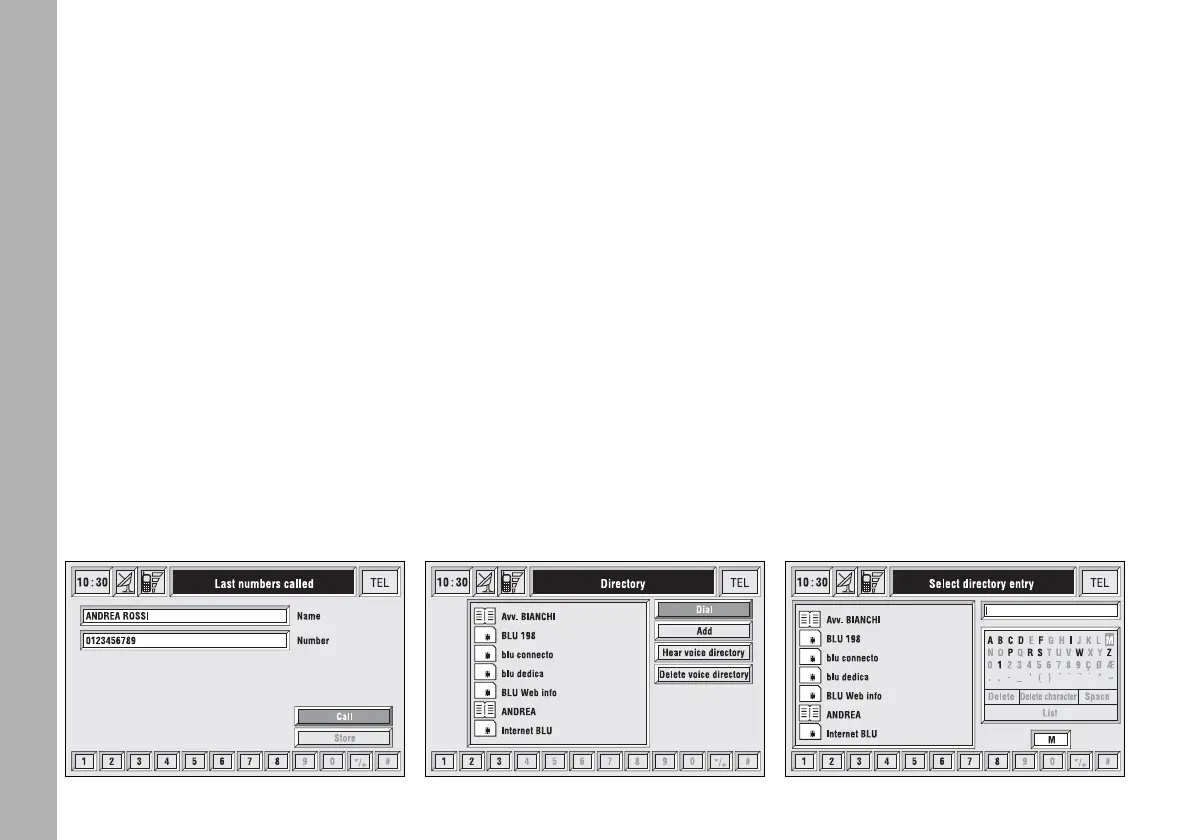
After selecting the required entry,
pushing on “ENTER” 15-fig. 1 opens
a window with detailed information
regarding selected name and number
fig. 54. Keys “Call” and “Store” are
available on the display:
– rotate the encoder 14-fig. 1 to se-
lect “Call” and press “ENTER” to con-
firm 15-fig. 1: system starts the call to
the displayed number;
– rotate the encoder 14-fig. 1 to se-
lect “Store” and press “ENTER” to
confirm 15-fig. 1: the system stores
the current name in the directory.
If the entry is already present in the
directory, “Store” key is disabled.
“Directory”
FUNCTION
“Directory” function makes access
to an electronic directory of person-
al phone numbers and names.
– rotate the encoder 14-fig. 1 to se-
lect “Directory” and press “ENTER”
to confirm 15-fig. 1; the screen
shown is that in fig. 55 with the fol-
lowing available keys: “Dial”, “Add”,
“Hear voice directory”, “Delete voice
directory” and a list with the first
items of the directory.
“Dial” icon key
“Dial” icon key is used to select a di-
rectory phone number.
Rotate the encoder 14-fig. 1, to
choose “Dial” and press “ENTER” to
confirm 15-fig. 1; the display shows
the keypad, the editing box and the list
of stored names fig. 56.
fig. 55
F0C4049g
fig. 56
F0C4193g
fig. 54
F0C4192g



 To Next Page