CONNECT Nav+
74
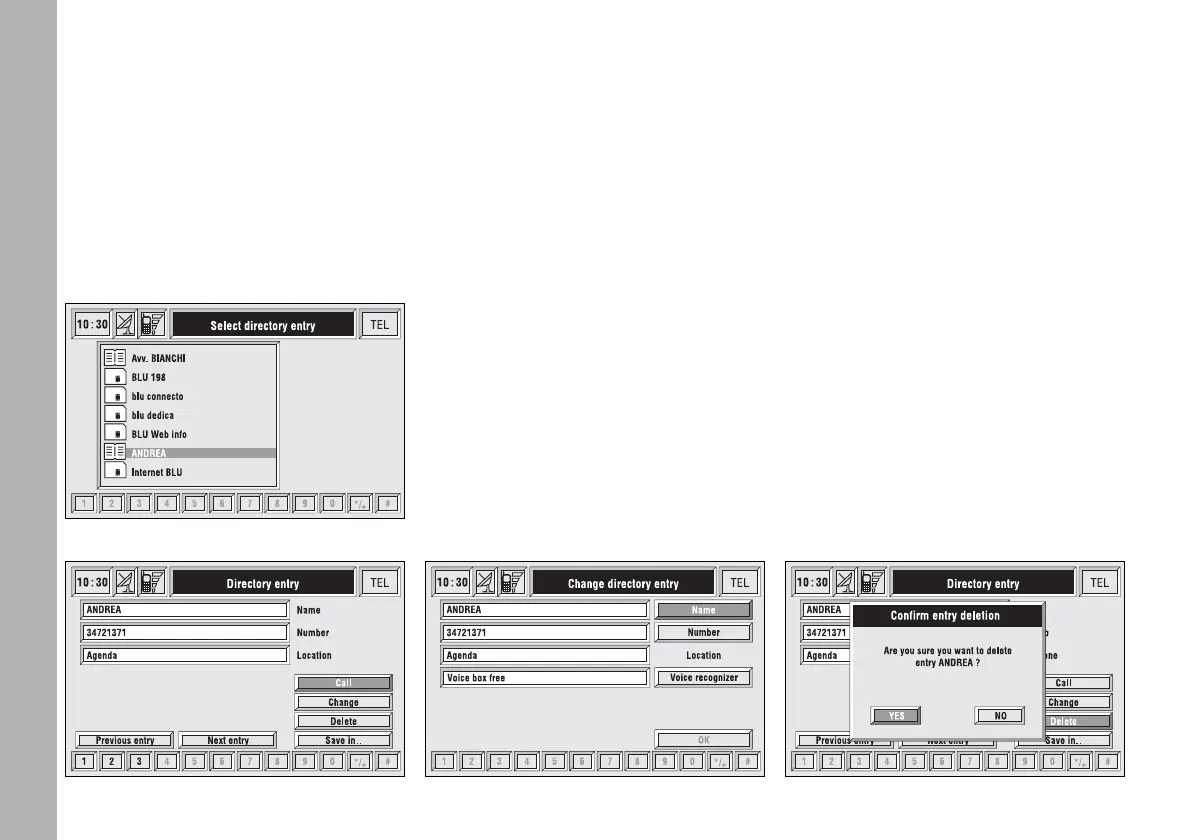
– pressing “ENTER” 15-fig. 1 takes
to a window with detailed information
about selected name and number.
Icons “Call”, “Change”, “Delete” and
“Save in ..” are available on the display
fig. 58.
IMPORTANT A SIM card element
cannot be associated to a voice sample.
“Call”: rotating the encoder 14-
fig. 1 to select this key and pressing
“ENTER” to confirm 15-fig. 1, starts
call to the selected number; the dis-
play goes back to “call in progress”
screen.
“Change”: rotating the encoder 14-
fig. 1 to select this key and pressing
“ENTER” to confirm 15-fig. 1, it is
possible to change the name, the
phone number and the relevant voice
sample. “Location” cannot be changed
fig. 59.
“Delete”: clears off a directory entry.
– rotate the encoder 14-fig. 1, to se-
lect “Delete”; a confirmation box with
“YES” - “NO” fig. 60 will come up;
– select “YES” by rotating the en-
coder 14-fig. 1;
– press “ENTER” to confirm 15-
fig. 1; during deleting operation the
display shows “Please wait …” then
goes back to main directory screen.
fig. 57
F0C4051g
fig. 58
F0C4052g
fig. 59
F0C4053g
fig. 60
F0C4054g



 To Next Page