DIRECTION INDICATORS
Front
To replace the bulb, proceed as follows:
remove the protective cover C fig.
154;
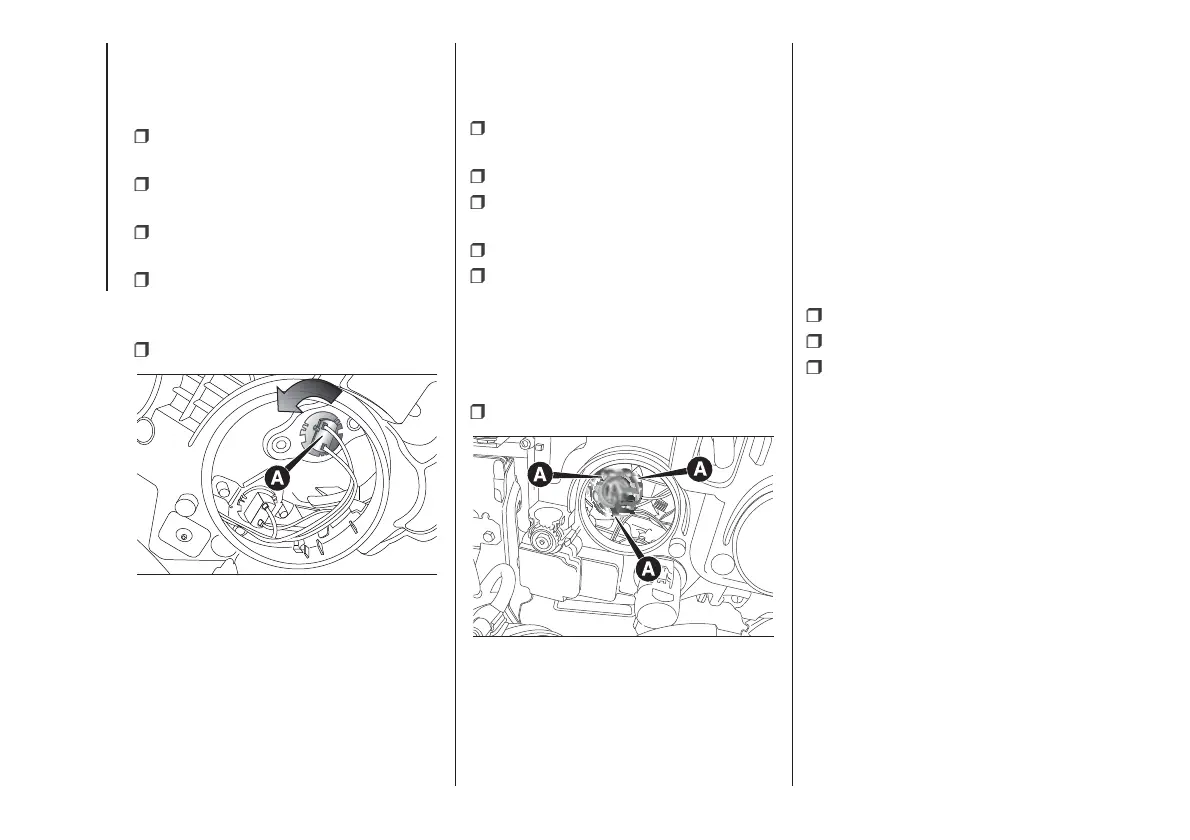
turn bulb holder A fig. 157
anticlockwise and remove it;
extract the bulb, pushing it gently
and turning it anticlockwise;
replace the bulb and refit the bulb
holder A fig. 157 by turning it clockwise
and locking it properly into place;
refit the protective cover C fig. 154.
Side
IMPORTANT Go to a Fiat Dealership to
have bulbs for the side direction
indicators replaced, because they are
located inside the wing mirror.
MAIN BEAM HEADLIGHTS
To replace the bulb, proceed as
follows:
remove the protective cover A fig.
154;
disconnect the electrical connector;
release the bulb holder from the
side clips A fig. 158;
extract the bulb and replace it;
fit the new bulb, ensuring that the
outline of the metal part coincides with
the grooves on the curve of the
headlight, pressing to engage it with the
side clips A fig. 158; then reconnect
the electrical connector;
refit the protective cover A fig. 154.
FOG LIGHTS
(for versions/markets, where provided)
IMPORTANT Go to a Fiat Dealership
to have the front fog light bulbs
replaced.
REAR LIGHT CLUSTERS
The rear light clusters contain the bulbs
for the side lights, direction indicators
and reversing/rear fog and brake lights.
To access the light clusters, proceed
as follows:
open the rear doors;
undo the fixing screws A fig. 159;
disconnect the electrical connector
and then remove the light cluster.
The bulbs are arranged inside the light
cluster fig. 160 as follows:
A
Brake lights
B
Direction indicators
C
Reverse lights
D
Side/rear fog lights;
To access the bulbs, undo the 6 fixing
screws E fig. 160 and remove the
bulb holder.
To change the bulb, push it in gently
and turn it anticlockwise (“bayonet”
type), then remove and replace it.
157
F0V0523
158
F0V0524
148
IN AN EMERGENCY



 To Next Page