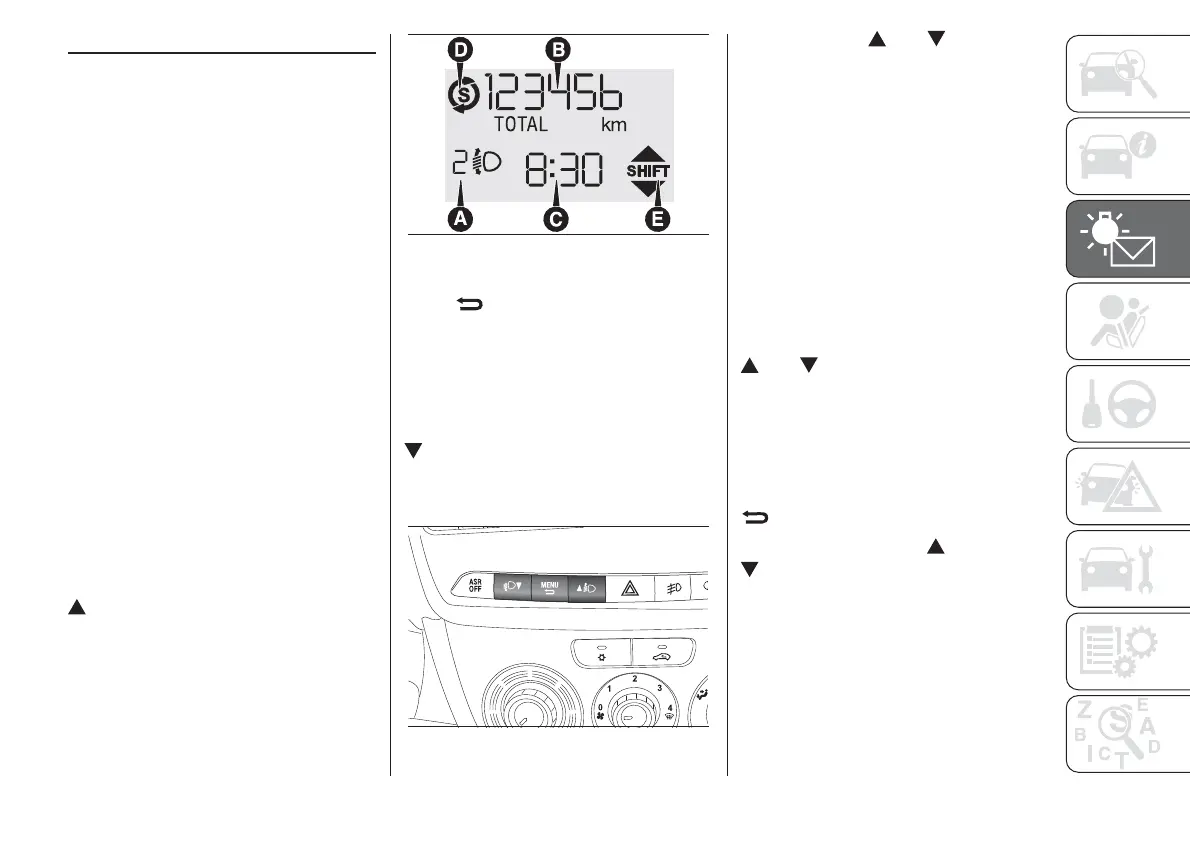
DIGITAL DISPLAY
STANDARD SCREEN
The standard screen fig. 113 can
display the following information:
A
Headlamp alignment position (only
with dipped headlamps on).
B
Milometer (distance covered in km or
miles).
C
Time (always displayed, even with the
key extracted and the front doors
closed).
D
Start&Stop function indication (for
versions/markets, where provided).
E
Gear Shift Indication (for versions/
markets, where provided).
Note With key removed (when opening
at least one of the front doors) the
display turns on and shows the time
and distance covered for a few
seconds.
CONTROL BUTTONS
To scroll up through the screen and
the related options or to increase
the displayed value.
MENU
Press briefly to access the menu
and/or go to next screen or to
confirm the required menu option.
Hold down to go back to the
standard screen.
To scroll down through the screen
and the related options or to
decrease the displayed value.
NOTE Buttons and activate
different functions according to the
following situations:
– within the menu, they allow you to
scroll up and down through the
options;
– during setting operations they
increase or decrease the value.
SET-UP MENU
The menu comprises a series of
functions arranged in a circular way,
which can be selected through the
and buttons to access the
different selection operations and
settings (setup) given in the following
paragraphs.
The setup menu can be activated by
briefly pressing the MENU
button.
Single presses on the
and
buttons will scroll the setup menu
options.
Management modes differ
according to the characteristic of the
option selected.
The menu comprises the following
functions:
❒ ILLU
113
F0V0011
114
F0V0509
77














 To Next Page