7
EXTRA TEMPERATURE SENSOR
To pair the FGBRS-001 with the device:
1. Use the included key to press and hold the button.
2. Release the button when you see blue LED colour.
3. Quickly click the button to conrm, the LED ring will start blinking
blue.
4. Within 1 minute click button on the sensor.
5. The LED ring on thermostatic head will glow green to conrm suc-
cessful pairing.
6. Place the sensor in same room as head, no further than 5 meters
from it.
#5: Extra temperature sensor
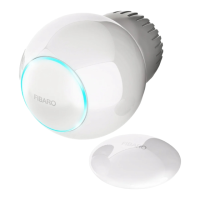
The device can be used with an additional, dedicated temperature
sensor (FGBRS-001) to provide the best temperature regulation.
It can be placed anywhere in the room and the device will use it as a
reference point for the room temperature.
Before using, the sensor must be paired with the thermostatic head.
One thermostatic head can be paired with only one sensor, but one
sensor can be paired with up to three thermostatic heads.
NOTE
FGBRS-001 is the only
compatible external
temperature sensor.
i
To remove all paired heads:
1. Press and hold the button on the sensor for 2 seconds.
2. LED on the sensor will blink 3 times to conrm unpairing.
CAUTION
This product is not a
toy. Keep away from
children and animals!
!



 To Next Page
 Loading...