CAUTION: READ AND FOLLOW ALL SAFETY GUIDELINES AND WARNINGS BEFORE HANDLING OR
ATTEMPTING ANY WORK ON YOUR FIELD ONE PAINTBALL MARKER. SHOULD YOU BE UNSURE AT ANY
POINT, STOP AND GET HELP FROM A FIELD ONE PAINTBALL CERTIFIED TECHNICIAN.
TOURNAMENT/BOARD LOCK - Your Force marker has a lock
function that insures that the settings cannot be adjusted without tools
when the lock is on. When the lock is ON, the lock indicator icon will
display if you attempt to enter “settings adjustment mode.” To turn the
lock OFF, turn on the marker and use your 5/64 allen wrench to
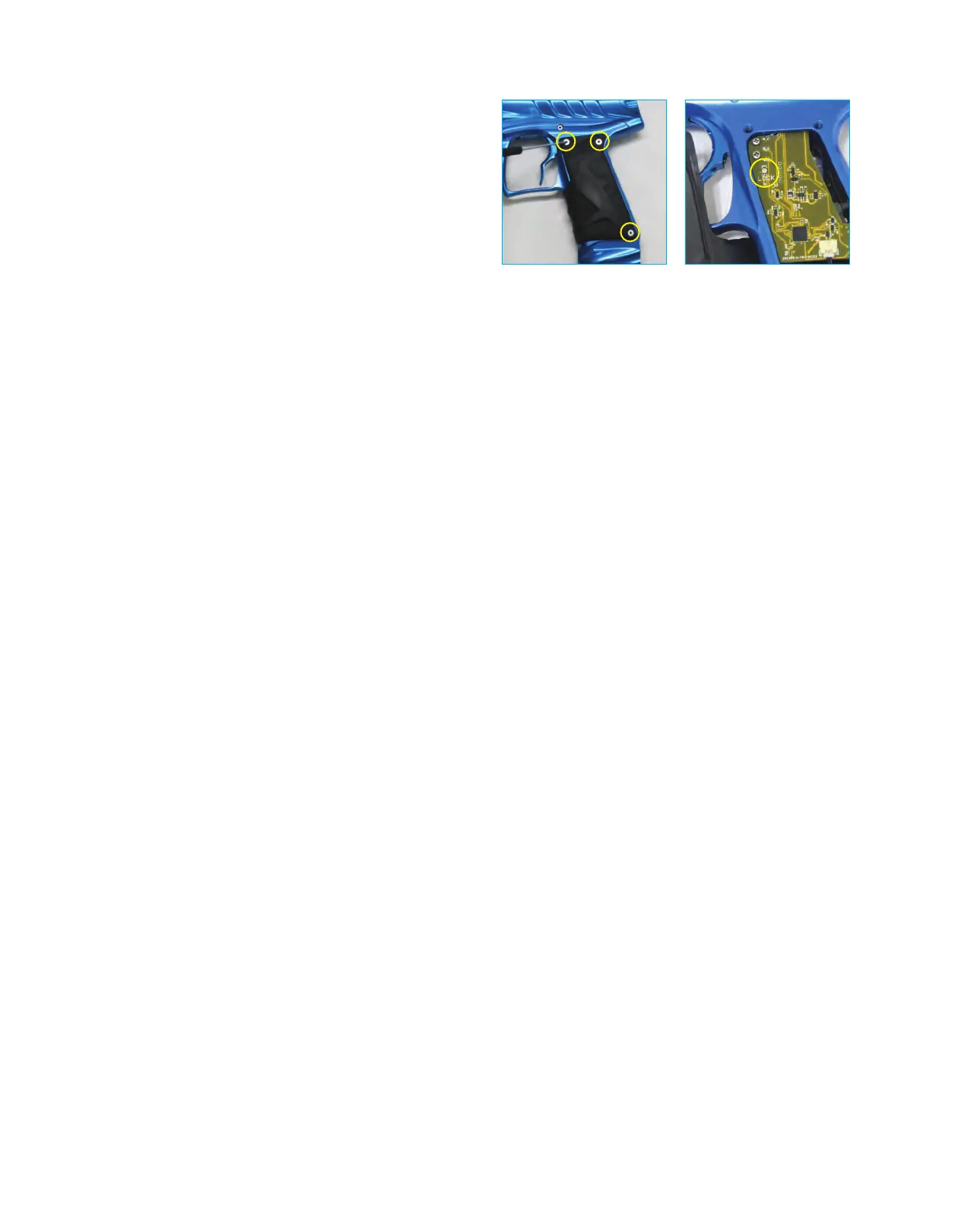
remove the 3 screws that hold the left grip panel to the grip frame
(fig 8A)
. Open the grip panel and press the button labeled “LOCK” on
the main board
(fig 8B)
. To toggle between Lock ON and OFF, repeat
these steps. When the marker is on and the LOCK button is pressed,
the OLED screen will display whether the board has been locked or
unlocked. Some tournaments will require you to play with the
tournament/board lock ON (settings are locked).
(fig 8A) (fig 8B)
PLAY!- Once you have followed and understood the steps listed above, you are now ready to take your
Field One Force out to play. HAVE FUN, BE SAFE AND SHOOT STRAIGHT!
• Be sure to adhere to all paintball safety guidelines and local rules/regulations
• If you have questions about safety or local regulations, contact your local paintball store or field
• Always wear paintball approved eye protection and face protection when operating your Field One Force
• Always use a barrel blocking safety device with your Field One Force whenever you are not operating
your marker
• Only shoot your paintball marker in areas where people, animals and property are not at risk of being
damaged or hurt by paintball projectiles
• Only shoot your paintball marker in areas where all people are wearing paintball approved eye and face
protection


 To Next Page